33

Curated datasets underwent a significant overhaul in version 10, primarily in the way content is delivered in the form of Objects and Entities. Additionally, it appears that this change in content delivery has also brought about a considerable decrease in performance. Consider the following:

ChemicalData[All, "Preload"]
MapThread[ElementData[#1, #2] &, Transpose@
    Tuples@{Range@112, {"Symbol", "Group"}}]; // AbsoluteTiming
MapThread[ElementData[#1, #2] &, Transpose@
    Tuples@{Range@112, {"Symbol", "DiscoveryYear"}}]; // AbsoluteTiming

The results from my system (Windows 7 64 bit) are {0.24, 0.16} seconds for version 10 and {0.04, 0.02} for version 9. My original hypothesis was the Head change in v10; however that does not seem to be the case since:

Head /@ Flatten@Outer[ElementData, {1}, 
    {"Symbol", "Group", "DiscoveryYear"}]

yields {String, Integer, DateObject} in v10 and {String, Integer, Integer} in v9; if the change in Head was the cause, we wouldn't expect slowdowns in both of the calls above.

The performance difference really shines in this next example:

out = ChemicalData["Hydrocarbons"];
If[$VersionNumber == 10.,
    QuantityMagnitude /@ Through[out[[30 ;; 40]]["BoilingPoint"]],
    Outer[ChemicalData, out[[30 ;; 40]], {"BoilingPoint"}] // Flatten] // AbsoluteTiming

I may be comparing apples to oranges here, but I couldn't come up with a single command that would handle the different Head types that are returned in v9 and v10; I'm assuming Through and Outer are similarly fast. In any case, they certainly couldn't account for the difference in timing; I get 6.44 seconds for v10 and 0.002 for v9.

Most of the bottleneck in this last example is due to my horrendously slow internet speed; however, it seems preloading the curated data, as suggested here apparently no longer applies in v10. If I turn the internet off with

$AllowInternet = False

The ChemicalData example returns errors in v10 and is unaffected in v9. Apparently, EntityValues used in v10 require an internet connection.

So from this information one can conclude that internet connectivity is one part of the performance issue in v10 curated data calls and leads to the question: How do we access curated data off line with v10? The data have been stored on my computer, I see them in "Location"/.PacletInformation["ElementData"], but something else that is occurring while processing these data requires the internet, and I'm at a loss as to how one debugs this issue further.

Internet connectivity is only part of the solution; however, since the ElementData example is unaffected by $AllowInternet = False in both v9 and v10. The second part of the question is then: what is v10 doing to make a no-internet-required curated data call 10 times slower than in v9?

J. M.'s missing motivation
  • 124,525
  • 11
  • 401
  • 574
bobthechemist
  • 19,693
  • 4
  • 52
  • 138

3 Answers3

31

There are system options available that should restore the old behavior for most of the currated data paclet:

SetSystemOptions[SystemOptions["DataOptions"] /. True -> False]    
{"DataOptions" -> {"ReturnEntities" -> False, "ReturnQuantities" -> False, 
"UseDataWrappers" -> False}}

Note that this prevents these paclets from returning Entity, Quantity, and DateObject expressions(as well as TimeSeries and other wrappers), but should restore the version 9 behavior.

Note that the method you were using via Through involves calls to EntityValue, rather than the data paclet itself, and EntityValue will make an explicit internet call ( Outer[ChemicalData, out[[30 ;; 40]], {"BoilingPoint"}] will also work in V10, and will strictly pull information from ChemicalData, rather than calling EntityValue).

RunnyKine
  • 33,088
  • 3
  • 109
  • 176
Nick Lariviere
  • 1,536
  • 13
  • 9
  • Fascinating. SetSystemOptions[SystemOptions["DataOptions"] /. True -> False] also brings the v10 ElementData example in line with v9. – bobthechemist Jul 29 '14 at 18:23
  • 1
    Nick Lariviere, am I correct in assuming that you are employed by WRI? Thanks for the (insider?) scoop on this. – Mr.Wizard Jul 29 '14 at 21:11
  • @Mr.Wizard, yes I work for WRI; These options were put in place because of the major updates to these paclets, though finding this information isn't necessarily easy(though I'm sure tech-support would provide them to anyone interested). – Nick Lariviere Jul 30 '14 at 18:34
  • @NickLariviere Is there some setting that would allow me to get functions like GeoPosition, GeoDirection, several Date* functions, etc. to return just numeric values instead of Quantity objects? – rm -rf Aug 01 '14 at 15:26
  • 1
    @rm -rf SetSystemOptions["DataOptions" -> {"ReturnQuantities" -> False}] will revert DateDifference to returning numerical values, but these options weren't designed to disable Quantity, Entity or any of the other newer object types system-wide; they're just a means to revert some larger changes in existing functions. GeoPosition and GeoDirection underwent enough updates that they don't necessarily respect these settings; There's always the option to use QuantityMagnitude to strip out the units. – Nick Lariviere Aug 01 '14 at 18:10
  • 3
    @NickLariviere Thanks for the info. I'm aware that I can use QuantityMagnitude, but returning quantity/entity objects is a huge breaking change (and unnecessary, IMO), especially for functions that have been around since v7. My packages have several modules that use GeoPosition and they're all broken now and it was a pain to go through and fix them. It would've been nice to have a system option that could alter this behaviour. – rm -rf Aug 02 '14 at 18:26
  • This doesn't seem to work for Imports. I have used the above but I still see a DateObject after reading in an Excel sheet. – Sjoerd C. de Vries Dec 15 '14 at 10:11
20

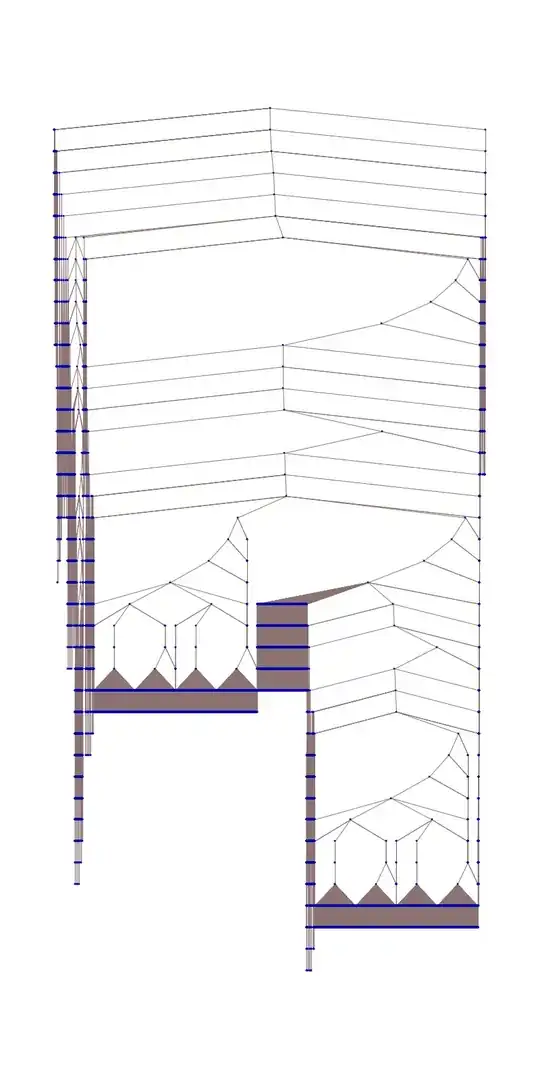
This is a long comment for Nick Lariviere's answer. You can use Trace to see how lengthy the entity and quantity logic is.

Version 9:

Tuples@{Range@112, {"Symbol", "Group"}} // First
ElementData @@ % // Trace;
% // ByteCount

78336

TreeForm[%%, VertexLabeling -> False, ImageSize -> 800, AspectRatio -> 2]

enter image description here

Version 10:

...
% // ByteCount

1541360

TreeForm[%%, VertexLabeling -> False, ImageSize -> 800, AspectRatio -> 2]

enter image description here

But using Nick's settings

SetSystemOptions[SystemOptions["DataOptions"] /. True -> False]

it is much closer to v9.

...
% // ByteCount

94672

TreeForm[%%, VertexLabeling -> False, ImageSize -> 800, AspectRatio -> 2]

enter image description here

mfvonh
  • 8,460
  • 27
  • 42
  • I didn't dare use Trace for fear that the output would be intractable; apparently I was right. Nice example of how to visualize and extract the information meaningful to this discussion. – bobthechemist Jul 29 '14 at 18:45
  • 6
    I tried visualising the Trace output of the Sunrise function like this but the kernel crashes. It really is a horrible function. (Sunrise, not @mfvonh's answer) – shrx Jul 29 '14 at 20:45
  • 4
    @shrx I agree, don't try this on ElementData[1,"Symbol"]. First time it runs on a fresh kernel results in 1.2+M ByteCount. Jeesh. All to print the letter H. – bobthechemist Jul 30 '14 at 00:15
  • @bobthechemist most of that is boiler-plate used for initializing the WDX frameworks from which all of this data is pulled, I think. I know this because I took apart those curated data functions so I could build my own. – b3m2a1 Aug 05 '17 at 16:35
3

As you have already noticed, Entity objects are annoying. Even if we prefetch or preload all the data, each time we output something contains an Entity object(especially in a fresh kernel restart), there are probably some internet connection going on below the surface that hinder performance severely, and the timing is unpredictable due to unpredictable internet connection.

So If we only want to use data locally, offline. I think we can dump a reorganized Association data. For example, for ElementData. We can create an Association like:

elementDataAssoc = Association@Table[
    atom -> 
     AssociationMap[ElementData[atom, #] &, ElementData["Properties"]],
    {atom, Table[i["AtomicSymbol"], {i, ElementData[]}]}];

Now, you can easily access properties of any element using elementDataAssoc["H"] or elementDataAssoc["Fe","Density"], etc

However, if you dump this Association to disk directly, and later load it back in a new kernel, you will find output of data needs internet connection again just because they contains Entity objects. Maybe Mathematica implicitly needs to check some update of Entity objects.

So here is a acceptable trick at least for me. I replace all Entity and EntityClass heads like

Protect[entityHead, entityClassHead];
elementDataAssoc = 
  elementDataAssoc /. {Entity -> entityHead, 
    EntityClass -> entityClassHead};

Now, Mathematica can not see Entity objects, but all information is retained. You can now dump this Association using

Export[filename,elementDataAssoc,"MX"];

You can load mx file back and use elementDataAssoc with blazing speed.

matheorem
  • 17,132
  • 8
  • 45
  • 115