I have a data file containing the position of about $10^5$ stars of a spiral galaxy. Here is the plot

and this is the corresponding code
Clear["Global`*"]
SetDirectory[" ... "];

data = Import["data_SGC.out", "Table"];
L0 = ListPlot[data, PlotStyle -> {Blue, PointSize[0.001]}, Axes -> False,
              Frame -> True, FrameLabel -> {"x", "y"},
              RotateLabel -> False, LabelStyle -> Directive[FontFamily -> "Helvetica", 20],
              AspectRatio -> 1, PlotRange -> 100, ImageSize -> 550];
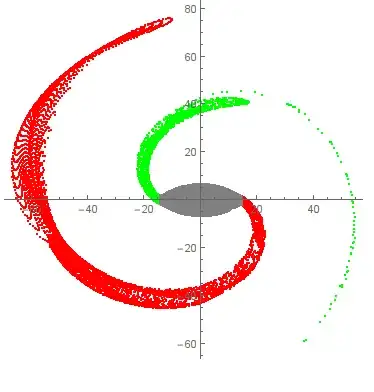
As we can see, there are two arms starting at about $(x,y) = (-14.6,0)$ and $(x,y) = (14.6,0)$. Now I would like to customize ListPLot, so as the arm starting at the left part $(x,y) = (-14.6,0)$, be in green color, while the other one in red. All the other points between the two yellow banana-type areas should be in gray.
Any suggestions?
The complete data file can be found here: data. Obviously, I could not generate simple random data in order to replicate this complicated spiral structure.


ListPlot, do we need all theContourPlotandRegionPlot? I guessdata = Import[..]andListPlot[...]would be enough. – Öskå Jul 31 '14 at 09:40ContourPlotandRegionPlotare not needed, so I removed them. See the revised post. – Vaggelis_Z Jul 31 '14 at 09:44