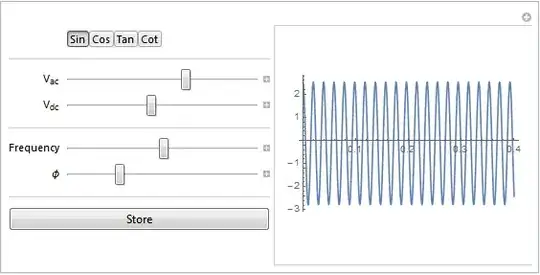
The following solution may or may not be too complicated to deal with, but it's kind of neat. It uses DynamicModule wormholes to link variables between two DynamicModules. One of the modules has to be created from within a live instance of the other one. That is to say, you instantiate one (the parent) in the Front End, and it has to create the other (the child). If the child is a Manipulate you have to use both options, InheritScope -> True and LocalizeVariables -> False. You then need to declare all the variables you want to use in the Manipulate into the parent DynamicModule or else they will be Global` variables.
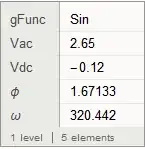
In this setup, I have made the OP's Manipulate the child. Whenever the variables are changed in the Manipulate, the parent DynamicModule has access to their values. You can do with them as you please, including creating a Dataset if desired. Just as a proof of concept, I have a button whose label dynamically shows the values of the variables in the Manipulate. If the button is pressed, the global function f is called. It does nothing if f is undefined, but it's there just to give the idea. If you uncomment Print@, pressing the button will print the function call (which is shown below the image).
DynamicModule[
 {ctrlgFunc = Sin, ctrlVac = 1.5, ctrlVdc = 0.5, ctrlf = 10, ctrlPhi = 0},

 Button[
  Inactive[f][Dynamic@{ctrlgFunc, ctrlVac, ctrlVdc, ctrlf, ctrlPhi}],
  (*Print@*)f[ctrlgFunc, ctrlVac, ctrlVdc, ctrlf, ctrlPhi]],

 Initialization :> {
   CellPrint@
    ExpressionCell[
     Manipulate[Module[{Vac, Vdc, ω, ϕ, f},
       Vac = ctrlVac;(*AC Voltage*)Vdc = ctrlVdc;(*DC Offset*)
       f = ctrlf;(*Frequency*)ω = 2 π f;
       ϕ = ctrlPhi;(*Phase Offset*)gFunc = ctrlgFunc;(*Function*)
       Plot[Vdc + Vac gFunc[ω t + ϕ], {t, 0,
         0.4}]], {{ctrlgFunc, ctrlgFunc, ""}, {Sin, Cos, Tan, Cot}},
      Delimiter, {{ctrlVac, ctrlVac, Subscript["V", "ac"]}, -10,
       10}, {{ctrlVdc, ctrlVdc, Subscript["V", "dc"]}, -1, 1},
      Delimiter, {{ctrlf, ctrlf, "Frequency"}, 0.001, 100},
      {{ctrlPhi, ctrlPhi, "ϕ"}, 0, 2 π},
      ControlPlacement -> Left, Paneled -> True, InheritScope -> True,
       LocalizeVariables -> False],
     "Output"]
   }
 ]

f[Sin, 1.5, 0.5, 10, 0]
Postscript
Here's an f that yields a Dataset:
f[func_, vac_, vdc_, f_, phi_] :=
  output = Dataset[<|"func" -> func, "vac" -> vac, "vcd" -> vdc, "f" -> f,  "phi" -> phi|>]
Update - Variations
Having the Manipulate cell automatically created by Initialization may prove troublesome, which I hinted at rather obscurely above. One variation would be to put the code in a button that would print the Manipulate in a cell whenever button was pushed. In the OP's application, another variation that might be convenient would be to have an edit button that creates the Manipulate in a new dialog/palette. All these approaches might allow the user to create multiple copies, which is probably not particularly desirable. One can put in code to block the check whether a Manipulate is already displayed. The following is one way to create palette. Make the changes indicated in the following:
DynamicModule[
 {ctrlgFunc = Sin, ctrlVac = 1.5, ctrlVdc = 0.5, ctrlf = 10, ctrlPhi = 0,
  editpalette},

 Column[{
   Dynamic @ Dataset[<|"func" -> ctrlgFunc, "vac" -> ctrlVac, "vcd" -> ctrlVdc,
       "f" -> ctrlf, "phi" -> ctrlPhi|>],
   Button[
    "edit",
    If[! MemberQ[Notebooks[], editpalette],
     editpalette = CreatePalette[
       Manipulate[..., InheritScope -> True, LocalizeVariables -> False],
       Saveable -> False
       ]]
    ]
   }]
 ]