This question looks as a duplicate of these questions:
How to create internally optimized expression for computing with high WorkingPrecision?
How to work with Experimental`NumericalFunction?
An internally optimized version of the original function can be created as follows:
n = 500;
f = Experimental`CreateNumericalFunction[{a, b},
   Unevaluated[Nest[# + a - b Sin[2 \[Pi] #] &, 0, n]/n], {},
   WorkingPrecision -> 880];
How the created Experimental`NumericalFunction should be used:
f[{1/10, 1/5}]
0.00016666666666666666666666666666666666666666666666666666666666666666\
6666666666666666666666666666666666666666666666666666666666666666666666\
6666666666666666666666666666666666666666666666666666666666666666666666\
6666666666666666666666666666666666666666666666666666666666666666666666\
6666666666666666666666666666666666666666666666666666666666666666666666\
6666666666666666666666666666666666666666666666666666666666666666666666\
6666666666666666666666666666666666666666666666666666666666666666666666\
6666666666666666666666666666666666666666664685468521373229053036940442\
3962701216291153088605786704858607575162427563183707930229553541195321\
2101361759645135515775432980342040381738861309064752553797366691813555\
0017169360630698662587053257997111846801265386183928858616194265489581\
2949120884649269257779567658163657155358878262590630724222855526137604\
688700110160340115203634767418946813394731969
Here is a comparison of performance (updated):
<< GeneralUtilities`
ff[a_, b_] := Nest[# + a - b Sin[2 \[Pi] #] &, 0, n]/n;
o1 = ff[1/100, 1/500]; // AccurateTiming
o2 = ff[0.01`880, 1/500]; // AccurateTiming
o3 = f[{1/100, 1/500}]; // AccurateTiming
3.603673
0.0668274
0.068519
o2 == o3
True
As one can see from the timings, unfortunately in this concrete case Experimental`NumericalFunction does not increase performance as compared to the inexact case (o2) based on pure Nest.
It means that the only way to increase performance of computing the ArrayPlot is to use parallelization. According to the documentation, "Outer products automatically parallelize" by Parallelize so the code in the question can be modified in straightforward way:
dat = Parallelize[Outer[f[500, #2, #] &, Range[0, 1.`880, 1/500], Range[0, 1.`880, 1/500]]]; // AbsoluteTiming
ArrayPlot[dat,
   ColorFunction -> (Blend[{Black, Blue, Green, Yellow, Red}, #] &),
   ColorFunctionScaling -> False, DataReversed -> True]
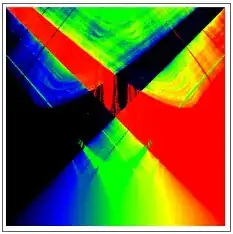
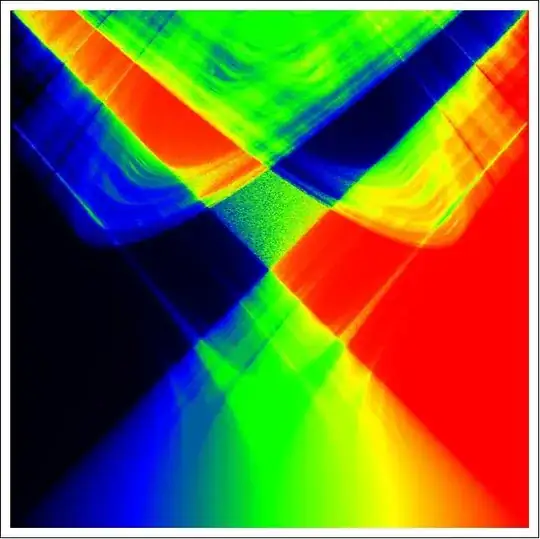
But even without parallelization it is possible to plot the problematic region in a reasonable time with precision 100 (MMa 8.0.4):
f[n_, a_, b_] := Nest[# + a - b Sin[2 \[Pi] #] &, 0, n]/n;

n = 500; prec = 100;
dat = Outer[f[n, #2, #] &, N[Range[4/10, 85/100, 1/n], prec],
    N[Range[3/10, 7/10, 1/n], prec]]; // AbsoluteTiming
ArrayPlot[dat,
 ColorFunction -> (Blend[{Black, Blue, Green, Yellow, Red}, #] &),
 ColorFunctionScaling -> False, DataReversed -> True]
{501.2916722, Null}

And here is the result with prec = 300:
{1109.0984368, Null}











f[500, N[5/10, 880], N[6/10, 880]]? – chris Aug 03 '14 at 08:04Compilethus won't have the high precision.. – Silvia Aug 03 '14 at 11:29f=Compile[{{n,_Integer},{z,_Complex}},Module[{a=Re[z],k=Im[z]},Nest[#+a-k Sin[2π#]&,0,n]/n],CompilationTarget->"C",RuntimeAttributes->{Listable},Parallelization->True];data=Outer[#2+#1I&,Range[0,1,1/500],Range[0,1,1/500]];dat=f[1000,data];//AbsoluteTiming. I think you can generalize your question to attract more attention, maybe something like How to have both high precision and performance.. – Silvia Aug 03 '14 at 11:49