14

I realize that the Plot function can plot multiple functions of x at the same time, using { }. I also know that the RegionFunction option is used to specify the particular region of the domain that you want plotted. My query is whether I can combine the two together and use different RegionFunctions on different functions of the same parent Plot statement, plotting multiple conditional functions rather than a whole domain:

$$f(x) =\begin{cases} 2\sqrt{x} & \text{if } 0\leq x \leq1 \\ 4-2x & \text{if } 1<x<2.5 \\ 2x-7 & \text{if } 2.5 \leq x \leq 4 \end{cases}$$

cormullion
  • 24,243
  • 4
  • 64
  • 133
The-Ever-Kid
  • 1,129
  • 10
  • 19
  • Yes it is the answer i was looking for ..... btw what made my question difficult to understand could you edit it . it seems you understood it correctly . – The-Ever-Kid May 17 '12 at 10:19
  • Btw I also wanted to know wether different RegionFunction can be used in the same plot – The-Ever-Kid May 17 '12 at 10:20
  • @Mr.Wizard I wasn't asking you to edit your answer. Could you edit my question to make it more clear. – The-Ever-Kid May 17 '12 at 10:22
  • Have you looked at RegionPlot? For example: RegionPlot[{(x + 1)^2 + y^2 < 2, (x - 1)^2 + y^2 < 2}, {x, -3, 3}, {y, -3, 3}] – Mr.Wizard May 17 '12 at 10:23
  • I don't want to plot a region i just wondered if the RegionFunction Could be used like the Piecewise Function – The-Ever-Kid May 17 '12 at 10:25
  • This is where I get confused: "I don't want to plot a region i just wondered if the RegionFunction Could be used like the Piecewise Function." I don't know what that means. If you don't want to plot a region, why are you using RegionFunction? – Mr.Wizard May 17 '12 at 10:27
  • The region function isnt one bit like the regionplot its more like making the plot function plot only some parts of the plot ref Mathematica>Visualization and Graphics > Graphic Options & Styling > Plotting Options > Region Function – The-Ever-Kid May 17 '12 at 10:30
  • I added an example using MapThread that may be useful. – Mr.Wizard May 17 '12 at 10:38

1 Answers1

23

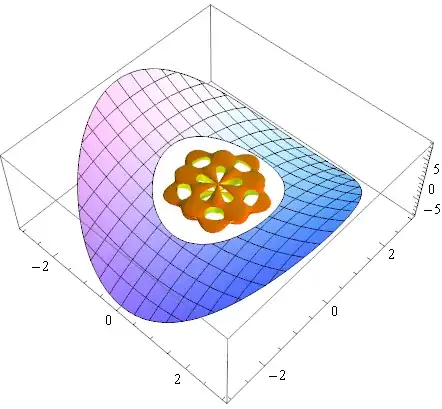
You can use Show to combine graphics of the same type:

g1 = Plot3D[x^2 - y^2, {x, -3, 3}, {y, -3, 3}, 
  RegionFunction -> Function[{x, y, z}, 2 < x^2 + y^2 < 9]];

g2 = SphericalPlot3D[
  1 + Sin[5 θ] Sin[5 φ]/5, {θ, 0, π}, {φ, 0, 2 π}, 
  Mesh -> None, RegionFunction -> (#6 > 0.95 &), PlotStyle -> FaceForm[Orange, Yellow]];

Show[g1, g2]

Mathematica graphics


Here is one way that you might construct a compound graphic:

funcs = {x^2 - y^2, Sin[x]^2 + 2 Cos[y]^2};

regions = {Function[{x, y, z}, 1 < x^2 + y^2 < 5], 
           Function[{x, y, z}, 2 < x^2 + y^2 < 9]};

styles = {Red, Green};

MapThread[
  Plot3D[#, {x, -3, 3}, {y, -3, 3}, RegionFunction -> #2, PlotStyle -> #3] &,
  {funcs, regions, styles}
] // Show

Mathematica graphics


You may also find utility in Piecewise:

pw = Piecewise[{
       {2 Sqrt[x],   0 <= x <= 1  },
       {4 - 2 x  ,   1 <  x <  2.5},
       {2 x - 7  , 2.5 <= x <= 4  }
      }, Indeterminate]

Plot[pw, {x, -1, 5}]

Mathematica graphics

rm -rf
  • 88,781
  • 21
  • 293
  • 472
Mr.Wizard
  • 271,378
  • 34
  • 587
  • 1,371