7

How do I read in an obj file as a MeshRegion so I can e.g. compute its area?

If I just import the object and try Area[O] it tells me it is not a correctly specified region, even for e.g. the StanfordBunny.

Also, how do I turn Geometry3D into a MeshRegion? For example

Area[ExampleData[{"Geometry3D", "SpaceShuttle"}]]

does not work either.

It seems that geometry has more than one representation in different parts of Mathematica - bad.

RunnyKine
  • 33,088
  • 3
  • 109
  • 176
Ralph
  • 73
  • 3

1 Answers1

11

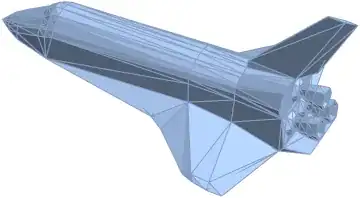
Well, you have to first convert it to a MeshRegion. Let's take the space shuttle for example:

shuttle = ExampleData[{"Geometry3D", "SpaceShuttle"}]

Mathematica graphics

Now, we discretize it, since it's a Graphics3D object, we use DiscretizeGraphics:

ds = DiscretizeGraphics[shuttle]

Mathematica graphics

Now, we can find the Area easily:

Area[ds]

177.301907

Similarly for the horse:

horse = ExampleData[{"Geometry3D", "Horse"}]

Mathematica graphics

dh = DiscretizeGraphics[horse]

Mathematica graphics

We compute the surface area:

Area[dh]

0.0358690432

RunnyKine
  • 33,088
  • 3
  • 109
  • 176
  • Does not always work. Area[DiscretizeGraphics[Import["somefile.obj"]]] still give a not correctly specified region error. – Ralph Aug 18 '14 at 10:51
  • Retried it and it did work. Apologies. I must have typed something wrong. – Ralph Aug 19 '14 at 07:44
  • I have some cases where Mathematica computes the volume of a closed surface mesh as zero, even though FindMeshDefects doesn't find any defects and all the MeshCoordinates are points in 3D. I might formulate an MVE and another SE question, but this one seems very closely related. – Reb.Cabin Jul 16 '17 at 21:59