6

I am trying to pick straight lines out of a photographic image to track deflections of a structure under loading.

The idea is to mark certain structural elements with straight lines, as they deflect I can then extract the vectors from the image, find the centre point and measure how much the vector has displaced and rotated since the previous image.

I have used the second answer to this question to get the bones of a process up and running, code below. Using a generic vector image from web as a test image until my rig is up and running.

i = ColorNegate@Import["http://goo.gl/5R4MAl"]
p = Closing[Binarize@ImageTake[i, 480], 1];
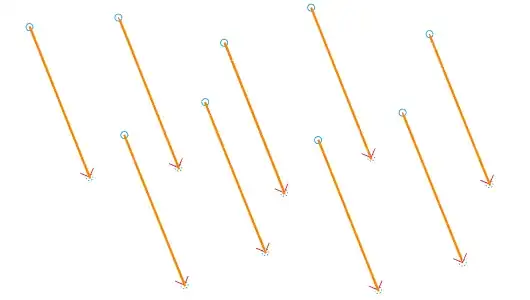
Show[p, Graphics[{Thick, Orange, Line /@ ImageLines[p, Segmented -> True]}]]

This seems to pick out the main vectors quite nicely.

enter image description here

Whilst the length of results returned is 9 which is what I expected, on closer inspection there are additional points that are very close together. I'm guessing that these are rogue parts of the arrowheads being picked up.

foo = ImageLines[p, Segmented -> True]
foo // Length

Gives the length to be 9, which is what I would have expected given there are nine primary lines, but if displayed in matrixform I'm getting additional rogue points.

foo // MatrixForm
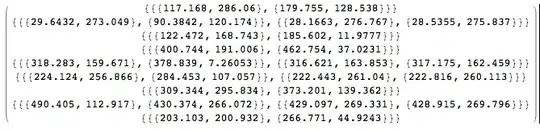
enter image description here

I've tried to tinker about with limiting the MaxFeatures->9 and using DeleteSmallComponents with mixed success. I'm struggling to find any helpful guidance too on what t (threshold) and d (distinctness) actually do with regards the image recognition.

What methods exist to extract the primary straight lines from images like the one used in the above example that gives a start and and end co-ordinate of the line that can then be used in subsequent calculations please? I'd also prefer to not set the number of lines I'm expecting Mathematica to discover.

ASBO Allstar
  • 1,106
  • 9
  • 15

1 Answers1

5

Here is an example returning 9 lines without additional points:

i = Import["http://goo.gl/5R4MAl"];
ii = Closing[Binarize[GradientFilter[ColorNegate@Binarize[i, .55], 2], 0.1], 1];
foo = Select[ImageLines[ii, Segmented -> True], EuclideanDistance @@ #[[1]] > 100 &];
Show[i, Graphics[{Thick, Orange, Line /@ foo}]]

Mathematica graphics

Here are the details for foo:

Length /@ foo
Length@foo
{2, 2, 2, 2, 2, 2, 2, 2, 2}
9

Note that foo = ImageLines[ii, .1, Segmented -> True] produces the exact same lines.

Checking the length of the lines in foo:

EuclideanDistance @@ # & @@@ foo
{164., 163.5, 163., 163.5, 163.5, 163.5, 163.5, 163., 162.}
ASBO Allstar
  • 1,106
  • 9
  • 15
Öskå
  • 8,587
  • 4
  • 30
  • 49
  • Because Segmented-> False is used on the second block of code, doesn't this extend the vectors out to the edge of the image, and this is why the y co-ordinate is always either 0 or 300. Therefore this doesn't give the actual length of the vector but a false measurement instead? Apologies if I'm misunderstanding. – ASBO Allstar Aug 07 '14 at 10:19
  • @ASBOAllstar See, that's why I wanted comments :D It's obviously a mistake. Fixing it now :) – Öskå Aug 07 '14 at 10:29
  • @ASBOAllstar Please check the edit. – Öskå Aug 07 '14 at 10:44
  • Thanks, essentially the sensitivity has been introduced for anything longer than 100? – ASBO Allstar Aug 07 '14 at 10:49
  • @ASBOAllstar Yes indeed, I have no idea why ImageLine creates those additional lines. Playing with ImageLine parameters seems to help. – Öskå Aug 07 '14 at 10:54
  • Having issues when pasting the revised code into Mathematica 10, with errors that EuclideanDistance is expecting 2 arguments... not sure why, which version are you using please? – ASBO Allstar Aug 08 '14 at 19:27
  • @ASBOAllstar I'm on v8 and I retried it and it works like a charm. I don't see any reason either, I will ask if anyone with v10 can figure it out. – Öskå Aug 08 '14 at 19:42
  • It's the third line of code that seems to be giving me issues... not sure why, I'll keep on tinkering. Thanks – ASBO Allstar Aug 08 '14 at 19:43
  • 1
    @ASBOAllstar Then you should use foo = ImageLines[ii, .1, Segmented -> True]. Like I said at the end of the answer, it's exactly the same as Select[..., EuclideanDistance..] – Öskå Aug 08 '14 at 19:49
  • @ASBOAllstar Or do that :) – Öskå Aug 08 '14 at 19:52
  • Brilliant, thanks :) – ASBO Allstar Aug 08 '14 at 20:04