18

Assume you import data from a Table source of the following format.

<< GeneralUtilities`; fields = {"Country", "Region", "BU", "Year", 
"Date", "Sales"};
organization = {{"Argentina", "LATAM", "Americas"}, {"SouthAfrica", 
    "Africa", "EAME"}, {"Brazil", "LATAM", "Americas"}, {"Japan", 
    "Japan", "APAC"}, {"Australia", "ASEAN", "APAC"}, {"Germany", 
    "Europe", "EAME"}};
SeedRandom[0];
list = Flatten[
   Table[Join[
     organization[[i]], {year, DateObject[{year, month, 1}], 
      RandomInteger[{100, 1000}]}], {i, 6}, {year, 2004, 
     2013}, {month, 1, 6, 5}], 2];
sales = Dataset[AssociationThread[fields, #] & /@ list]
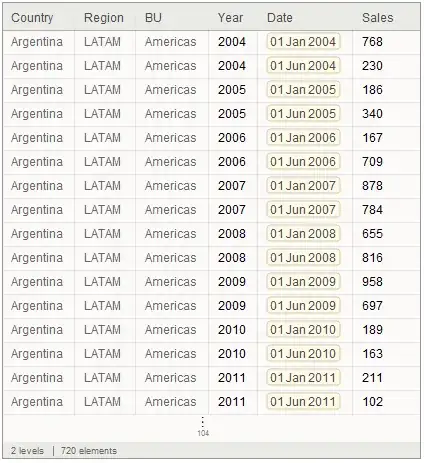
enter image description here

I would like to summarize the data at the year level. If working with a database, an SQL command of the following format would allow you to create a dataset that is still flat.

SELECT sales.Country, sales.Region, sales.BU, sales.Year, Sum(sales.Sales) AS SumOfSales FROM sales GROUP BY sales.Country, sales.Region, sales.BU, sales.Year;

enter image description here

Using

sales[GroupBy@Key["Country"], GroupBy@Key["Region"], 
 GroupBy@Key["BU"], GroupBy[Key["Year"]], Total, "Sales"]

Creates a multilevel hierarchical data structure, which is not as simple to operate as a table type of dataset.

enter image description here

Is there a way to operate (total,mean, median,etc) on a dataset by grouping on several keys of interest while keeping the dataset flat the same way as done with the SQL procedure?

Szabolcs
  • 234,956
  • 30
  • 623
  • 1,263
Zviovich
  • 9,308
  • 1
  • 30
  • 52
  • 1
    PatoCriollo: the GeneralUtilities package does not seem to be documented in V. 10. Could you please describe what is it used for and how you found it? – magma Aug 09 '14 at 08:46
  • @magma See here. I believe that package was first introduced in that answer by Taliesin. – RunnyKine Aug 09 '14 at 12:24

5 Answers5

14

Probably far from ideal, but this works:

sales[
  GroupBy[{#Country, #Region, #BU, #Year} & -> Key["Sales"]]
][Normal, Total
][All, Apply[Append]
]

Mathematica graphics

(Thanks to WReach for the tip on the unusual but useful linebreak pattern.)


Update

This works too, and preserves the keys. Now if only I could specify Normal to be descending here ...

sales[
 GroupBy[#, KeyTake[{"Country", "Region", "BU", "Year"}] -> KeyTake["Sales"], Total] &
][Normal
][All, Apply[Join]]

Mathematica graphics

Szabolcs
  • 234,956
  • 30
  • 623
  • 1,263
  • Brilliant! Dataset[AssociationThread[Drop[fields, {5}], #] & /@sales[ GroupBy[{#Country, #Region, #BU, #Year} & -> Key["Sales"]] ][Normal, Total ][All, Apply[Append]]//Normal] puts the keys back again. ] – Zviovich Aug 09 '14 at 04:15
  • 1
    @PatoCriollo That came out really wordy though, I'm hoping for a shorter solution! It would be good to have something like Merge that doesn't merge each key using the same function. – Szabolcs Aug 09 '14 at 04:20
  • @Szabolcs I'm using your answer for a similar problem that I have, but I don't really understand the syntax. I was hoping you could help. How are [Normal][All,Apply[Join]] applied to the result from Total? – Mitchell Kaplan Aug 20 '14 at 20:17
  • 1
    @MitchellKaplan This dataset contains an association, the keys of which are also associations. Normal will convert this outer association, which has the form <| <|...|> -> <| "Sales" -> 1 |>, <|...|> -> <| "Sales" -> 2 |>, ... |> to a simple list of rules, { <|...|> -> <| "Sales" -> 1 |>, <|...|> -> <| "Sales" -> 2 |>, ... }. You can see e.g. the first element of this list using ...[Normal][1]. Now what we want to do is join the left-hand-side of -> together with its right-hand-side into a single association. Instead of having <| "a" -> 1 |> -> <| "b" -> 2 |> we want ... – Szabolcs Aug 20 '14 at 20:26
  • 1
    ... <| "a" -> 1, "b" -> 2 |>. This is what Apply is good for: change the head Rule (i.e. ->) into something else. What we need here is to change it to Join. Apply[Join][...] is equivalent to Apply[Join, ...] so we can use the form Apply[Join]. I hope this clears it up a bit. Regarding this method, while it works, it's probably not efficient and I am not really happy with it. I find it too convoluted. I am hoping for something simpler ... I'm not yet experienced with Dataset, and even though my answer got accepted, I'm not too confident about it. – Szabolcs Aug 20 '14 at 20:28
  • @Szabolcs I think I'm getting it, thanks! For my data, the efficiency is not a problem, about 1,000 rows. Your explanation also helped clear up a few things in my mind about how operators work with a dataset. – Mitchell Kaplan Aug 20 '14 at 21:37
  • @Szabolcs okay, I'm not getting it. How does the "#" in the GroupBy work? – Mitchell Kaplan Aug 25 '14 at 00:00
  • @Szabolcs To simulate Merge with key-dependent merging function, one could use sales[GroupBy[ KeyTake[{"Country", "Region", "BU", "Year"}] -> KeyTake["Sales"]]][All, Transpose][All, {"Sales" -> Total}][ Normal][All, Apply[Join]]. – jhrmnn Jan 08 '16 at 16:19
8

Here is an alternative:

 Query[Map[Total] /* Normal /* Map[Apply@Append]]@
 sales[GroupBy[{#Country, #Region, #BU, #Year} & -> Key["Sales"]]]

Mathematica graphics

OR

sales[GroupBy[{#Country, #Region, #BU, #Year} & -> Key["Sales"]]][
 Map[Total] /* Normal /* Map[Apply@Append]]
RunnyKine
  • 33,088
  • 3
  • 109
  • 176
7

Here is another possibility:

sales[
  GroupBy[KeyTake[{"Country","Region","BU","Year"}]] /* Normal /* (Association@@@#&)
, <| "Sales" -> Query[Total, "Sales"] |>
]

This approach has the interesting property that it can be "scaled up" to perform multiple aggregations at the same time:

sales[
  GroupBy[KeyTake[{"Country","Region","BU"}]] /* Normal /* (Association@@@#&)
, <| "Sales" -> Query[Total, "Sales"]
   , "MinYear" -> Query[Min, "Year"]
   , "MaxYear" -> Query[Max, "Year"] |>
]

dataset screenshot

WReach
  • 68,832
  • 4
  • 164
  • 269
5

A possibility

sales[
 GroupBy[KeyTake[{"Country", "Region", "BU", "Year"}] -> KeyDrop["Date"]] /* Values,     
 merge[{"Sales" -> Total}, First]
 ]

merge is an operator such that you can specify a merging function for particular keys, and a default one

merge[r : {__Rule}, def_] := Merge[Identity] /* Query[{
     Query[KeyDrop@Keys@r, def],
     Query[KeyTake[#], #2] & @@@ r} // Flatten] /*
  Merge[First]

or something among these lines

groupBy2D[groupby_, newCols : {__Rule}] := 
 With[{tr = Transpose[#, AllowedHeads -> All] &},
  Query[
   GroupBy[KeyTake[groupby]] /* Values,
   Query[{First, tr /* Query[<|newCols|>]}] /* Merge[First] /* 
    KeyTake[groupby]]
  ]

so that

sales[
 groupBy2D[
  {"Country", "Region", "BU", "Year"}, 
  {"SumOfSales" -> (Total@#Sales &)}
  ]
 ]

These are probably not too efficient

Rojo
  • 42,601
  • 7
  • 96
  • 188
  • groupBy2D[groupby_, newCols : {__Rule}] := With[{tr = Transpose[#, AllowedHeads -> All] &}, Query[GroupBy[KeyTake[groupby]] /* Values, Query[{First, tr /* Query[<|newCols|>]}] /* Merge[First] /* KeyTake[Join[groupby, Keys[newCols]]]] ], just changing last KeyTake from KeyTake[groupby] to KeyTake[Join[groupby, Keys[newCols]]] includes the newCols in the returned Dataset. Very handy construction, thank you @Rojo – pjc42 Mar 14 '15 at 17:52
2

Its a bit late to add a comment, but I found that GeneralUtilities` has a some operators such as AssociationPairs and AssociationMapThread. I used them to adjust the internal Dataset format. Since a GroupBy leaves a single association in the Dataset whose keys are the grouping keys, you need to process what is essentially a single association and make each k-> v in that association a "row." I used

dsGroupByResult[AssociationPairs]

to fix the structure. However it loses the column names and the "rows" are now lists.

To add columns back in, I use AssociationMapThread to "add" the columns back in and restructured back into a list of associations. My GroupBys usually output an association of values (e.g. mean, min, max for a numerical leaf column) so I just use ##2 since it already has keys on the values.

dsGroupByResult[AssocationMapThread[<|"theGroupingKeyColumnName"->#1 (*or whatever *), ##2|>]&]

I think both of these functions should be included in the standard package.

aappddeevv
  • 21
  • 2