10

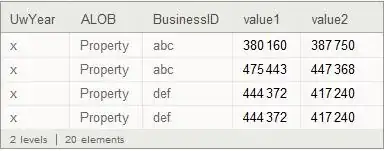
I'm importing the following Excel file:
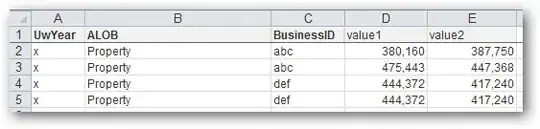
Excel file

My code and its results are:

fileTemp = Import[NotebookDirectory[] <> "problem.xlsx", {"Sheets", "s1"}];
assoc = AssociationThread[fileTemp[[1]] -> #] & /@ fileTemp[[2 ;;]]
ds = Dataset[assoc]
ds1 = ds[GroupBy[Key["BusinessID"]], Total, "value2"]
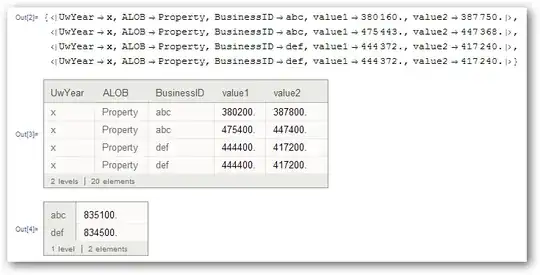
output1

It seems to be rounding to the nearest 100.

Applying eldo's workaround I get:

fileTemp = Partition[(Flatten[
Import[NotebookDirectory[] <> "problem.xlsx", {"Sheets", "s1"}], 1]
/. x_Real :> Round[x]), 5];
assoc = AssociationThread[fileTemp[[1]] -> #] & /@ fileTemp[[2 ;;]]
ds = Dataset[assoc]
ds1 = ds[GroupBy[Key["BusinessID"]], Total, "value2"]

output2

The Excel file should be findable at: sample excel file

Mitchell Kaplan
  • 3,696
  • 22
  • 34
  • 1
    Could you give a sample xlsx file? In case people want to try but don't have an MS Office. – Silvia Aug 18 '14 at 18:50
  • @Silvia I don't know exactly how to give anyone a test file. I just installed DropBox, but have never used it before. Is that the best way? Any hints? – Mitchell Kaplan Aug 18 '14 at 20:04
  • It seems you have got your answer:) FWIW I have reproduced the bug with Dataset[{<|"a" -> 380160.|>}], so do you agree we can rephrase the question to excluding the Excel part? – Silvia Aug 18 '14 at 20:34
  • @Silvia Gee I just figured out how to use DropBox. But, yes that will simplify things. Will you do the edit or should I? I may also have to edit my question, because in my "real" case, I don't know if the problem is limited to a display problem. I'm using GroupBy and Totaling, and getting rounded totals. I need to look at my original code and see if the dataset with the totals contains the rounded numbers or is just displaying the rounded numbers. – Mitchell Kaplan Aug 18 '14 at 20:53
  • As it's your post, if you feel like to edit, it will be more accurate than I editing. Regarding to your worry, I suggest having a look at what the developer of Dataset said under the linked dup-question. – Silvia Aug 18 '14 at 21:02
  • @Slivia eldo's workaround seems to solve downstream problems as well. I'll edit my question by showing the summation I want to do and how eldo's workaround helps. I'll also post a link to the xlsx file. – Mitchell Kaplan Aug 18 '14 at 21:18

2 Answers2

11

It appears to be rounding only in the visual representation, but internally it stores the exact number. So e,g. doing:

ds[1, "value2"]

We get

387750.

Which is the number from the excel sheet.

RunnyKine
  • 33,088
  • 3
  • 109
  • 176
  • 3
    That's pretty misleading though, I'd still call it a bug. It is possible that it simply rounds to 4 digits, regardless of how many digits are to the left of the decimal point and how many to the right. It might make sense to round 2.34567 * 10^6 to 2.346 * 10^6, but it makes no sense to round 2345670 to 2346000 for display purposes. – Szabolcs Aug 18 '14 at 19:06
  • If you agree that it's a bug, go ahead and add the tag. – Szabolcs Aug 18 '14 at 19:07
  • @Szabolcs, I mean that internally, the exact number is still available. – RunnyKine Aug 18 '14 at 19:11
  • Yes, that's a very useful observation, you already got my +1 for it. I meant that I'd say it's a formatting/display bug. – Szabolcs Aug 18 '14 at 19:12
  • @Szabolcs Thanks. As per the display, I agree it's probably a bug. – RunnyKine Aug 18 '14 at 19:13
8

In my opinion it's a bug.

I input your data in Excel without the comma separator, execute the steps as per your question and get the same wrong result.

A possible workaround:

fileTemp = Flatten[Import["C:\\...\\problem.xlsx"], 1] /. x_Real :> Round[x]

assoc = AssociationThread[fileTemp[[1]] -> #] & /@ fileTemp[[2 ;;]]

Dataset[assoc]

enter image description here

eldo
  • 67,911
  • 5
  • 60
  • 168