I am pretty new in Mathematica drawing. I am trying to draw a core-shell structure, it means a core sphere with a shell sphere, like this

It can be in 2D or preferentially in 3D. Does someone can help me?
I am pretty new in Mathematica drawing. I am trying to draw a core-shell structure, it means a core sphere with a shell sphere, like this
It can be in 2D or preferentially in 3D. Does someone can help me?

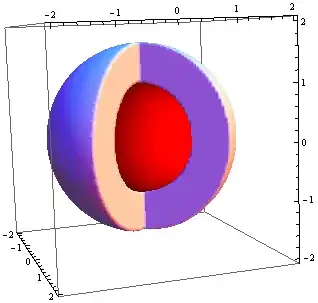
Show[RegionPlot3D[1 <= x^2 + y^2 + z^2 <= 3 && (y >= x Sin[Pi/2] || y < -x Sin[Pi/2]),
                  {x, -2, 2}, {y, -2, 2}, {z, -2, 2}, Mesh -> None, PlotPoints -> 100],
     Graphics3D[{Red, Sphere[{0, 0, 0}, 1]}]]

SetOptions[{SphericalPlot3D, ParametricPlot3D}, Mesh -> None];

fun = {r {0, -Sin[t], Cos[t]}, r {Sin[t], 0, Cos[t]}};

p1 = SphericalPlot3D[{2, 2.5}, {u, 0, Pi}, {v, 0, 1.5 Pi},
   PlotStyle ->
    Directive[Green, Opacity[0.7], Specularity[White, 20]]];

p2 = ParametricPlot3D[fun, {r, 2, 2.5}, {t, 0, Pi},
   PlotStyle ->
    Directive[Green, Opacity[0.7], Specularity[White, 20]]];

p3 = SphericalPlot3D[{1.5, 1.99}, {u, 0, Pi}, {v, 0, 1.5 Pi},
   PlotStyle -> Directive[Red, Opacity[0.7], Specularity[White, 20]]];

p4 = ParametricPlot3D[fun, {r, 1.5, 1.99}, {t, 0, Pi},
   PlotStyle -> Directive[Red, Opacity[0.7], Specularity[White, 20]]];

p5 = SphericalPlot3D[{1, 1.48}, {u, 0, Pi}, {v, 0, 2 Pi},
   PlotStyle -> Directive[Blue, Opacity[0.7], Specularity[White, 20]]];

Show[p1, p2, p3, p4, p5, PlotRange -> All, Axes -> False,
 Boxed -> False]
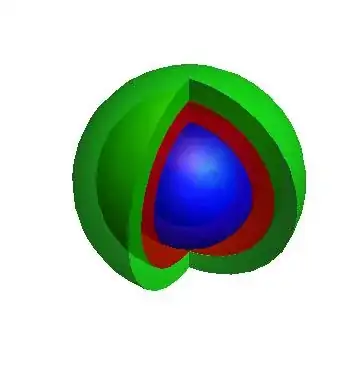
Show[p1, p2, p3, p4, p5, PlotRange -> All, ViewPoint -> Front]

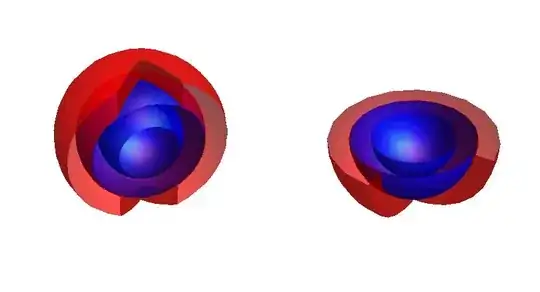
 Grid[{{

   Show[p3, p4, p5, ClipPlanes -> {{-1, 1, 0, 1}},
    Axes -> False, Boxed -> False, ImageSize -> 400],

   Show[p3, p4, p5, ClipPlanes -> {{0, 0, -1, 0}},
    Axes -> False, Boxed -> False, ImageSize -> 400]}}]

 p = N@Table[  { Cos[x], 0, Sin[x]}, {x, Pi/2, -Pi/2, -Pi/200}];
 Show[
      {
     SphericalPlot3D[ 1 , {t, 0, Pi}, {phi, 0, 3 Pi/2}, Axes -> False, Mesh -> False],
     Graphics3D@{{Red, Sphere[{0, 0, 0}, 1/2]},
                 Polygon[ p],
                 Polygon@(RotationTransform[-Pi/2, {0, 0, 1}]@p)
         }} , Boxed -> False ]


This is adapted from 3D solid modeling thick cylindrical shell done before (also ref. Mma site). Here it generates volume between two concentric spherical shells separately in three modes, for any desired choice. Hope it may be suitable.
 1. sweeps along parallels... t
 2. sweeps along meridians ...v ,or,
 3. dilates along shell normal, sphere expands or shrinks...a

ThickShell[a_, t_, v_] = a {Cos[t] Cos[v], Sin[t], Cos[t] Sin[v]}; (* GLNarasimham SolidModelingThickShell.nb *) Manipulate[ Row[{ParametricPlot3D[{Cos[t] Cos[u], Sin[u], Cos[u] Sin[t]}, {t, 0, 2 Pi}, {u, -1.5, 1.5}, ImageSize -> 300, ViewPoint -> {3, 1, 2}], ParametricPlot3D[ThickShell[a, t, v], {v, 0, 2 Pi}, {a, 1, 1.6}, Mesh -> {18, 4}, ImageSize -> 300, PlotRange -> {{-1.8, 1.8}, {-2, 2}, {-1.8, 1.8}}, ViewPoint -> {3, 1, 2}], ParametricPlot3D[ThickShell[a, t, v], {t, 0, 2 Pi}, {a, 1, 1.6}, Mesh -> {18, 4}, ImageSize -> 300, PlotRange -> {{-1.8, 1.8}, {-2, 2}, {-1.8, 1.8}}, ViewPoint -> {3, 1, 2}], ParametricPlot3D[ThickShell[a, t, v], {t, 0, 2 Pi}, {v, 0, 2 Pi}, Mesh -> {18, 18}, ImageSize -> 300, PlotRange -> {{-1.8, 1.8}, {-2, 2}, {-1.8, 1.8}}, ViewPoint -> {3, 1, 2}]}], {t, 0, 2 Pi, Pi/5}, {v, 0, 2 Pi, Pi/10}, {a, 1, 1.6, .05}]

