How can I import only the 2nd and 5th elements (numbers, located in the 2nd and 5th columns) from all n raws of a data file (.xlxx) that contains both numbers and text. Imported data be inserted into a constant array. Thanks
Asked
Active
Viewed 503 times
3

-
related/possible duplicate q/a ...from Excel specific cells into Mathematica – kglr Sep 15 '14 at 18:59
1 Answers
3
Even though I don't see it in the documentation, you can use All when specifying what elements you want to import.
So for an example Excel spreadsheet:
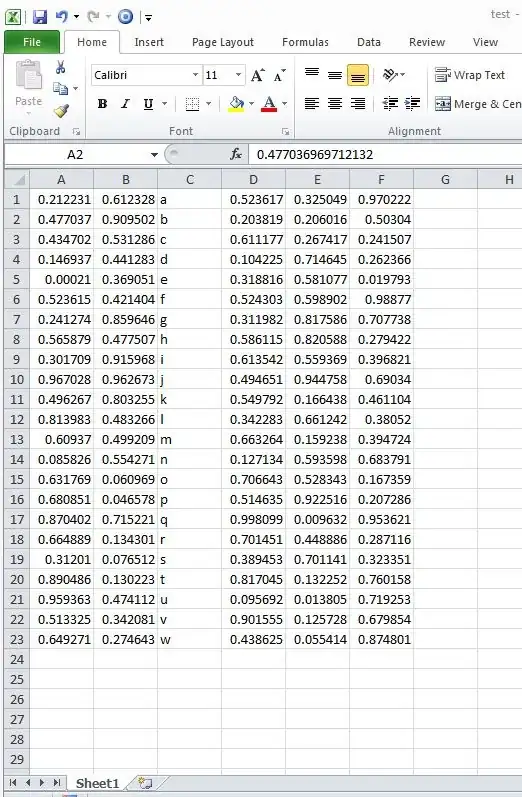
We can import the 2nd and 5th elements from every row on the first sheet as such:
Import["pathtoxlsx.xlsx", {"Data", 1, All, {2, 5}}]
{{0.612328, 0.325049}, {0.909502, 0.206016}, {0.531286, 0.267417}, {0.441283, 0.714645}, {0.369051, 0.581077}, {0.421404, 0.598902}, {0.859646, 0.817586}, {0.477507, 0.820588}, {0.915968, 0.559369}, {0.962673, 0.944758}, {0.803255, 0.166438}, {0.483266, 0.661242}, {0.499209, 0.159238}, {0.554271, 0.593598}, {0.0609692, 0.528343}, {0.046578, 0.922516}, {0.715221, 0.00963152}, {0.134301, 0.448886}, {0.0765122, 0.701141}, {0.130223, 0.132252}, {0.474112, 0.0138053}, {0.342081, 0.125728}, {0.274643, 0.0554139}}

kale
- 10,922
- 1
- 32
- 69
-
Truly brilliant. All the more so since the
DocumentationforImportis so short. – eldo Sep 15 '14 at 18:10 -
nice. does this perform any different vs
Import[...][[1,All,{2,3}]]– george2079 Sep 16 '14 at 11:44 -
Just checked that, it is in fact faster to import the whole works and take what you need afterward. – george2079 Sep 16 '14 at 18:31
-
Thanks Kale and George, I am really a novice. Just starting my first steps, so sorry for the really simple questions. Did like Kale recommended and got as out :out[2]= import["desktop/ipxi/4136928.xlsx", {"data", 1, All, {2, 4}}] How can I actually se the results like in Kale's example? – Assaf Thon Sep 21 '14 at 15:46
-
-
Question - what is the function of the number 1 after the "Data" keyword? what is it telling mathematica? – Tom Mozdzen Apr 24 '17 at 17:24
-
@TomMozdzen
1= First worksheet within the workbook.All= All rows.{2,5}= columns 2 and 5. – kale Apr 25 '17 at 02:45