12

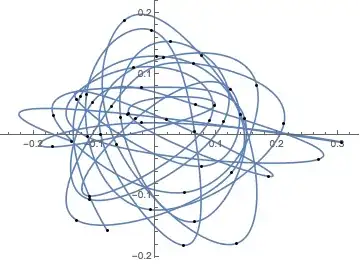
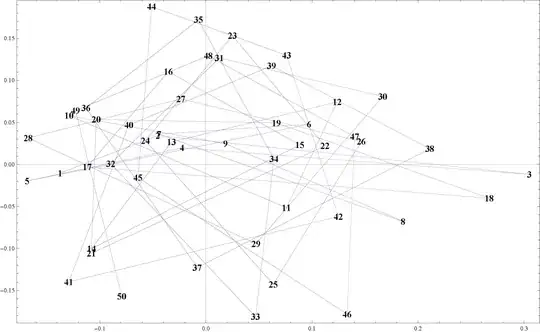
I have a collection of points

{{-0.137445, -0.0103507}, {-0.0452845, 0.0343154}, {0.30498, -0.0118266}, {-0.0224633, 0.0197979},
 {-0.168469, -0.0197066}, {0.0973217, 0.0478612}, {-0.0441388, 0.0360607}, {0.185982, -0.0679699},
 {0.0185057, 0.0245944}, {-0.129016, 0.0581276}, {0.0759223, -0.0514376}, {0.123763, 0.0743706}, 
 {-0.0324282, 0.0267871}, {-0.107764, -0.100215}, {0.0885256, 0.0232463}, {-0.0353817, 0.110461}, 
 {-0.111862, -0.00308756}, {0.267131, -0.0401582}, {0.0665588, 0.0494041}, {-0.103328, 0.0535261},
 {-0.107966, -0.105811}, {0.112237, 0.0221174}, {0.0250018, 0.153274}, {-0.0569079, 0.0282354}, 
 {0.0635016, -0.142617}, {0.146519, 0.027247}, {-0.0235671, 0.0778935}, {-0.167359, 0.0314445}, 
 {0.0472315, -0.0944644}, {0.166657, 0.0808811}, {0.0127167, 0.126777}, {-0.0896872, 0.00085879}, 
 {0.0468778, -0.181101}, {0.0641557, 0.00642259}, {-0.00698507, 0.172202}, {-0.112879, 0.0671148}, 
 {-0.00809596, -0.12273}, {0.211062, 0.0186191}, {0.0619741, 0.117436}, {-0.0725547, 0.0468807}, 
 {-0.129253, -0.139777}, {0.124918, -0.0620453}, {0.0761669, 0.129845}, {-0.0510648, 0.1879}, 
 {-0.063928, -0.0156006}, {0.133047, -0.178149}, {0.140128, 0.0330165}, {0.00229768, 0.129346}, 
 {-0.122887, 0.0639973}, {-0.079265, -0.156894}}

that look like this
enter image description here

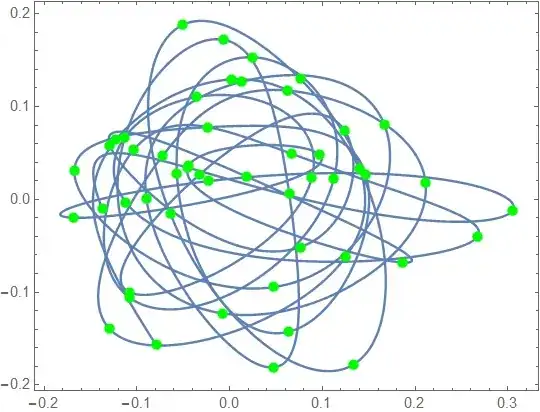
They are ordered in some sort of spiral, and I would like to join them with splines as shown below

enter image description here

The points are ordered clockwise (starting from 50 going backwards), and I would like the piecewise curves to be joined as smoothly as possible (doing another circuit if necessary before joining to the next point). How would I go about doing this?

Update

@kguler's answer is great, but doesn't join all of the points:

enter image description here

Is there a way to ensure the spline passes through each point?

martin
  • 8,678
  • 4
  • 23
  • 70
  • [I would normally put this in a comment, but my reputation on this part of Stack is not high enough.] I assume you have tried using something like Fit[data,{1,x,x^2,x^3},x] for a cubic spline already? You could also find the convex hull for 4, 5, or 6 point sets inside your list and then model the fit to an ellipse. Then take the set of ellipses and smoothly interpolate them together. – honeste_vivere Sep 25 '14 at 13:58

5 Answers5

13

The built-in functionality can do this directly:

{xs, ys} = Transpose[points];
xinterp = Interpolation[xs, Method -> "Spline"];
yinterp = Interpolation[ys, Method -> "Spline"];
ParametricPlot[{xinterp[t], yinterp[t]}, {t, 1, Length@points}, Epilog -> Point /@ points]

enter image description here

Without the "Spline" method, the interpolating functions are not always differentiable, which creates corners in the plot. The "Spline" method gives a differentiable function (actually twice-differentiable, since the default InterpolationOrder is 3). More information here: How does Interpolation really work?

  • I also tried this. With bigger InterpolationOrder it looks good enough :) – ybeltukov Sep 25 '14 at 16:11
  • Ah, yes, but then it begins overshooting a lot. –  Sep 25 '14 at 20:10
  • It turns out that nondifferentiability is only a problem if you don't use the "Spline" method. I wonder why the documentation doesn't mention this. –  Sep 26 '14 at 00:41
  • Great! Indeed, there is the curves appear close, but the spline has a continuous derivative in docs (Method section for Interpolation). – ybeltukov Sep 26 '14 at 11:51
  • @ybeltukov, that is very noble of you ;) I will take a close look & compare ... – martin Sep 26 '14 at 13:06
  • @ybeltukov, yes, must agree, curves are "more natural" (highly technical term, that ;)) – martin Sep 26 '14 at 13:37
  • @ybeltukov: Ah, there is that. But under "Possible Issues" it says that the interpolating function may not be differentiable, without mentioning that the spline method does not have this issue. –  Sep 26 '14 at 15:28
  • 3
    It might be worth remarking that one can get a single interpolation of the curve with xyfn = Interpolation[MapIndexed[{#2, #1} &, points], Method -> "Spline"]. – Michael E2 Sep 28 '14 at 15:06
12

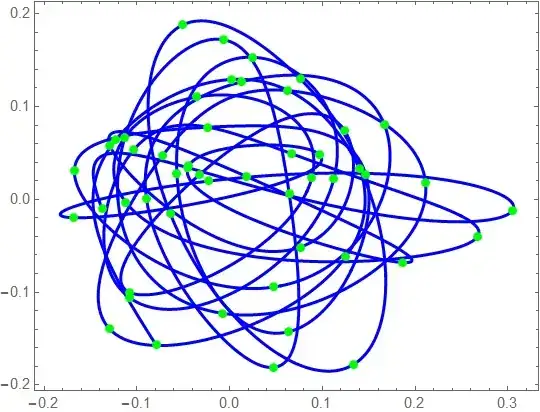
I appreciate kguler's elegant solution, but it doesn't join the points. To be more precise, it joins only every third point because Bezier line additionally takes 2 anchor points for each point. There are different methods to obtain these points. The simplest one is the following (pictures taken here)

enter image description here

enter image description here

enter image description here

In Mathematica it looks like the following code (for an open path)

pts = {{0, 0}, {1, 1}, {2, 0}, {5, 1}, {6, 0}, {7, 1}};

dist = Norm /@ Differences[pts];
k = 0.5;
coeff = Rest[dist]/(Most[dist] + Rest[dist]);
diff = Differences[pts, 1, 2];
a1 = pts - Join[{{0, 0}}, k (1 - coeff) diff, {{0, 0}}];
a2 = pts + Join[{{0, 0}}, k coeff diff , {{0, 0}}];
bezier = BezierCurve@Flatten[{a1, pts, a2}, {{2, 1}}][[2 ;; -2]];

Graphics[{Darker[Green], Line[pts], Red, Line@Transpose[{a1, a2}], 
  Black, PointSize[0.01], Point[pts], Red, Point@Join[a1, a2], Blue, 
  Thick, bezier}, ImageSize -> 700]

enter image description here

For OP's points:

Graphics[{PointSize[0.01], Point[pts], Blue, Thick, bezier}, ImageSize -> 700]

enter image description here

You can tune the coefficient k to change sharpness of corners.

ybeltukov
  • 43,673
  • 5
  • 108
  • 212
6
llp = ListLinePlot[points, ImageSize -> 500];
llp2 = llp /. Line[x___] :> BSplineCurve[x, SplineDegree -> 2];
Row[{llp, llp2}]

enter image description here

where

points = {{-0.137445, -0.0103507}, {-0.0452845,  0.0343154}, {0.30498, -0.0118266}, 
          {-0.0224633, 0.0197979}, {-0.168469, -0.0197066}, {0.0973217, 0.0478612}, 
          {-0.0441388, 0.0360607}, {0.185982, -0.0679699}, {0.0185057,  0.0245944}, 
          {-0.129016,  0.0581276}, {0.0759223, -0.0514376}, {0.123763,  0.0743706},
          {-0.0324282, 0.0267871}, {-0.107764, -0.100215}, {0.0885256,  0.0232463},
          {-0.0353817, 0.110461}, {-0.111862, -0.00308756}, {0.267131, -0.0401582},
          {0.0665588, 0.0494041}, {-0.103328,  0.0535261}, {-0.107966, -0.105811}, 
          {0.112237,  0.0221174}, {0.0250018, 0.153274}, {-0.0569079,  0.0282354}, 
          {0.0635016, -0.142617}, {0.146519,  0.027247}, {-0.0235671, 0.0778935}, 
          {-0.167359,  0.0314445}, {0.0472315, -0.0944644}, {0.166657, 0.0808811}, 
          {0.0127167, 0.126777}, {-0.0896872,  0.00085879}, {0.0468778, -0.181101},
          {0.0641557, 0.00642259}, {-0.00698507, 0.172202}, {-0.112879, 0.0671148},
          {-0.00809596, -0.12273}, {0.211062, 0.0186191}, {0.0619741, 0.117436}, 
          {-0.0725547,  0.0468807}, {-0.129253, -0.139777}, {0.124918, -0.0620453},
          {0.0761669, 0.129845}, {-0.0510648, 0.1879}, {-0.063928, -0.0156006}, 
          {0.133047, -0.178149}, {0.140128, 0.0330165}, {0.00229768, 0.129346}, 
          {-0.122887, 0.0639973}, {-0.079265, -0.156894}};
kglr
  • 394,356
  • 18
  • 477
  • 896
  • great! thank you! – martin Sep 25 '14 at 14:14
  • @martin, my pleasure.. – kglr Sep 25 '14 at 14:18
  • I have noticed on some points the spline changes direction - is it possible to specify that the points are always joined by anticlockwise curve, for example? (Even if another circuit has to be made?) – martin Sep 25 '14 at 14:18
  • ... It does seem to avoid this behaviour if I drop points 1-10 though – martin Sep 25 '14 at 14:22
  • 1
    @martin, there a quite a few possibilities to play with the option settings (SplineDegree, SplineKnots, SplineWeights). Not sure what the right option settings would like to get something close to the second picture in your post. – kglr Sep 25 '14 at 14:32
  • Great - thanks for your help - will take a look at the options you mentioned :) – martin Sep 25 '14 at 14:37
  • The splines approximate, but don't actually pass through all points (only seemingly the first and last specified). Is there a way of doing this? (See question update.) – martin Sep 25 '14 at 14:49
6

As an alternative, one can use J.M.'s nice implementation of a spline with centripetal parametrization which gives (IMO) a "natural" and undisturbed curve.

belisarius has packed J.M.'s code into a function in this answer (which would be much more suitable here than in that thread because despite large number of upvotes it does not answer the original question).

I have shortened and redesigned belisarius's code:

ClearAll[toSplineData];
toSplineData[data_, order_, prec_] /; MatrixQ[data, NumericQ] := 
 Module[{tvals, bas, ctrlpts, knots, l = Length[data]}, 
  tvals = FoldList[Plus, 0, Normalize[(Norm /@ Differences[data])^(1/2), Total]];
  (*knots for interpolating B-spline*)
  knots = Join[ConstantArray[0, order + 1], 
               MovingAverage[ArrayPad[tvals, -1], order], 
               ConstantArray[1, order + 1]];
  (*basis function matrix*)
  bas = Table[BSplineBasis[{order, knots}, j - 1, N[tvals[[i]], prec]], {i, l}, {j, l}];
  ctrlpts = LinearSolve[bas, data];
  {ctrlpts, order, knots}]

Now the function toSplineData can be used in the following ways:

{ctrlpts, m, knots} = toSplineData[points, 5, MachinePrecision];

plot = ParametricPlot[
  BSplineFunction[ctrlpts, SplineDegree -> m, SplineKnots -> knots][t] // Evaluate, {t, 0, 1}, 
  Axes -> None, Frame -> True, ImageSize -> Medium,
  Epilog -> {Directive[Green, AbsolutePointSize[6]], Point[points]}]

plot

Graphics[{{Blue, Thick, 
           BSplineCurve[ctrlpts, SplineDegree -> m, SplineKnots -> knots]}}, Options@plot]

plot2

Please note that this function does not have all the flexibility of J.M.'s original code.

Alexey Popkov
  • 61,809
  • 7
  • 149
  • 368
5

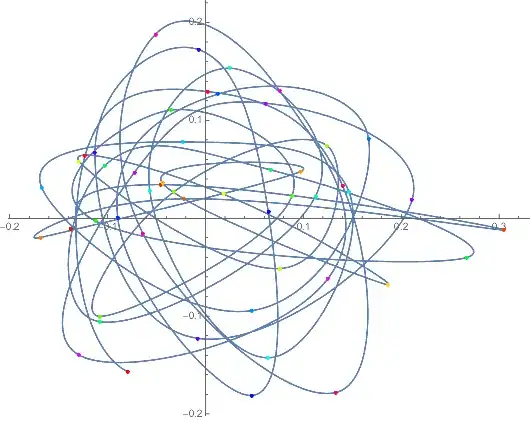
An alternative way to force Interpolation to construct a differentiable interpolation is to specify derivatives at the interior points. To get a good curvature, I used 70% of the vector (difference) between the points adjacent to a given point.

xyfn = Interpolation @ Thread @
    {List /@ Range @ Length @ points,
     points,
     Join[{Automatic}, 0.7 Differences[points, 1, 2], {Automatic}]};

ParametricPlot[xyfn[t], {t, 1, Length @ points}, 
 Epilog -> {PointSize[Medium], 
   Point[points, VertexColors -> Hue /@ Rescale @ Range @ Length @ points]}]

Mathematica graphics

Michael E2
  • 235,386
  • 17
  • 334
  • 747