11

When I thought to vary PointSize on a ListPlot, I expected to find it trivial to do. I've likely overlooked something simple, but I've found it quite curious.

Reducing the problem to some simple examples:

ListPlot[{0.1, 0.2, 0.3}] 
ListPlot[{0.1, 0.2, 0.3}, PlotStyle -> (PointSize[#] & /@ {Small, Medium, Large})]
ListPlot[{{0.1}, {0.2}, {0.3}}, PlotStyle -> (PointSize[#] & /@ {Small, Medium, Large})]
ListPlot[{{1, 0.1}, {2, 0.2}, {3, 0.3}}, PlotStyle -> (PointSize[#] & /@ {Small, Medium, Large}), PlotRange -> {{0, 3}, Automatic}]

plots

The 1st plot shows the starting plot with no PlotStyle set.

The 2nd plot shows an attempt to size the individual points. This does not work either, but the documentation for PlotStyle explains why:

PlotStyle documentation

The 3rd plot makes each value in the original list its own object. This sizes the points properly, but does not plot them as I would like along the x axis.

The 4th plot adds position values for each object's point, but now I've lost the PointSizing.

Any suggestions on how to do this?

Any explanation of the paradigm involved in doing this properly?

Jagra
  • 14,343
  • 1
  • 39
  • 81

4 Answers4

9
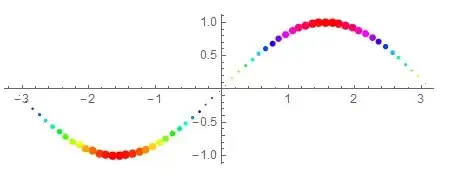
data = Table[{x, Sin[x]}, {x, -Pi, Pi, 0.1}];
Graphics[{Hue[#2], PointSize[Abs[#2]/50], Point[{#1, #2}]} & @@@ data,
  Axes -> True]

enter image description here

Basheer Algohi
  • 19,917
  • 1
  • 31
  • 78
8

Your forth input form is not three sets of points but rather one set in {x, y} form. Adding an additional set of brackets gives the output you desire:

ListPlot[{{{1, 0.1}}, {{2, 0.2}}, {{3, 0.3}}}, 
 PlotStyle -> (PointSize /@ {Small, Medium, Large}), 
 PlotRange -> {{0, 3.1}, Automatic}]

enter image description here

Mr.Wizard
  • 271,378
  • 34
  • 587
  • 1,371
8

Just for fun

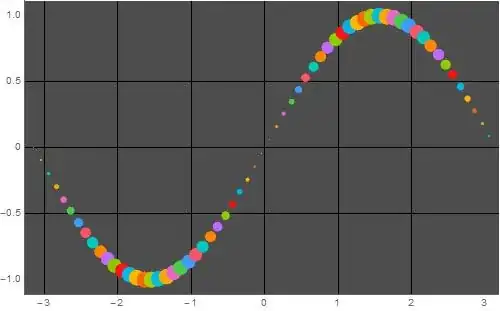
data = Table[{x, Sin[x]}, {x, -Pi, Pi, 0.1}];

ListPlot[List /@ data, 
 GridLinesStyle -> Black,
 ImageSize -> 500,
 PlotStyle -> PointSize /@ (Abs[Last /@ data]/30),
 PlotMarkers -> None,
 PlotTheme -> "Marketing"]

enter image description here

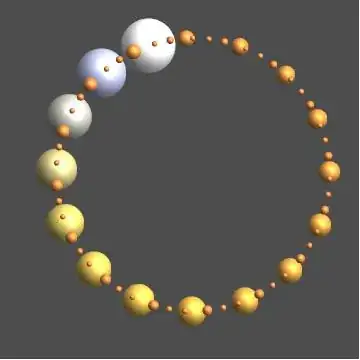
BubbleChart[Table[{Sin[2 x], Cos[2 x], Exp[x]}, {x, -2 Pi, 2 Pi, 0.2}],
 ColorFunction -> "BeachColors",
 Frame -> False,
 GridLines -> None,
 PlotTheme -> "Marketing"]

enter image description here

eldo
  • 67,911
  • 5
  • 60
  • 168
5

An alternative to breaking the data into individual elements and using different PlotStyles for each element is to wrap individual elements with Style:

data = {0.1, 0.2, 0.3};
colors = {Red, Green, Blue};
pointsizes = PointSize /@ {.06, Medium, Large};

You can apply styling directives to individual elements in several ways:

styleddata1 = Style @@@ Thread[{data, colors, pointsizes}];
styleddata2 = Thread[Style[data, colors, pointsizes]];
styleddata3 = MapThread[Style, {data, colors, pointsizes}];

ListPlot[#, PlotRange -> {{0, 3.1}, {0, Automatic}}, ImageSize -> 350] & /@
    {styleddata1, styleddata2, styleddata3} // Row

enter image description here

kglr
  • 394,356
  • 18
  • 477
  • 896