When writing mathematica slides I create an equation with DisplayFormulaNumberedStyle. I then add a cell tag to it. Then in the document I reference to that equation by inserting automatic numbering. Then when giving the presentation I click on that reference and it takes me to that equation. I then want to go back to the point where I clicked on that reference. I was wondering if there is any way to go back without having to simply click next slide until I get there. It would be very useful if there was some kind of "back" button like in a web browser or pdf displayer.
Asked
Active
Viewed 124 times
5

-
What platform are you on and what version of Mma do you use? On Macs we have a "back" button in the toolbar – Mike Honeychurch Sep 28 '14 at 20:24
-
@MikeHoneychurch I am using a mac os x 10.9.5 and mma 9. I don't see a back button in the toolbar. Just a button that moves to the next or previous slide. – Virgo Sep 28 '14 at 20:28
1 Answers
4
On a Mac you can go to the top menu Windows > ShowToolbar and add a toolbar to your notebook. This has a "back" button:
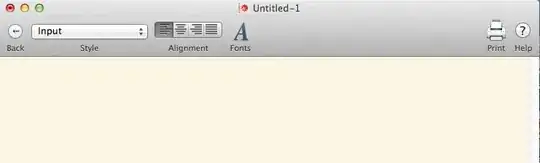
Note that the toolbar goes away when the slideshow is in fullscreen mode.

m_goldberg
- 107,779
- 16
- 103
- 257

Mike Honeychurch
- 37,541
- 3
- 85
- 158
-
Brilliant, thanks for that! For some reason when I hit back it goes to the slide just before the one I clicked on, but that's not too serious a bug. – Virgo Sep 28 '14 at 20:33
-
That functionality has been present long before SlideShow was created so it probably wasn't updated when SlideShow was added. – Mike Honeychurch Sep 28 '14 at 20:38