2
"ϕ" <> "1";
Variables[%]

Exp["ϕ" <> "1"];
Variables[%]

Exp[Subscript[ϕ, 1]];
Variables[%]

Say I have lots of variables used for construct an expression. I am new to MMA, so I am still trying to determine which way to put it, i.e. using subscripts? catenate?

But the main issue is that, Variables can't seem to give me all the variables I want except the direct case (first case above).

Only time it worked is in the first case. So if I want to use

Table[Exp[Subscript[ϕ, j]], {j, 1, 10}]
Variables[%]

to create a function, and do some calculation with it, I can't use Length[Variables[%]] to determine how many parameters I have.

Table[Subscript[η, ϕ, j], {j, 1, 10}];
Variables[%]  (*works fine*)

Table[Exp[Subscript[η, ϕ, j]], {j, 1, 10}];
Variables[%]  (*But this is what I want to use*)

What I am used to for the above (in Maple), is to express this using eta and subscript phi1, phi2, phi3, etc. I haven't figured out how exactly to achieve this in MMA 10 yet.
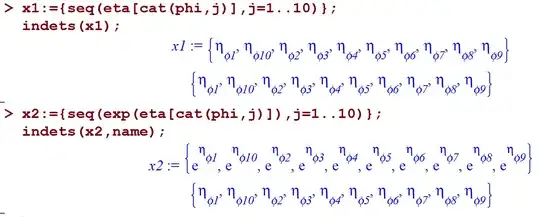
enter image description here

Is there a way to get Variables[%] to cope with this?

Thanks!

J. M.'s missing motivation
  • 124,525
  • 11
  • 401
  • 574
Chen Stats Yu
  • 4,986
  • 2
  • 24
  • 50

2 Answers2

5
Variables[Level[expression, {-1}]]

you have to know that Subscript variables is not considered as pure variables in MMA. it is basically a built in function expression. in this case I would suggest you to used:

d = Table[Exp[Subscript[ϕ, j]], {j, 1, 10}];
Cases[d, Subscript[__, __], {1, -1}]

{Subscript[ϕ, 1], Subscript[ϕ, 2], Subscript[ϕ, 3], \
Subscript[ϕ, 4], Subscript[ϕ, 5], Subscript[ϕ, 6], \
Subscript[ϕ, 7], Subscript[ϕ, 8], Subscript[ϕ, 9], \
Subscript[ϕ, 10]}
LCarvalho
  • 9,233
  • 4
  • 40
  • 96
Basheer Algohi
  • 19,917
  • 1
  • 31
  • 78
4

There's an internal, undocumented utility that will do it for you:

Integrate`getAllVariables[Cos[t x] E^y, {}]
(*  {t, x, y}  *)

OP's example:

Table[Exp[Subscript[\[Eta], \[Phi], j]], {j, 1, 10}];
Integrate`getAllVariables[%, {}]

Mathematica graphics

Examples showing some variation:

Integrate`getAllVariables[f[t x] E^y, {}]
(*  {y, f[t x]}    --- f is not identified as a function *)

SetAttributes[ff, NumericFunction]
Integrate`getAllVariables[ff[t x] E^y, {}]
(*  {t, x, y}      --- the attribute causes f to be treated as a function *)

Integrate`getAllVariables[ff[t x] E^y, {x}]
(*  {t, y}         --- the arguments in the list are omitted from output *)

The last example can be explained in the context of a definite integral with respect to x. The integral itself does not depend on x, even though the integrand does.

Michael E2
  • 235,386
  • 17
  • 334
  • 747