48

Note: This question was asked when Mathematica 8 was latest release. Version 9 has built-in support for volume rendering through Image3D.


There's an example on wolfram.com showing some medical data rendered in 3D. Unfortunately there's no code, only an animation.

Volume rendering

Note that the data is shown as a solid three-dimensional body, not only 2D slices of it like in the example on the doc page of Texture.

Given a 3D texture, how can such a visualization of a solid 3D body be made using Mathematica? You will find the volumetric data on the doc page of Texture, under Applications -> Volume Rendering.

I notice there's something included with CUDALink. Unfortunately I can't try it (I don't have the hardware), but it looks quite different from the image I linked to above, so I think there must be an independent way to produce the image above.

[With Sjoerd's hardware (it's pretty cool, movements are totally smooth):]
Mathematica graphics

Link to the MathGroup version of this post.

Szabolcs
  • 234,956
  • 30
  • 623
  • 1,263
  • I dropped the output of CUDAVolumetricRender you were talking about in your question. Please remove if you don't like it. It really is an impressive volumetric renderer. – Sjoerd C. de Vries May 30 '12 at 21:56
  • This is an interesting question for me as well, since a number of the quaternion-based fractals are often rendered through this technique... – J. M.'s missing motivation May 31 '12 at 01:06
  • There is an OpenCLLink set of commands as well, which will work on ATI graphics cards:

    http://reference.wolfram.com/mathematica/OpenCLLink/guide/OpenCLLink.html

    – Guillochon May 31 '12 at 02:38
  • @Sjoerd The CUDAVolumetricRender output is actually mouse-rotatable? – Szabolcs May 31 '12 at 07:25
  • @Szabolcs It is. Moreover, it's amazingly fluent. You really see the power of CUDA acceleration here. – Sjoerd C. de Vries May 31 '12 at 09:13
  • @SjoerdC.deVries how long did it take to render? I gave up after about 10 minutes because my CPU was getting a bit too hot to my liking. The "Installing data...." counter was at 30% by then. – Heike May 31 '12 at 10:46
  • @Heike Isn't that part just installing the CUDA tools? – Szabolcs May 31 '12 at 10:55
  • @Szabolcs You're probably right. I'm trying Yu-Sung's code below at the moment, and the CUDAResourcesInstall... step seems to take a while (although not as long as before). – Heike May 31 '12 at 10:58
  • @heike A second at most, I'd say. But I had used it before. I think at first use it downloads over 100 MB of data and programs – Sjoerd C. de Vries May 31 '12 at 12:08
  • @heike If you look at the directory sizes in this answer of mine you'll see that CUDAlink is over 300MB. I'm not sure whether this is part of a basic install or is downloaded on demand. I guess it is the latter. – Sjoerd C. de Vries May 31 '12 at 12:14
  • @SjoerdC.deVries I managed to get is working in the end, but it isn't terribly responsive. I think my hardware is a bit outdated. – Heike May 31 '12 at 12:15
  • @heike I'd say on my PC it's even more responsive than rotating a low-polygon-count Graphics3D. – Sjoerd C. de Vries May 31 '12 at 12:19
  • @SjoerdC.deVries On my system it's moderately responsive, but the kernel does seem to use a lot of cpu while the CUDAVolumetricRender is active. One of these days I'll get a proper desktop with a decent graphics card. – Heike May 31 '12 at 12:24
  • @heike I'm on a laptop with a fast (but not top of the line) mobile nVidia card. So, no need for a desktop. – Sjoerd C. de Vries May 31 '12 at 13:36
  • @Sjoerd Yes, CUDALink is big in the default install. The additional programs it downloads go into either $BaseDirectory or $UserBaseDirectory (not sure which), but the $InstallationDirectory is not touched. – Szabolcs May 31 '12 at 13:39

2 Answers2

47

Solution 1: Using 3D Texture with Polygons

The idea is to use Polygon with 3D texture supported by Texture, but it requires a bit of undocumented hack to make it smooth.

The original data set is from Stanford Graphics Group website. The dataset that has been used is CThead, 8-bit tiffs (download). Before proceed, make sure that you have a plenty of memory (~500MB would be enough). Also, if you don't have a good graphics card, turning off 3D antialiasing (through "Preference" menu) will be helpful.

Step 1

Download slices into Mathematica (it takes a long time...).

filename = "cthead-8bit.tar.gz"; (* Appropriate path to the downloaded file *)   
slices = Import[filename, #] & /@ Import[filename];

The images should look like this:
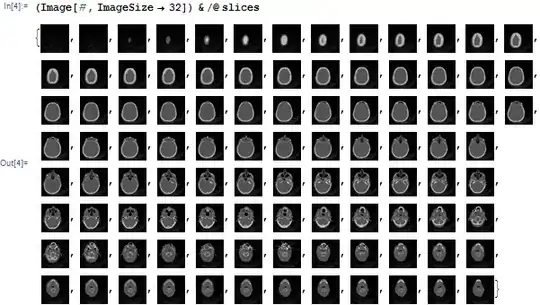
slices

Step 2

Let's apply some colors and transparency. We apply color function using Colorize, then add alpha channel based on binarized image using ColorCombine. Don't forget to specify the color space "RGB" (otherwise, the last channel will not be interpreted as opacity). Since it is a lot of slices, we will use ParallelMap. I am reversing the result to match the orientation.

colored = 
  Reverse[ParallelMap[
    With[{img = #}, 
      ColorCombine[{
        Colorize[img, ColorFunction -> "SunsetColors"], Binarize[img]
        }, "RGB"]] &, slices]];

The result will look like this:

enter image description here

We will combine them and pack them so that it will make a nice volumetric color dataset. Again, notice that option DataReversed is used to reverse the orientation.

data = Developer`ToPackedArray[Map[ImageData[#, DataReversed -> True] &, colored]];

Step 3

Basically, we put a lot of polygons with textures coming from this volumetric color dataset. But to make it work rather smooth, you need to use undocumented option BaseStyle -> {RenderingOptions -> {"DepthPeelingLayers" -> n}} (n being some reasonable number). I won't go deep into how this option works, I will just say that this sets limit on rendering of translucent polygons.

Here is the main code to display it:

(* All are in 0-1 coordinates. *)
(* top is z-value for x-y cutaway. *)
(* right is x value for y-z cutaway. *)
(* step defines how many polygon slices will be inserted. Smaller -> more *)
With[{top = 0.4, right = 0.4, rpad = -.2, step = 0.01},
 Graphics3D[{
   EdgeForm[],
   Opacity[.4], (* Overall transparency of the textured polygons *)
   Texture[data], (* Set volumetric texture *)

   (* Bottom part up until the variable top *)
   With[{pts = Table[{{0, 0, z}, {1, 0, z}, {1, 1, z}, {0, 1, z}}, {z, 0, top, step}]},
     Polygon[pts, VertexTextureCoordinates -> pts]
   ],

   (* Top part from top to 1, but from 0 to right in x direction *)         
   With[{pts = Table[{{x, 0, top}, {x, 1, top}, {x, 1, 1}, {x, 0, 1}}, {x, 0, right, step}]},
     Polygon[pts, VertexTextureCoordinates -> pts]
   ],

   (* Cutaway decoration *)
   EdgeForm[Directive[Opacity[.6, RGBColor[1., .8, .1]], Thick]], 
   FaceForm[], 
   Polygon[{{right, 0, top}, {1 + rpad, 0, top}, {1 + rpad, 1, top},
     {right, 1, top}, {right, 1, 1}, {right, 0, 1}}]
 },
 PlotRange -> {{0, 1 + rpad}, {0, 1}, {0, 1}}, 
 Lighting -> "Neutral", Background -> Black, 
 RotationAction -> "Clip", SphericalRegion -> True, 
 BoxStyle -> Directive[Opacity[.2], White], 
 ImageSize -> 4 {100, 100}, 
 (* Rendering option for smooth volumetric rendering *)
 BaseStyle -> {RenderingOptions -> {"DepthPeelingLayers" -> 100}}, 
 BoxRatios -> {1 + rpad, 1, .9}]
]

Here is the result:

enter image description here

Warning: Be very careful of decreasing step or increasing DepthPeelingLayers and ImageSize. It will crash the Front End...

Solution 2: Using CUDAVolumetricRender

It is a limited solution for the people who has CUDA capable graphics cards. Essentially, it will call CUDAVolumetricRender function which is a part of CUDALink.

Step 0

We need to load the CUDALink package.

<<CUDALink`

The following line will make it sure that you get the latest CUDA paclet.

CUDAResourcesInstall[Update -> True]

It takes a long time to download full paclet, so if you are sure that your CUDA distribution is up to date (CUDAResourcesInstall[] returns 8.0.4.2, as of 5/31/2012), then you can skip this step.

Step 1

Download slices into Mathematica (the same as above).

filename = "cthead-8bit.tar.gz"; (* Appropriate path to the downloaded file *)   
slices = Import[filename, #] & /@ Import[filename];

Step 2

Create a volume data suitable for the CUDAVolumetricRender. First, the data should be a packed integer array with depth 3, each element should range from 0 to 255 (0 being background). Since original data is already in 0-255 range (8-bit TIFF), you can use ImageData[..., Automatic] to take original values out. Otherwise, you can use ImageData[..., "Byte"] to enforce it to be in byte range.

data = Developer`ToPackedArray[Map[ImageData[#, Automatic] &, slices]];

Here is a slight problem. Apparently there is a bug. To render $d \times h \times w$ voxel data, you need to partition it again, so that the data would have $h \times w \times d$ dimension. We are not talking of transposing it, instead, literally we just need to change dimension, without touching data order. It is hard to explain and no need to understand, so I will just provide a conversion function here:

Clear[prepareCUDAVolumeData];

prepareCUDAVolumeData::arg = 
  "The argument should be an integer array of depth 3.";

prepareCUDAVolumeData[array_] /; ArrayQ[array, 3, IntegerQ] := 
  Module[{x, y, z}, {x, y, z} = Dimensions[array];
   Developer`ToPackedArray[
    Partition[#, x] & /@ Partition[Flatten[array], x*z]]];

prepareCUDAVolumeData[___] /; (Message[prepareCUDAVolumeData::arg]; 
    False) := Null;

Step 3

Now, we are ready. Let's try this:

CUDAVolumetricRender[prepareCUDAVolumeData[data]]

Here is the result (with some parameter tweak):
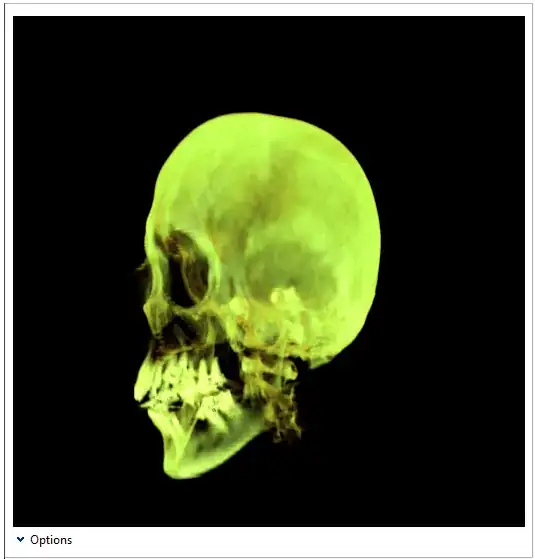
enter image description here

The problem with this approach is that you don't have much flexibility except what is given by the interface.

Note: The volume rendering support in Mathematica 8 is quite limited (without CUDALink). Technically, it is not really volumetric rendering in traditional sense. A proper volumetric rendering requires a transfer function which converts accumulation of density values into certain color per each pixel. Here, we are mimicking the effect by using false coloring and alpha blending. The CUDALink volume rendering is a real deal, but you don't really need CUDA as long as graphics cards supports shader language (which is mostly true nowadays).

Note 2: You can expect much improved (and proper) volumetric support in the future... ;)

Szabolcs
  • 234,956
  • 30
  • 623
  • 1,263
Yu-Sung Chang
  • 7,061
  • 1
  • 39
  • 31
  • Could you comment on how one would do this using CUDALink? – rcollyer May 31 '12 at 03:14
  • @rcollyer , CUDAVolumetricRender is in the documentation (link), although it is a canned function. You don't really have much freedom except what's offered there through the interface... (also, you sometimes get memory allocation error). – Yu-Sung Chang May 31 '12 at 03:24
  • I've looked at the documentation, but it only gives examples involving data already in the raw format. I'm more interested in how one would take a set of slices, as above, and use CUDAVolumetricRender. – rcollyer May 31 '12 at 03:27
  • 3
    Added the solution using CUDAVolumetricRender. – Yu-Sung Chang May 31 '12 at 05:30
  • 3
    This is really great ;-) – Vitaliy Kaurov May 31 '12 at 05:32
  • Awesome, thank you. – rcollyer May 31 '12 at 11:42
  • Yu-Sung, do you know if CUDALink is supported on the new retina Macbook Pros? I have an NVIDIA GeForce GT 650M 1024 MB card, done CUDAResourcesInstall[Update -> True], and CUDADriverVersion[] returns 5.0.17. Yet CUDAQ[] returns False... anything else I should be doing or is it just not supported yet? – rm -rf Aug 04 '12 at 15:44
  • Sorry for the late reply. I haven't got hold of retina Macbook, so I can't answer... But I will ask around and see if I can find some answer for you. – Yu-Sung Chang Aug 09 '12 at 14:23
  • OK. Update (suggestions from Wolfram TS and CUDA developer): 1) Make sure that you have the most recent dev driver from Nvidia. 2) Retina has dual GPU, and apparently Intel HD4000 is set by default. Make sure that you set NVidia one as default (I don't know how... I don't have the machine :) ). – Yu-Sung Chang Aug 09 '12 at 14:40
  • This seems to be a related article from Apple (about switching the GPU): http://support.apple.com/kb/HT4110 – Yu-Sung Chang Aug 09 '12 at 14:43
  • Thanks for the replies! Sorry for the late response, but I saw these only now. I wasn't pinged about these because you didn't explicitly ping me with @ and I casually decided to check :) Anyway, the trick was to force it to use Nvidia all the time as in the support article. That, with the latest CUDA (5.02), CUDAQ[] gives True. However, running example 2 above gives the error: LibraryFunction::memerr: -- Message text not found -- (oVolumetricRendering_Initialize) >> when calling CUDAVolumetricRender and the output is not displayed... any ideas? The doc page it leads to doesn't say much – rm -rf Aug 20 '12 at 03:18
6

Here is my extremely slow volume rendering solution. It is based on placing a Cuboid[] for each voxel of the data.

I switched from MapThread to ParallelMap as for some reason MapThread cannot be parallelized.

slices = Import["https://dl.dropbox.com/u/3730003/slicedata.wdx"]
data = Developer`ToPackedArray[Map[ImageData, slices]];

(*downsampling slices*)
resized = ImageResize[#, 64] & /@ slices;
data = Developer`ToPackedArray[Map[ImageData, resized]];

(*3D*)
dims = Dimensions@data;
coordswithdata = Table[{data[[x, y, z]], {x, y, z}}, {x, 1, dims[[1]]}, {y, 1, dims[[2]]}, {z, 1, dims[[3]]}];
cubes = {Hue @@ #1, EdgeForm[], Cuboid@#2} &
output = ParallelMap[cubes @@ # &, coordswithdata, {3}];
Graphics3D@output

When I tried to rotate the view Mathematica crashed so here is an ugly screenshot, but it works (sort of)!

screenshot

(*2D*)
dims = Dimensions@data[[45]];
coordswithdata = Table[{data[[45, x, y]], {x, y, 1}}, {x, 1, dims[[1]]}, {y, 1, dims[[2]]}];
cubes = {Hue @@ #1, EdgeForm[], Cuboid@#2} &
output = ParallelMap[cubes, coordswithdata, {2}];
Graphics3D@output

"Mathematica graphic"

s0rce
  • 9,632
  • 4
  • 45
  • 78
  • 1
    This took 7 minutes of kernel time and 1G of kernel memory, then it died in swapping while transferring the data to the front end. Can you post a screenshot just to satisfy my curiosity? – Szabolcs May 31 '12 at 08:09
  • @Szabolcs, screenshots uploaded. – s0rce May 31 '12 at 15:02
  • 2
    A couple of things — This still isn't using the actual 3D texture, but simply uses Hue to fake colour it. Secondly this won't be smooth and will eat up memory and resources like crazy even for a rough output. Compared to this, Yu-Sung's was fluid. In fact, I have a very similar deleted answer, and the main issue there too was memory and roughness. The missing ingredient is the undocumented DepthPeelingLayers that Yu-Sung showed. – rm -rf May 31 '12 at 15:25
  • @R.M. You are right, it is very slow and memory intensive. I left it up there in case anyone wanted to see or improve upon it, no doubt, Yu-Sung's answer is much better. However, this doesn't fake the 3D texture using Hue it renders each voxel using the hue value given in the dataset including the opacity so the low-intensity (z) voxels are translucent. – s0rce May 31 '12 at 16:04