1

I want to present my work somewhere and thus I made a Powerpoint presentation. I am wondering if it is possible to make a colorful and stylish text by MMA. For example at the end of my presentation I write phrases such as "Thank you for your attention", "Questions?", or something similar.

For example would it be possible to create the below image by MMA and make each circle with the letter inside it move randomly or like a Sine wave. Could we add sparks of light around each moving circle.

enter image description here

MOON
  • 3,864
  • 23
  • 49
  • 1
    Something like that can be easily done. It's all about Style. – Öskå Oct 16 '14 at 11:54
  • Would it be possible that each letter was in a circle and the circles moves harmonically or randomly and they had flashes of light coming out of them. This example might be too extreme! but I just wanted to give an idea. – MOON Oct 16 '14 at 11:59
  • 9
    "Stylish" and "colorful" (esp. in conjunction with "Powerpoint") may raise a few alarms for the seasoned typographer. – Yves Klett Oct 16 '14 at 12:00
  • 2
    @YvesKlett "Powerpoint" raises a few alarms with or without "Stylish" or "colorful" :P – Öskå Oct 16 '14 at 12:03
  • 1
    There is probably much fancier but if you want a sine wave: http://i.imgur.com/XWG1Aj1.gif – Öskå Oct 16 '14 at 12:14
  • @Öskå now, Excel and stylish, that would raise at least DEFCON 2. I think Powerpoint is not a bad tool as such, but it is often used in a bad way. Sparks seem kind of borderline... – Yves Klett Oct 16 '14 at 12:19
  • 1
  • I would not agree with downvoting, though. The question would benefit if the OP showed some previous effort, but quite probably we can expect some dazzling (um) and fun answers. And the intention to use Mathematica to generate graphics at all in the presence of PPT is commendable. @Öskå: why not post an answer? – Yves Klett Oct 16 '14 at 13:22
  • @YvesKlett Because there are not circles, only some a simple wave. It's basically just Style.. – Öskå Oct 16 '14 at 13:26
  • @Öskå I think the OP would already benefit from that to get an idea how to go about modding text. However garish, thou shalt get an upvote from me, at least. – Yves Klett Oct 16 '14 at 13:28
  • 1
    IMHO, I would say the speaker should bring the attention at the end to himself or herself. Dim the last slide (e.g. gray @ 50% alpha) or a solid color/muted design; say "Thank you" etc. If there is to be Q&A, then perhaps for the next slide, an outline of the talk; say "I would be pleased to take questions" etc. – Michael E2 Oct 16 '14 at 13:29
  • @MichaelE2 I do so agree from an asthetic point of view, but at the same time I am kind of looking forward to some completely OTT answers ;-) – Yves Klett Oct 16 '14 at 13:33
  • @YvesKlett I don't mean to dissuade people from answering. I only meant to help the OP think about how to address the non Mathematica problem of making a good impression on the audience. – Michael E2 Oct 16 '14 at 13:39
  • @MichaelE2, personally I like the last slide to contain just the word "APPLAUSE" :-) – Simon Woods Oct 16 '14 at 14:48

2 Answers2

8

Purely an extended comment, offered in the spirit of promoting clear communication.

From Edward Tufte's essay, The Cognitive Style of Powerpoint: Pitching Out Corrupts Within:

In corporate and government bureaucracies, the standard method for making a presentation is to talk about a list of points organized onto slides projected up on the wall. For many years, overhead projectors lit up transparencies, and slide projectors showed high-resolution 35mm slides. Now "slideware" computer programs for presentations are nearly everywhere. Early in the 21st century, several hundred million copies of Microsoft PowerPoint were turning out trillions of slides each year.

Alas, slideware often reduces the analytical quality of presentations. In particular, the popular PowerPoint templates (ready-made designs) usually weaken verbal and spatial reasoning, and almost always corrupt statistical analysis. What is the problem with PowerPoint? And how can we improve our presentations?

Also:
PowerPoint Does Rocket Science--and Better Techniques for Technical Reports

Lousy PowerPoint presentations: The fault of PP users?

The common defense of bad PowerPoint presentations is that they are the "fault of the user, not the tool."

This point raised by PP advocates in fact provokes a rich and complex question about nearly any type of expressive performance: What are the causes of presentations?

We Have Met the Enemy and He Is PowerPoint

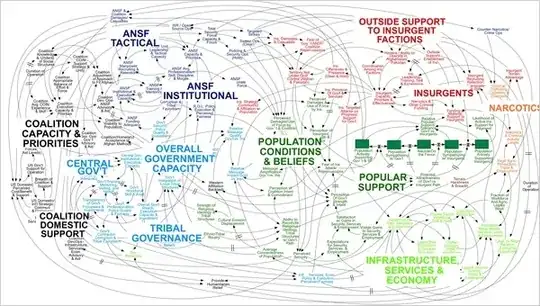
enter image description here

Jagra
  • 14,343
  • 1
  • 39
  • 81
  • 2
    Thanks for this. Especially this quote from your second link: It appears that many young engineers do not understand the need for, or know how to prepare, formal engineering documents such as reports, white papers, or analyses (Crippen, et al., "A.2, Observations" in Final Report of the Return to Flight Task Group, July 2005). – dionys Oct 16 '14 at 13:59
5

Some funky waves:

(The following can probably be neater but I'm just dropping the idea here)

DynamicModule[{a, b, imgs, drange, str, n = 6, export},
 drange[it_, d_] := Range[Pi/(d/it), Pi*it, Pi/(d/it)];
 str = ToUpperCase /@ StringSplit["This is some text!", ""];
 Panel@Column@{
    Row@{Slider[Dynamic[a], {-2, 2, .1}], Dynamic[a]},
    Row@{Slider[Dynamic[b], {-2, 2, .1}], Dynamic[b]},
    Row@{Slider[Dynamic[imgs], {3, 6}], Dynamic[imgs]},
    Dynamic@Row[Text@
         Style[#, #3, #2*20] & @@@ (Thread@{str, ((Sin[a*# + b] + 2) & /@ N@drange[n, Length@str]), 
          Hue[Length@str/#] & /@ Range@Length@str}), 
      ImageSize -> imgs*100],
    Dynamic@Plot[Sin[a*x + b], {x, 0, n*Pi}],
    Button["Export to GIF", export[a, imgs]]},
 Initialization :> (export[a_, imgs_] := Export["~/test.gif",
     Table[Row[Text@
          Style[#, #3, #2*20] & @@@ (Thread@{str, ((Sin[a*# + b] + 2) & /@ N@drange[n, Length@str]), 
           Hue[Length@str/#] & /@ Range@Length@str}), 
       ImageSize -> imgs*100], {b, 0, 2 Pi, Pi/20}], 
     "DisplayDurations" -> .1])]
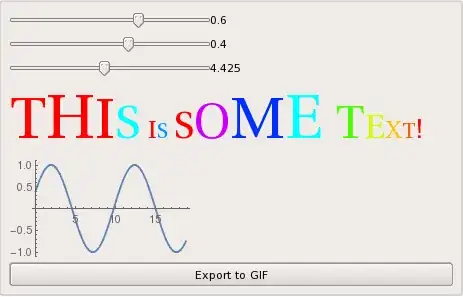
Mathematica graphics

(And yes, the colours are ugly as well :D)

Clicking on Export to GIF results in:

enter image description here

By using Framed[Style[#, #3, #2*20], RoundingRadius -> 100] & as Yves mentioned you can have the less fancy text on earth:

enter image description here

And without text:

And with colours:

Öskå
  • 8,587
  • 4
  • 30
  • 49