3

Could anybody explain, how the coordinates in Placed influence each other?

ArrayPlot[RandomInteger[10, {400, 400}], 
ColorFunction -> "ThermometerColors", 
PlotLegends -> {Placed[
BarLegend[{"ThermometerColors", {0, 100}}, 
 LabelStyle -> Directive[Black, FontSize -> 12], 
 LegendLabel -> "D33 content in wt%", 
 LegendMarkerSize -> 300], {{.35, -.65}, {-0, -3.}}], 
 Placed[Graphics[{Thickness[0.05], Line[{{0, 25}, {10, 25}}], 
  Text[Style["200 nm", Black, FontSize -> 12], {10/2, 26}]}], {{0,
   0}, {-1, 3.}}]}]

Which gives: Misplaced Legends

EDIT:
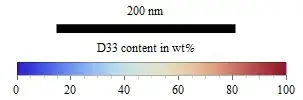
I would like to have the black bar on the left hand side and the legend on the right hand side, below the arrayplot. I the alignment should be horizontally, not vertically.

Bimmel
  • 573
  • 3
  • 13

2 Answers2

6

Placement in Placed is {{x_pos, y_pos}, {x_obj_pos, y_obj_pos}}, where x_pos and y_pos are scaled(from 0 to 1) position referring to the plot, and x_obj_pos and y_obj_pos are scaled position referring to the legend object. Scaled values can be outside the range of {0,1}.

ArrayPlot[RandomInteger[10, {400, 400}], 
 ColorFunction -> "ThermometerColors", 
 PlotLegends -> {Placed[
    BarLegend[{"ThermometerColors", {0, 100}}, 
     LabelStyle -> Directive[Black, FontSize -> 12], 
     LegendLabel -> "D33 content in wt%", LegendMarkerSize -> 300, 
     LegendLayout -> "Row"], {{1, 0}, {1, 1}}], 
   Placed[Graphics[{Thickness[0.05], Line[{{0, 25}, {10, 25}}], 
      Text[Style["200 nm", Black, FontSize -> 12], {10/2, 26}]}], {{0,
       0}, {0, 1}}]}]

enter image description here

MinHsuan Peng
  • 2,046
  • 15
  • 14
1
bl1 = Graphics[{Thickness[0.05], Line[{{0, 25}, {10, 25}}],
    Text[Style["200 nm", Black, FontSize -> 12], {10/2, 26}]}];
bl2 = BarLegend[{"ThermometerColors", {0, 100}},
   LabelStyle -> Directive[Black, FontSize -> 12],
   LegendLabel -> "D33 content in wt%",
   LegendMarkerSize -> 300, LegendLayout -> "Row"];
lgnd = Column[{bl1, bl2}, Alignment -> Center]

enter image description here

ap = ArrayPlot[RandomInteger[10, {400, 400}], ColorFunction -> "ThermometerColors"];

Legended[ap, Placed[lgnd, Below]]
Labeled[ap, lgnd, Bottom]
Panel[ap, lgnd, Bottom, Appearance -> "Frameless"]
ArrayPlot[RandomInteger[10, {400, 400}], ColorFunction -> "ThermometerColors",
          PlotLegends -> Placed[lgnd, Below]]

all give

enter image description here

Or, to place the legends horizontally,

lgnd2 = Row[{bl1, bl2}, Alignment -> Center]

enter image description here

Change lgnd to lgnd2 in the expressions above, e.g.,

Labeled[ap, lgnd2, Bottom]

to get

enter image description here

kglr
  • 394,356
  • 18
  • 477
  • 896