4

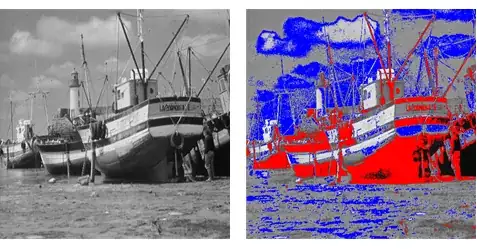
I have a grayscale image that contains two objects. The grayscale pixel values can be divided into three intervals where two of them represent objects and the third represents the background. The background is almost uniform, with pixel values close to 0.5. The other two intervals are [.2,.4] and [.55,.73].

I developed a function to colorize this image. It works fine, but I'm looking for ways to make it run faster. Any suggestions?

colorizeFunction[image_, α_, β_, γ_, θ_] :=
  Module[{data, newdata, red, green, blue, datared, datagreen, 
   datablue, newdatared, newdatagreen, newdatablue}, (
   {red, green, blue} = ColorSeparate[image];
   datared = ImageData[red];
   datagreen = ImageData[green];
   datablue = ImageData[blue];
   newdatared = datared /. x_ /; α <= x <= β -> 1;
   newdatagreen = datagreen /. x_ /; α <= x <= β -> 0;
   newdatablue = datablue /. x_ /; α <= x <= β -> 0;
   newdatared = newdatared /. x_ /; γ <= x <= θ -> 0;
   newdatagreen = newdatagreen /. x_ /; γ <= x <= θ -> 1;
   newdatablue = newdatablue /. x_ /; γ <= x <= θ -> 0;
   ColorCombine[{Image[newdatared], Image[newdatagreen], 
     Image[newdatablue]}, "RGB"]
   )]
C. E.
  • 70,533
  • 6
  • 140
  • 264
BetterEnglish
  • 2,026
  • 13
  • 19

2 Answers2

5

something like this?

  ImageApply[ If[ # < .5, {1, 0, 0}, {0, 1, 0}] &, 
       ExampleData[{"TestImage", "Gray21"}] ]

enter image description here

another example, looking again I guess you want to leave gray outside the specified ranges.

 ImageApply[Piecewise[{ 
     {{1, 0, 0}, .1 < # < .3},
     {{0, 0, 1}, .6 < # < .7},
     {{#, #, #}, True}}] &, ExampleData[{"TestImage", "Boat"}]]

enter image description here

george2079
  • 38,913
  • 1
  • 43
  • 110
3

I think the key is Binarize but I couldn't figure out a good way to overlay colored parts on a grayscale image so this is rather hackish. At least it is quite a bit faster than your method:

colorize2[image_, α_, β_, γ_, θ_] :=
 ColorCombine[{
    ImageSubtract[ImageAdd[img, #1], #2],
    ImageSubtract[ImageAdd[img, #2], #1], 
    ImageSubtract[img, ##]}] &[
      Binarize[image, {α, β}], 
      Binarize[image, {γ, θ}]
    ]

Test:

img = ExampleData[{"TestImage", "Lena"}] ~ColorConvert~ "Grayscale";

colorize2[img, 0.2, 0.4, 0.55, 0.73]

enter image description here


Edit: I figured out HighlightImage but it is an order of magnitude slower than what I wrote myself:

colorize3[image_, α_, β_, γ_, θ_] := Fold[
  HighlightImage[#, Binarize[image, #2[[1]]],
    Method -> "Solid", "HighlightColor" -> #2[[2]]] &,
  image,
  {{{α, β}, Red}, {{γ, θ}, Green}}
]

Edit #2: Another method, perhaps more pleasing in style, but twice as slow as colorize2:

extract[i_][x_, y_, c_] := # ~ImageMultiply~ c ~SetAlphaChannel~ # & @ Binarize[i, {x, y}]

colorize4[image_, α_, β_, γ_, θ_] := 
  Fold[ImageCompose, image, extract[image] @@@ {{α, β, Red}, {γ, θ, Green}}]

Edit #3: A slightly faster but less clean version of colorize2 leveraging this:

colorize2fast[image_, α_, β_, γ_, θ_] :=
 ColorCombine[
   Image /@ {Subtract[#3 + #, #2],
             Subtract[#3 + #2, #],
             Subtract[#3, # + #2]},
 ] & @@ ImageData /@
         {Binarize[image, {α, β}],
          Binarize[image, {γ, θ}],
          image}
Mr.Wizard
  • 271,378
  • 34
  • 587
  • 1,371
  • colorize2[] is ~ 13 faster than colorizeFunction[]. But the color is not uniform. For example the green pixels haven't the same values like {a,b,c}. – BetterEnglish Oct 20 '14 at 19:44
  • But colorize2[] is 1.04 faster than colorize3[]. perfect – BetterEnglish Oct 20 '14 at 19:49
  • @Developer2000 Could you give me an example of the non-uniform colors? I am seeing e.g. {{0., 1., 0.}, {0., 1., 0.}, {0., 1., 0.}, {0., 1., 0.}, ... in the upper left corner of the image in my answer. – Mr.Wizard Oct 20 '14 at 19:54
  • @Developer2000 Your comment that colorize2 is only 13 times faster than the original made me look at things again. It was my mistake to use Timing rather than AbsoluteTiming, but correcting that I still measure about 45X faster in 10.0.1 under Windows. Which version are you running? – Mr.Wizard Oct 20 '14 at 20:02
  • @Developer2000 I added colorize2fast which tests somewhat faster still on my machine. Please try it. – Mr.Wizard Oct 20 '14 at 20:09
  • color2fast is 3.27 fatser than color2. I use Mathematica 10.0.1 on Mac os X 10.9,core i7, Ram=8G. But, on my image, the color is not uniform. I will check – BetterEnglish Oct 20 '14 at 21:07
  • @Developer2000 Thanks for the report. – Mr.Wizard Oct 20 '14 at 21:08
  • about 15x faster than my ImageApply :(. – george2079 Oct 20 '14 at 21:12