3

Mathematica help file says:

"With ImageSize->{w,h} an object will always be drawn in a $w\times h$ region, and will be sized to fit in the region. "

However:

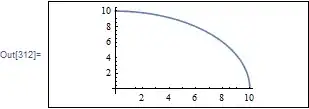
enter image description here

Doesn't look like "and will be sized to fit in the region" is working. Am I thinking incorrectly here?

Using Version 10.0.

David
  • 14,883
  • 4
  • 44
  • 117

2 Answers2

6

First, here is a trick to see the actual space used by the plot:

Grid[{{Plot[Sqrt[100 - x^2], {x, 0, 100}, PlotRange -> Automatic, 
      ImageSize -> {250, 100}]}}, Frame -> All]
Mathematica graphics

Grid[{{Plot[Sqrt[100 - x^2], {x, 0, 100}, PlotRange -> Automatic, 
    ImageSize -> {500, 100}]}}, Frame -> All]

Mathematica graphics

So you can see that it did actually use more space (width). Now if you want to widen your plot, this is something else. You can use Aspect ratio for this.

Grid[{{Plot[Sqrt[100 - x^2], {x, 0, 100}, PlotRange -> Automatic, 
   ImageSize -> {500, 100}, AspectRatio -> .2]}}, Frame -> All]

Mathematica graphics

But this does not look too good. ps. (You can also use Framed@Plot[...] to see the actual space used instead of Grid as above)

Nasser
  • 143,286
  • 11
  • 154
  • 359
4

By default Plot has AspectRatio -> 1/GoldenRatio which is a definite value:

1./GoldenRatio
0.6180339887498948

According to the Documentation page for ImageSize (emphasis mine),

  • With ImageSize->{w,h} an object will always be drawn in a $w×h$ region, and will be sized to fit in the region.

  • If the object has a definite aspect ratio that is not $h/w$, then space will be left around it.

From the above follows that ImageSize does not change AspectRatio when the latter has a definite value and if you want the plot to fit the ImageSize you should explicitly specify AspectRatio -> h/w where h and w are taken from ImageSize -> {w, h}:

Grid[{{Plot[Sqrt[100 - x^2], {x, 0, 100}, PlotRange -> Automatic, 
    AspectRatio -> 1/5, ImageSize -> {500, 100}]}}, Frame -> All]

plot

Alexey Popkov
  • 61,809
  • 7
  • 149
  • 368