Taking user5601's suggestion to do a little demo, I quickly whipped this up as an example of ProcessLink being used to do non-trivial communication between Mathematica and an external program, but with much less ceremony than using ProcessLink or MathLink.
Let's take this little Go program:
package main
import "net/http"
import "bufio"
import "os"
import "fmt"
import "html"
import "strings"
func main() {
    http.ListenAndServe(":8080", http.HandlerFunc(render))
}
func render(w http.ResponseWriter, req *http.Request) {
    var img, response, input string
    input = req.FormValue("input") // extract the input from the page
    if input != "" {
        fmt.Println(input)                  // send to mathematica
        reader := bufio.NewReader(os.Stdin) // get back result
        img, _ = reader.ReadString('\n')
        img = strings.TrimSpace(img)
        img = <img src="data:image/png;base64, + img + "/>
    }
    response = <html><body><form action="result.html">Enter a Wolfram Language expression:<br><input type="text" name="input" size="65" value=" +
        html.EscapeString(input) + "></form><br>The result was:<br> + img + </body></html>
    w.Write([]byte(response)) // write back the new page
}
And this Mathematica program:
server = StartProcess["/Users/taliesinb/processLinkExample/main"]
While[True,
  input = ReadLine[server];
  If[input == "Quit[]", KillProcess[server]; Break[]];
  Print["Executing ", input];
  result = ToExpression[input];
  img = Developer`EncodeBase64[ExportString[Rasterize[result, ImageSize -> Small], "PNG"]];
  WriteLine[server, img]]
You will get a tiny web-server running on localhost:8080 that you can visit in your browser. Here's an example of what it will do:
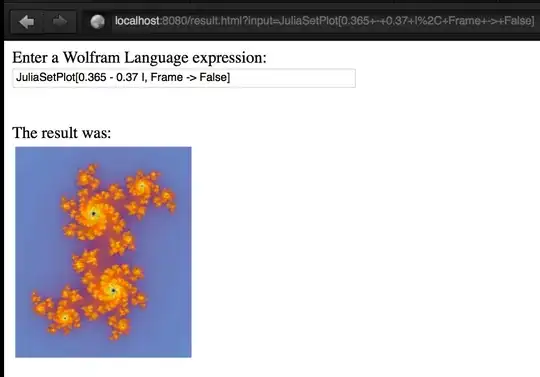
Brought to you by ProcessLink (tm)!


RunProcess,StartProcess, etc.) Indeed it is also written in Go. – Taliesin Beynon Nov 19 '14 at 23:18