When I execute this
Grid[{{x, x}, {SpanFromAbove, x}, {SpanFromAbove, x}},
 ItemSize -> {{Automatic},
  {Automatic, {1 -> Scaled[0.2], 2 -> Scaled[0.4], 3 -> Scaled[0.4]}}},
 Frame -> All,
 Alignment -> {Center, Center}, Spacings -> {{2}, {1}}]
I get an extremely tall grid instead of a normal height grid. Is this a bug or am I doing something wrong? Version 10.0.1 Win8.1 64bit
Update
This just keeps getting worse. I am have used a Pane as some have suggested that the grid needs a sized container for it to work with Scaled. I get back a truncated grid. This is really baffling. Any ideas how to get this to work.
Pane[
 Grid[{{x, x}, {SpanFromAbove, x}, {SpanFromAbove, x}},
  ItemSize -> {{{Scaled[0.5]}},
   {Automatic, {1 -> Scaled[0.2], 2 -> Scaled[0.4], 3 -> Scaled[0.4]}}},
  Frame -> All, Alignment -> {Center, Center}, Spacings -> {{1}, {1}}],
 ImageSize -> {432, 216}]
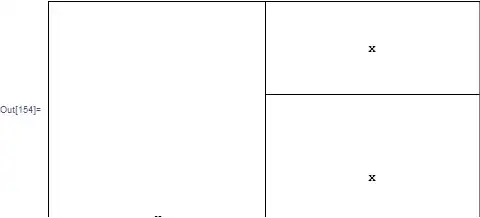
It gives a cut off grid. ??? I can just make out the top of the "x" in the first column. It shouldn't be this difficult to have a grid a prescribed size and scale some rows within it. I must be doing something wrong.


Gridwith something with set size,Scaledwill refer to WindowSize. – Kuba Nov 24 '14 at 12:40PaneorPaneland that will work? – Edmund Nov 24 '14 at 13:47Itemheight not width. specx here is{Automatic}and it is width of items. But for specy he set explicitly1->Scaled[.4]etc. what means "first row heigth 40% of enclosing region. – Kuba Nov 24 '14 at 13:51Scaledtakes something different into account:Framed["x", ImageSize -> {Scaled@1, Scaled@1}]– Kuba Nov 24 '14 at 13:53StringReplace[stuff, "width" -> "size"]built in my brain! :O – Silvia Nov 24 '14 at 14:01Gridcomes up with whenItemSizeis omitted. When the chart is made its width is specified but height isAutomaticso I don't know how tall it is. Also, the combined height of the 3 grid tables is greater than the height of the chart. I thoughGridwould use the total height it gets when noItemSizeoption is given and then scale the rows using that height. But now I know it doesn't do this. – Edmund Nov 24 '14 at 17:09