0

I have the Tree : enter image description here

TreeForm[Criminals["cat" , "dog", "human"["killer", "thug", "macho"]],
  DirectedEdges -> True,
  VertexRenderingFunction -> (Inset[
      Panel@Rotate[#2, -\[Pi]/2], #1] &)] // Rotate[#, \[Pi]/2] & 

Is it possible to mark node macho with a bold frame and mark the path from root to it (example bigger line) ?

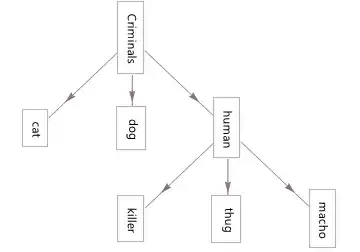
Another issue is how do I fix so that when I exported the graph looks like this : (I used paint print screen :( ) enter image description here

TraceKira
  • 363
  • 1
  • 8

1 Answers1

1
myVertexes = {"Criminals", "cat", "dog", "human", "killer", "thug", "macho"};

myVertexLabels = 
  Table[myVertexes[[i]] -> 
    Placed[Rotate[
      Panel[myVertexes[[i]], 
       Background -> 
        If[AnyTrue[{"Criminals", "human", "macho"}, 
           # == myVertexes[[i]] &], Orange, Yellow]], -\[Pi]/2], Center], 
           {i, Length[myVertexes]}];

myEdgeShape[el_, ___] := Arrow[el, 0.2];

CriminalTree = 
  TreeGraph[{"Criminals" -> "cat", "Criminals" -> "dog", 
    Style["Criminals" -> "human", Thick, Orange], "human" -> "killer",
     "human" -> "thug", Style["human" -> "macho", Thick, Orange]},
   DirectedEdges -> True,
   EdgeShapeFunction -> myEdgeShape,
   VertexLabels -> myVertexLabels];

Rotate[Image[CriminalTree], \[Pi]/2]
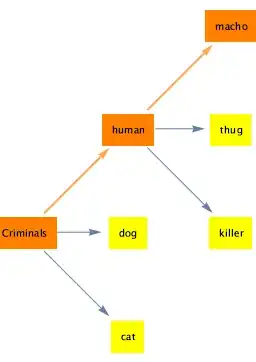
enter image description here

And here is a direct screen shot of this figure inserted into a Pages document, showing it is in proper orientation.
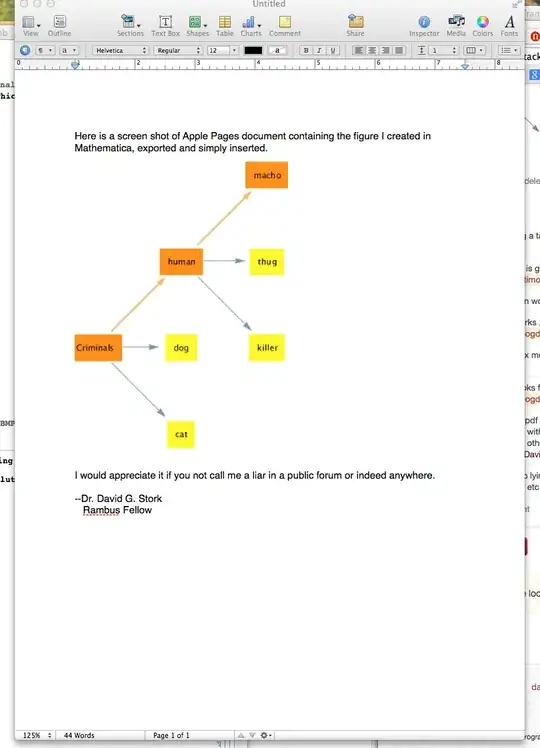
enter image description here

And here is a direct screen shot of this figure inserted into an MS Word document, showing it in proper orientation.

enter image description here

And here is a direct screen shot of this figure inserted into an Adobe Illustrator document, showing it in proper orientation

enter image description here

And here is a direct screen shot of this figure inserted in MS Powerpoint document, showing it in proper orientation.

enter image description here

David G. Stork
  • 41,180
  • 3
  • 34
  • 96
  • try adding a tab at the beginning of your code to typeset; FYI it does not work in its current form. – chris Nov 25 '14 at 20:17
  • The code is giving an error: The specified setting for the option PanelBoxOptions, Background cannot be used. – TraceKira Nov 25 '14 at 21:40
  • The option works fine in v. 10.0.0. – David G. Stork Nov 25 '14 at 21:50
  • The Vertex must be also rotated :( – TraceKira Nov 25 '14 at 22:41
  • Now it looks fine but when I copy image and paste it in Paintbrush in windows still looks nor right :( – TraceKira Nov 25 '14 at 23:15
  • 1
    I copy as pdf and bitmap and paste into Adobe products, Preview on the Mac and all my imaging programs without problems. (I use neither Paintbrush nor Windows.) Try copying or Exporting it as a pdf or bitmap or other format. At the very worst (and you shouldn't have to do this) take a screen shot of the graph. – David G. Stork Nov 26 '14 at 16:56
  • Well I must resume to the stupid print screen method because in Windows 8 the image is screwed .... Anyway I wonder why the tree graphics quality is so low and pixelated? – TraceKira Nov 26 '14 at 23:14