3

Is it possible to create such kind of GIF via Mathematica?

animation

J. M.'s missing motivation
  • 124,525
  • 11
  • 401
  • 574
LCFactorization
  • 3,047
  • 24
  • 37
  • 7
    It is possible... – Apple Nov 30 '14 at 15:09
  • 5
    As @Chenminqi answered, it is possible. But before anyone actually show you the ways, it would be better you show the effort you have made. So what have you tried? – Silvia Nov 30 '14 at 15:13
  • @Silvia Writing code.. – Apple Nov 30 '14 at 15:35
  • 2
  • @Silvia I created the GIF via Geogebra – LCFactorization Dec 02 '14 at 02:19
  • 2
    @LCFactorization I mean you might want to include a description (even better with some code) on what you have tried in solving the problem in Mathematica, so instead of accomplishing your work from scratch, people can see the specific point where *you* are stuck in, so they might have a better chance giving more specific and effective answers. That would fit more in the spirit of the site, also more polite for people who are reading and trying to answer your questions. :) – Silvia Dec 02 '14 at 04:35
  • @Silvia sounds reasonable but that would limit the diversity of the answers. Different people may be comfortable with different approaches. – LCFactorization Dec 03 '14 at 01:57
  • @Silvia the mathematics I used in Geogebra is a little more complicated than the answer below. E.g., I used 3D rotation matrix and parallel projection to obtain the parametric equations for the first step; then I used a complex computation in Descartes frame rather than polarized frame to obtain the parametric curve for the second step. I am surprised that the implementation can actually be simplified so much in mathematica – LCFactorization Dec 03 '14 at 02:25
  • @LCFactorization Hey there, if you're interested, you can drop me an email(please see my profile for addr) for more discussions! – Silvia Dec 03 '14 at 11:29

2 Answers2

9
Clear["Global`*"]
f[x_, θ_] = 
  RotationTransform[θ, {1, 0, 1}, {5 Pi, 0, 5 Pi}][{x, 
     0, -((10 Pi)/6) Sin[x] + 5 Pi}][[{1, 3}]];
p1 = ParametricPlot[{x, x}, {x, -10 Pi, 10 Pi}, 
   PlotRange -> {{-10 Pi, 10 Pi}, {-10 Pi, 10 Pi}, {-10 Pi, 10 Pi}}, 
   ImageSize -> 300, Axes -> True];
n = 7;
g[a_] := Evaluate[
   t^(1/n) (5 a π^2)/(1 + 5 a π) + (1 - t^(1/n)) (
       10 a π)/(1 + 5 a π) /. 
     t -> Rescale[a, {0.002, 2 Pi}, {0, 1}] // Simplify];
t = Pi;
Manipulate[
 If[var < Pi + 0.0025, 
  Show[p1, ParametricPlot[f[x, var], {x, -10 Pi, 10 Pi}]], 
  Show[p1, PolarPlot[
     5 Pi + 1/(var - t) - 
      5/3 π Sin[(2 Pi)/(2*g[var - t]/10) θ], {θ, -g[
        var - t], g[var - t]}, 
     PlotRange -> {{-10 Pi, 10 Pi}, {-10 Pi, 10 Pi}}, 
     ImageSize -> 300] /. 
    Line[data___] :> 
     Translate[Line[data], {-(1/(var - t)), 0}]]], {var, 0, 
  2 Pi + Pi}]

enter code here

The best way is take suitable discrete points of var artificially, not let var change uniform.

Update 1 A better solution from other people.

Manipulate[
 ParametricPlot[{1 - 1/y + 
    Cos[θ] (2 + 1/y - Sin[(10 θ)/y]), 
   Sin[θ] (2 + 1/y - 
      Sin[(10 θ)/y])}, {θ, -π y, π y}, 
  PlotRange -> {{-5, 5}, {-5, 5}}], {y, 0.01, 1}]
LCarvalho
  • 9,233
  • 4
  • 40
  • 96
Apple
  • 3,663
  • 16
  • 25
7

Here's a start, the 2nd transformation is tricky for me.

data = Table[{i, 0.1 Sin[100 i] + 0.7, 0}, {i, 0, 1, 0.01}];
gr = Graphics3D[{Thick, Red, Line@data}, Boxed -> False];
Manipulate[Graphics3D[
  {If[t < 0.1 Pi, {Dashed, Blue, Line[{{0, 0, 0}, {1, 1, 0}}]}, {}],
   Arrow[{{0.5, 0, 0}, {0.5, 1, 0}}],
   Arrow[{{0, 0.5, 0}, {1, 0.5, 0}}], 
   GeometricTransformation[{Thick, Red, Line@data}, 
    RotationTransform[t, {1, 1, 0}]]}, 
  PlotRange -> {{0, 1}, {0, 1}, {-1, 1}}, Boxed -> False, 
  SphericalRegion -> True, ViewPoint -> Top], {t, 0, 0.99 Pi}]
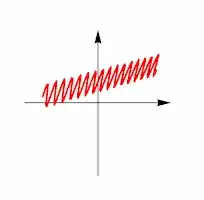
enter image description here

bobthechemist
  • 19,693
  • 4
  • 52
  • 138