5

I want all of my solutions in a table to be the same color. My attempt:

sol = DSolveValue[y'[t] == -2/t*y[t] + 4 t, y[t], t];
tbl = Table[sol /. C[1] -> C, {C, -1, 1, 0.25}];
Plot[tbl, {t, -2, 2}, PlotStyle -> {Thick, Blue}]

produces:
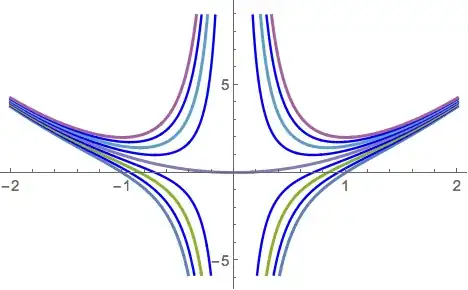
enter image description here

Is there a simple way to make all curves blue?

VividD
  • 3,660
  • 4
  • 26
  • 42
David
  • 14,883
  • 4
  • 44
  • 117

5 Answers5

9
PlotStyle -> {{Thick, Blue}}

You have a set of nine separate graphs, and PlotStyle applies each element in its list to subsequent graphs. Thus if you put PlotStyle -> {Thick, Blue}, Mathematica applies Thick to the first graph, Blue to the second graph, Thick to the third, Blue to the fourth, and so on. But if you set PlotStyle -> {{Thick, Blue}}, there is only one (compound) element in the list, so Mathematica keeps applying it to every graph.

David G. Stork
  • 41,180
  • 3
  • 34
  • 96
8
Plot[tbl, {t, -2, 2}, PlotStyle-> Directive[Thick,Blue]] (* or Directive[{Thick,Blue}] *)

enter image description here

kglr
  • 394,356
  • 18
  • 477
  • 896
  • 1
    Aha! Interesting. There is obviously a difference in the way PlotStyle->{Thick,Blue} and PlotStyle->Directive[Thick,Blue] perform. David Stork gave a nice explanation above. What is it about the Directive command that does not force me to write PlotStyle->Directive[{Thick,Blue}]? – David Jan 31 '15 at 20:19
  • @David, the docs (Directive >> Details) says: Directive[{Subscript[g, 1],Subscript[g, 2],\[Ellipsis]}] is equivalent to Directive[Subscript[g, 1],Subscript[g, 2],\[Ellipsis]]. – kglr Jan 31 '15 at 21:19
6

Here is a very simple way.

Plot[tbl, {t, -2, 2}, ColorFunction -> (Blue &)]

plot

m_goldberg
  • 107,779
  • 16
  • 103
  • 257
3

My solution:

 sol = DSolve[y'[t] == -2/t*y[t] + 4 t, y[t], t];
 resTable = 
    Flatten[y[t] /. Table[sol /. {C[1] -> C}, {C, -1, 1, 0.25}]];

 Show[
  Plot[#, {t, -2, 2}, PlotStyle -> {Thick, Blue}] & /@ resTable, 
  PlotRange -> {{-2, 2}, {-5, 10}}]

enter image description here

Update

Plot[#, {t, -2, 2}] & /@ resTable

enter image description here

From this graphic, I can know the range of y axis is appoximately $[-30,20]$

Show[
  Plot[#, {t, -2, 2}] & /@ resTable, PlotRange -> {{-2, 2}, {-30, 20}}]

enter image description here

xyz
  • 605
  • 4
  • 38
  • 117
3

I'd use Directive but here's another alternative :)

Plot[# &@tbl, {t, -2, 2}, PlotStyle -> {Thick, Blue}]

inspirated by the answer of Mr.Wizard (working till V9):

Plot draws list of curves in same color when not using Evaluate

Kuba
  • 136,707
  • 13
  • 279
  • 740