As titled above, How I can justify and how I can change the space between columns in this Grid specified below:
m=4;
x={1,2,3,4};
F = Table[i, {i, m}, {j, m - i + 1}];
head={"Subscript[x, i]","f(Subscript[x, i])"};
data=Table[0,{m+1}];
data[[1]]=Column[x];
For[i=2,i<=m,i++,
    data[[i]]=Column[F[[i-1]]];
  ];
Grid[Join[{head},{data}],Dividers->{3->Blue,2->Blue},Alignment->Right]
I want the space of elements to increase vertically, but by using the Spacing command it doesn't get increased; and by vertically align I mean for example the 2 number in the following to be aligned center vertically
Grid[{{1, 2, 3}, {4, SpanFromAbove, 6}, {7, 8, 9}}, Frame -> All]
This this what Mathematica gives to me

and this is what I want: (something like this) but according to my codes
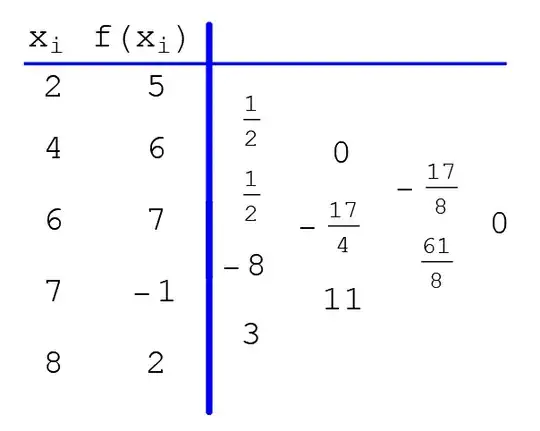
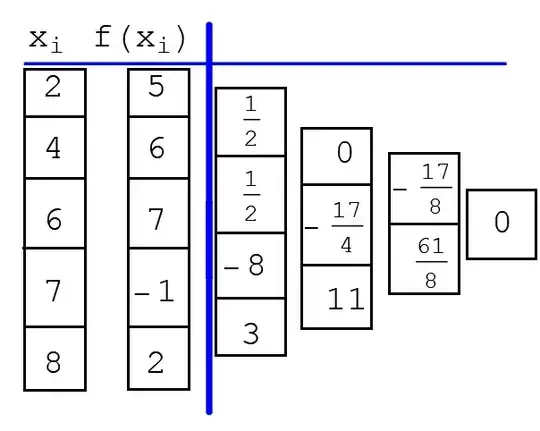
I have displayed frames of elements for illustration purposes only below


Grid[{{1, 2, 3}, {4, SpanFromAbove, 6}, {7, 8, 9}}, Alignment -> {Center, Center}, Frame -> All]– Mike Honeychurch Feb 01 '15 at 21:56