8

It is very useful during refactoring to move lines around. All popular IDEs or text editors have this feature (PyCharm, Vim, Sublime, etc..) for example in Xcode you press: ⌥⌘[ or ⌥⌘] to move lines up and down.

Question: Is there a shortcut for reordering cells like this, i.e. moving the cell your cursor is in up one cell or down one cell? Effectively, this would be the same as cutting the current cell and pasting before the previous cell or after the next one.

Mr.Wizard
  • 271,378
  • 34
  • 587
  • 1,371
M.R.
  • 31,425
  • 8
  • 90
  • 281

1 Answers1

6

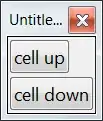
Here is a quick pass at a Palette that does this. The same commands could be used for keyboard commands in KeyEventTranslations.tr. This is not rigorously written or tested so be careful with it.

mover[label_, c_List] :=
 Button[label,
  With[{nb = SelectedNotebook[]},
   (NotebookWrite[nb, #2];
      SelectionMove[nb, Previous, Cell]) &[
    SelectionMove[nb, All, Cell],
    NotebookRead[SelectedCells[nb]],
    NotebookDelete[nb],
    SelectionMove[nb, #, Cell] & /@ c
    ]
   ]
  ]

{mover["cell up", {Previous, Before}],
 mover["cell down", {Next, After}]} // CreatePalette

enter image description here

Mr.Wizard
  • 271,378
  • 34
  • 587
  • 1,371
  • @Kuba In reverse order: (2) yes, just a way to avoid a Symbol to hold the Cell. (1) On my system I can already repeat click to move up and down more than one place, unless I (again?!) pasted the wrong code here. Which OS do you run again? – Mr.Wizard Feb 04 '15 at 10:03
  • @Kuba I tested it again, and in my 10.0.2 under Windows 7-x64 it works. After NotebookWrite the cursor is below the newly inserted cell, and after SelectionMove[nb, Previous, Cell] the original cell (in its new location) is selected. Really weird if you're seeing something else. I have the Suggestion Bar turned off; do you have it on by chance? – Mr.Wizard Feb 04 '15 at 10:10
  • @Kuba Yes, I checked a third time. However I'm not sure why I put [[1]] there and now I think it would be better without it. If you leave that out does this work better for you? – Mr.Wizard Feb 04 '15 at 10:24
  • @Kuba For me the output of NotebookRead[SelectedCells[nb]] is a list, e.g. {Cell[BoxData["foo"], "Input"]} -- to get the first Cell I used [[1]]. I'll remove that from my answer however as it is not needed on my system and apparently breaks something on yours. – Mr.Wizard Feb 04 '15 at 10:42
  • 1
    Ok, now I've patiently tested this and it seems there is a difference between V9 and V10. On V9 NotebookRead[SelectedCells[nb]] gives Cell[_] if SelectedCells has length 1. I've probably tested this in hurry earlier and haven't realised that it was on 9. Nevertheless, it's better to have something more general :) – Kuba Feb 04 '15 at 18:27
  • @Mr.Wizard I'm trying to add this to my KeyEvents, but having trouble, (* Item[KeyEvent["UpArrowKeyDown",Modifiers->{Control}],FrontEndExecute[{ cd = FrontEndNotebookRead[FrontEndEvaluationCell[]]; FrontEndSelectionMove[FrontEndSelectedNotebook[], Previous, Cell, 2]; FrontEndSelectionMove[FrontEndSelectedNotebook[], Before, Cell]; FrontEndNotebookWrite[FrontEndSelectedNotebook[], cd]; FrontEndSelectionMove[FrontEndSelectedNotebook[], Next, Cell, 2]; FrontEndNotebookDelete[FrontEndSelectedNotebook[]] }]],*) – M.R. Feb 15 '15 at 04:12
  • @M.R. I will attempt this a bit later. – Mr.Wizard Feb 15 '15 at 12:23
  • @M.R. I gave this a try and ran into problems myself. It seems neither Set nor Function is handled by front end evaluation and I am trying to think of another way to pass the read data back to NotebookWrite at the correct time. – Mr.Wizard Feb 15 '15 at 14:03
  • @Mr.Wizard I noticed the same thing, it its unclear to me the exact subset of functions allowed in the .tr file – M.R. Feb 15 '15 at 21:05
  • @M.R. I think we could do this with cut and paste but that will change the clipboard which is undesirable. – Mr.Wizard Feb 15 '15 at 21:35