1

I have generated many random variables within a specific function, and have counted them up. So far, I have counted the variables:

 bcount1=BinCounts[function,{0,20,1}]
 {86,10,2,2,0,0,0,0,0,0,0,0,0,0,0,0,0,0,0,0}

Now I need to generate a histogram with a bin width of 1 that'll display something like:

x-axis 0 to 1 ---> a bar 86 units high x-axis 1 to 2 ---> a bar 10 units high x-axis 2 to 3 --> a bar 2 units high

and so on and so forth....however the Histogram function is giving me the reverse. It's telling me something from 80 to 100 is a bar 1 unit high..

Can I get some help with appropriate syntax?

user12289
  • 311
  • 2
  • 7
  • Similar to http://mathematica.stackexchange.com/questions/70059/how-to-create-a-histogram-from-a-given-frequency-table – A.G. Feb 06 '15 at 02:22
  • For a true histogram you would be better off having a bar 86 units high from -.5 to .5, etc. – A.G. Feb 06 '15 at 02:23

3 Answers3

2
bincounts = {86, 10, 2, 2, 0, 0, 0, 0, 0, 0, 0, 0, 0, 0, 0, 0, 0, 0, 0, 0};
bins = Range[0, 20, 1];

You can use BarChart:

BarChart[bincounts]

Or Histogram after reconstructing an input data set using bins and bincounts:

Histogram[Flatten[ConstantArray[##] & @@@ Transpose[{Most@bins, bincounts}]]]
kglr
  • 394,356
  • 18
  • 477
  • 896
1
data = {86, 10, 2, 2, 0, 0, 0, 0, 0, 0, 0, 0, 0, 0, 0, 0, 0, 0, 0, 0};
BarChart[data, ChartLabels -> Range[20]] 

enter image description here

If you must have a true histogram:

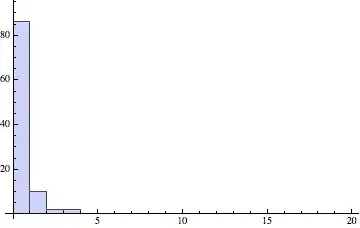
Histogram[Flatten[Table[i, {i, Length[data]}, {j, data[[i]]}]]]

enter image description here

David G. Stork
  • 41,180
  • 3
  • 34
  • 96
  • Yeah, but I still have a counter for "86" through a bar that is 1 unit in height. I want a bar 86 units in height to represent the number of data sets between 0 and 1 that were generated from my function. I had a previous function that generated random variables for many simulations, and I'm counting how many of those simulated variables fall within a range. I just need a histogram that has 0 to 1 with a height of 86, 1 to 2 with a height of 10, 2 to 3 with a height of 2, 3 to 4 with a height of 0, etc. etc – user12289 Feb 05 '15 at 19:00
  • David, care to edit your post ? – Sektor Feb 05 '15 at 20:33
1
values = Range[0, 20];
frequencies = {86, 10, 2, 2, 0, 0, 0, 0, 0, 0, 0, 0, 0, 0, 0, 0, 0, 0, 0, 0, 0};
n = Length[values]; (* 21 *)
data = Flatten@Array[Table[values[[#]], {frequencies[[#]]}] &, n];

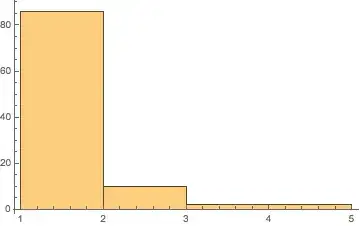
Histogram[data, {First@values, Last@values, 1}]

Mathematica graphics

A.G.
  • 4,362
  • 13
  • 18