Suppose we have a grid like this:
x = NestList[RotateRight, {1.5, 2/3, Pi, 9/7`, "!"}, 5];

Grid[x]
It looks like this in the Front End:
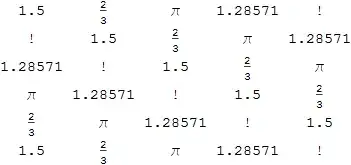
The image above was produced by selecting the Cell bracket and choosing File > Save Selection As....
If we use the Context Menu item Copy As > Plain Text we get:
1.5 2/3 \[Pi]   1.28571 !
!   1.5 2/3 \[Pi]   1.28571
1.28571 !   1.5 2/3 \[Pi]
\[Pi]   1.28571 !   1.5 2/3
2/3 \[Pi]   1.28571 !   1.5
1.5 2/3 \[Pi]   1.28571 !
Using halirutan's toolbar the \[Pi] are easily converted to π:
1.5 2/3 π   1.28571 !
!   1.5 2/3 π   1.28571
1.28571 !   1.5 2/3 π
π   1.28571 !   1.5 2/3
2/3 π   1.28571 !   1.5
1.5 2/3 π   1.28571 !
Copy As > Input Text results different things depending on what is selected. If only the content of the grid is selected (e.g. quadruple-click) we get:
{
 {1.5, 2/3, \[Pi], 1.28571, "!"},
 {"!", 1.5, 2/3, \[Pi], 1.28571},
 {1.28571, "!", 1.5, 2/3, \[Pi]},
 {\[Pi], 1.28571, "!", 1.5, 2/3},
 {2/3, \[Pi], 1.28571, "!", 1.5},
 {1.5, 2/3, \[Pi], 1.28571, "!"}
}
This form is useful because it can be pasted back into Mathematica.
However if the entire grid is selected we get something a lot messier:
\!\(
TagBox[GridBox[{
{"1.5`",
FractionBox["2", "3"], "\[Pi]", "1.2857142857142856`", "\<\"!\"\>"},
{"\<\"!\"\>", "1.5`",
FractionBox["2", "3"], "\[Pi]", "1.2857142857142856`"},
{"1.2857142857142856`", "\<\"!\"\>", "1.5`",
FractionBox["2", "3"], "\[Pi]"},
{"\[Pi]", "1.2857142857142856`", "\<\"!\"\>", "1.5`",
FractionBox["2", "3"]},
{
FractionBox["2", "3"], "\[Pi]", "1.2857142857142856`", "\<\"!\"\>", "1.5`"},
{"1.5`",
FractionBox["2", "3"], "\[Pi]", "1.2857142857142856`", "\<\"!\"\>"}
},
AutoDelete->False,
GridBoxItemSize->{
     "Columns" -> {{Automatic}}, "ColumnsIndexed" -> {}, "Rows" -> {{Automatic}},
      "RowsIndexed" -> {}, "Items" -> {}, "ItemsIndexed" -> {}}],
"Grid"]\)
Another option is Copy As > LaTeX and then pasting the expression between $ symbols, to yield:
$\begin{array}{ccccc}
1.5 & \frac{2}{3} & \pi & 1.28571 & ! \\
! & 1.5 & \frac{2}{3} & \pi & 1.28571 \\
1.28571 & ! & 1.5 & \frac{2}{3} & \pi \\
\pi & 1.28571 & ! & 1.5 & \frac{2}{3} \\
\frac{2}{3} & \pi & 1.28571 & ! & 1.5 \\
1.5 & \frac{2}{3} & \pi & 1.28571 & ! \\
\end{array}$
This is visually pleasing but slow to render, and it cannot be easily pasted back into Mathematica.
Finally we can use Export or ExportString to export in any supported format:
ExportString[x, "TSV"]
And Copy As > Plain Text:
1.5 2/3 Pi  1.2857142857142856  !
!   1.5 2/3 Pi  1.2857142857142856
1.2857142857142856  !   1.5 2/3 Pi
Pi  1.2857142857142856  !   1.5 2/3
2/3 Pi  1.2857142857142856  !   1.5
1.5 2/3 Pi  1.2857142857142856  !
Note that the Real numbers are printed here with full precision rather than being truncated.


InputFormand copy that. – bbgodfrey Feb 06 '15 at 11:39Mathematicafrequently here, they deal with Matrix and post questions and answers much more often than the others. I guess somebody may have already had a solution here. Would you please keep it for a while? – Nick Feb 06 '15 at 11:41InputForm"? – Silvia Feb 06 '15 at 11:50InputFormafter reading your comment. It is much easier to edit. Thank you. – Nick Feb 06 '15 at 12:24