1

Here is my issue:

I want to export to csv file some data:

Export["C:\\Documents and Settings\\commatest.csv", \
datafile, "Table", {"FieldSeparators" -> ";", "NumberPoint" -> ","}]

The output is something like this (When i open it with notepad):

0;0;0;-0.013497386587717805;0.0019942835592972347

I want the NumberPoint to be "," instead of "." in order to have the output:

0;0;0;-0,013497386587717805;0,0019942835592972347

Sjoerd C. de Vries
  • 65,815
  • 14
  • 188
  • 323
kevin
  • 97
  • 3
  • 1
    I'm irritated that this stone age problem still exists. Usual workaround was using String[] and StringReplace[]. Not good for big data, though. – mikuszefski Feb 13 '15 at 14:11
  • try doing Numberform[datafile, "NumberPoint" -> ","] – george2079 Feb 13 '15 at 14:14
  • The NumberForm works inside mathematica, but when i export the result it gives inside excel:

    NumberForm[{{1.3 2.54 4 23 5.323 0.0024} {23.4 23 1.54434 121.324}} "NumberPoint" -> " ]

    – kevin Feb 13 '15 at 14:51

2 Answers2

1

a workaround..

 exportsemiseparated[fname_String, data_?MatrixQ] := Module[{f},
        (f = OpenWrite[fname, BinaryFormat -> True];
            BinaryWrite[f, StringJoin[Riffle[StringJoin[Riffle[#, ";"]] & /@
            Map[StringReplace[ToString[CForm[#]], "." -> ","] &,
                 data, {2}], "\r\n"]]];(*note windows line end used here*)
         Close[f])]
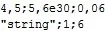
 exportsemiseparated["test.out", {{4.5, 5.6 10^30, 0.06}, {"string", 1,6}}]
 FilePrint["test.out"]

enter image description here

derived from https://mathematica.stackexchange.com/a/60141/2079 where we show the performance is at least comparable to Export

another approach..

 Export["test.out",
      StringReplace[
        ExportString[data, "Table", {"FieldSeparators" -> ";"}], "." -> ","] ,
              "Text"]
george2079
  • 38,913
  • 1
  • 43
  • 110
  • I test it but when i tried to export the FilePrint["test.out"], it didn't work:

    Export["path.csv",FilePrint["test.out"]

    I get an empty csv file

    – kevin Feb 13 '15 at 16:00
  • you don't export Fileprint, exportsemiseparated writes the file, the FilePrint is there to show that it worked. – george2079 Feb 13 '15 at 16:03
  • it writes it where exactly? i don't see a csv created – kevin Feb 13 '15 at 16:10
  • I used '.out' for the extension in the example but you can make that whatever you like. It goes in the current directory shown by Directory[] – george2079 Feb 13 '15 at 16:30
1

You shouldn't group options with { }. Also, "NumberPoint" is not an option for Export, but only for Import (and that is documented).

datafile = {{0, 0, 0, -0.013497386587717805, 0.0019942835592972347}};

ExportString[
   Map[
     StringReplace[ToString[#], "." -> ","] &, 
     datafile, 
     {2}
   ], 
   "Table", "FieldSeparators" -> ";"
]

0;0;0;-0,0134974;0,00199428

Replace ExportString with Export and a filename to write the result to file instead of in your notebook (as I did for demonstration purposes).

Sjoerd C. de Vries
  • 65,815
  • 14
  • 188
  • 323
  • better do ToString[CForm@#] in case any numbers require scientific notation. – george2079 Feb 13 '15 at 17:53
  • I did export it to Csv file, and it works, but the problem that it exports all my matrix to the first cell only. and i am having problem reading it after inside VBA code. Is there any way to export each line string in a cell? – kevin Feb 16 '15 at 08:58
  • Are you sure you want ; as fieldseparator? That's not usually the case for CSV's (COMMA seprated values). – Sjoerd C. de Vries Feb 16 '15 at 15:26
  • @SjoerdC.deVries: when you use comma as the number-point character you actually have to use something else to seperate fields, and using semicolon is AFAIK the quasi-standard then. This is very common on computers set to German language settings as there a comma is the default for the number-point character... – Albert Retey Apr 15 '15 at 18:01