3

I want to make a point plot of a table with lists in it. Assume I have data like this:

data={{1,2,3,4},{5,6},{1,5},{2,4}};

and now I want to make a point plot which has points at the following places in the plot: (1,1), (1,2), (1,3), (1,4), (2,5), (2,6), (3,1), (3,5), (4,2) and (4,4).

Is there a quick way to do this, I couldn't figure it out. Thanks in advance!

Kuba
  • 136,707
  • 13
  • 279
  • 740
matti0006
  • 87
  • 1
  • 6
  • try data = {{1, 2, 3, 4}, {5, 6}, {1, 5}, {2, 4}}; points = Flatten[MapIndexed[Transpose@{ConstantArray[First@#2, Length@#], #} &,data], 1]; ListPlot[points, PlotStyle -> Directive[Red,PointSize[Large]]] – Harry Feb 18 '15 at 14:53
  • its an ambiguous example. What would you expect if the first list was other than {1,2,3,4} ( == Range[Length@data] ) ? – george2079 Feb 18 '15 at 15:13

3 Answers3

4

I will abuse the fact you want to plot points in specific positions, not get those coordinates:

If you know how to transpose ragged array it is quite strightforward:

ListPlot[Flatten[data, {2}], PlotStyle -> Blue]

enter image description here

as pointed out in comments, it is not general so here's something useful:

data = {{1, 2, 3, 4}, {5, 6}, {}, {1, 5}, {2, 4, 7}};

Join @@ MapThread[Thread[{##}] &, {Range@Length@data, data}] // ListPlot

enter image description here

Kuba
  • 136,707
  • 13
  • 279
  • 740
  • how...how can this workI don't understandFlatten[data, {2}]gives {{1, 5, 1, 2}, {2, 6, 5, 4}, {3}, {4}}. how ListPlot handle such ragged list? – Harry Feb 18 '15 at 15:06
  • @Harry ListPlot by default puts values on x: 1,2... . And it will do this for every sublist in transposed array: {{1, 5, 1, 2}, {2, 6, 5, 4}, {3}, {4}}. If you remove PlotStyle you can see those sublists. – Kuba Feb 18 '15 at 15:08
  • The only problem may appear if you receive list which matches: {{a,b}, {c,d}, ...}, then it may get this wrong and take explicit coordinates from those pairs. – Kuba Feb 18 '15 at 15:09
  • I have another question, this doesnt work if my data list contains empty lists, for example data={{1,2},{},{3,4}}, it just skips these. Is it possible to include this? – matti0006 Feb 18 '15 at 15:14
  • will it work if the length of lists in the table increase? such as data={{1,2,3,4},{5,6},{1,5},{2,4,7}} ? – Harry Feb 18 '15 at 15:17
  • @Harry good point, thanks. Should work now. – Kuba Feb 18 '15 at 15:21
  • seems that Thread[{##}] & is a useful code~~ – Harry Feb 18 '15 at 15:33
  • @matti0006 You're welcome. :) Please take a tour. It is good habit to hold on with an accept a day or two to not discourage other, you can always upvote answer you like anyway. – Kuba Feb 18 '15 at 15:36
  • @Kuba Thanks, makes more sense to have multiple answers as well! – matti0006 Feb 19 '15 at 15:44
4

another approach:

data= {{1, 2, 3, 4}, {5, 6}, {1, 5}, {2, 4}}
ListPlot[Flatten[
   MapIndexed[ 
     Sequence@{#2[[1]], #1} & ,data, {2} ], 1], PlotRange -> {{0, 5}, {0, 8}}]

enter image description here

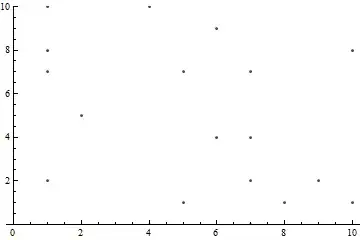
more general example:

 data = {{2, 7, 8, 10}, {5}, {}, {0, 10}, {1, 7},
     {4, 9}, {0, 2, 4, 7}, {1}, {2}, {1, 8}}

enter image description here

george2079
  • 38,913
  • 1
  • 43
  • 110
3

Another way to use MapIndexed:

data2 = MapIndexed[Thread@{First@#2, #1} &, data];
ListPlot[data2, PlotStyle -> PointSize[Large], PlotRange -> {{0, 5}, Automatic}]

enter image description here

kglr
  • 394,356
  • 18
  • 477
  • 896