I recently set about to re-compile some old (2008-2009) applications that use MathLink in preparation for creating new, modified versions. Mathlink has been deprecated but WSTP seems like a fairly painless replacement and I had no trouble getting the code to compile and the project to build under Visual Studio 2013.
Unfortunately, the resulting code doesn't run correctly. Whereas the old code, if double-clicked, did this:

the new one does this

The "missing" DLL is definitely on the drive, and the project would not have compiled without it. Putting an extra copy into the application directory doesn't help.
DependencyWalker reports as follows:

Which seems to restate the problem in other words but doesn't bring me to a solution.
The DLL has been included in the project, but Visual Studio marks it "Does Not Participate in Build," which seems as though it might be a problem but it's not at all obvious what to change it to.
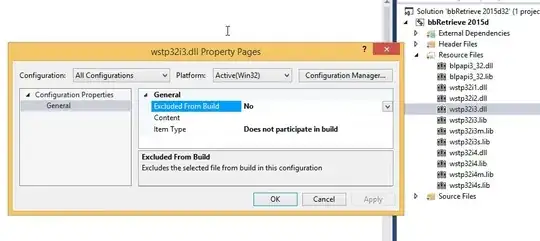
Any suggestions?

ml64i3.dllorml64i4.dll(for interface version 4). Since it's an old program and you might want to ensure compatibility with v9 too, I suggest using interface version 3. – Szabolcs Feb 18 '15 at 20:15