I saw a couple of posts dicretizing the graphic and generate DelaunayMesh to get volume of 3D object. The issue I'm having is that DelaunayMesh creates a bigger solid covering the original one, resulting more volume. Please see the following.
Let's say I have this 3D solid defined as below. In spherical coordinate,
R[θ_, ϕ_] := Abs[Cos[θ]]^2
or in Cartesian system
pf[θ_, ϕ_] := {Sin[θ] Cos[ϕ], Sin[θ] Sin[ϕ], Cos[θ]}*R[θ, ϕ];
This object has two lobes as shown below.
plot = ParametricPlot3D[pf[θ, ϕ], {θ, 0, π}, {ϕ, 0, 2 π}]
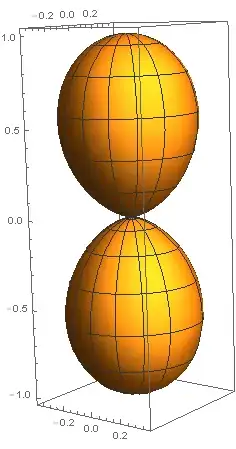
where its volume from spherical integral is 0.598399,
NIntegrate[ρ^2 Sin[θ], {θ, 0, π}, {ϕ, 0, 2 π}, {ρ, 0, R[θ, ϕ]}]
After discretizing
displot = DiscretizeGraphics[Normal[plot /. (Lighting -> _) :> Lighting -> Automatic]]
I get

which still has two lobes, but with DelaunayMesh the feature disappears
hull = DelaunayMesh[MeshCoordinates[displot]]

And now it has different volume of 0.784115, greater than 0.598399 from the direct integration.
Volume[hull]
So I would like to know the best way to create mesh which gives the volume as precise as possible, both from a symbolic expression R(theta,phi) or from sampled points {{1,1,1},{3,2,2},....}.
One of the object I'm dealing with looks like this. Has many lobes, no symmetry.
Here are more examples of distortion when I generate DelaunayMesh from a graphic.
From Parametricplot3D,

Then DelaunayMesh gives


NIntegrate[ρ^2 Sin[θ], ...]method? – Feb 25 '15 at 08:04