10

I want to build a 6 by 3 matrix, from the following: one vector is 3 by 1, then a matrix, which is 3 by 2. These will go to the top 3 rows. Now the bottom 3 rows, I'll have 3 vectors each is 3 by 1. Like this:
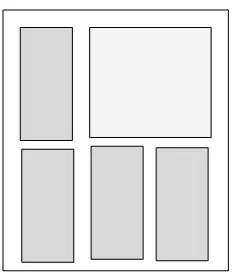
Mathematica graphics

It is easy to do this, when all the objects are the same. Say we have 6 vectors, each is 3 by 1. Like this:

Mathematica graphics

But because I have a 3 by 2 matrix in there, ArrayFlatten is not happy for some reason.

I'll show the case with the 6 vectors first.

v1 = {1, 2, 3}; v2 = {4, 5, 6}; v3 = {7, 8, 9}; v4 = {10, 11, 12};
v5 = {13, 14, 15};  v6 = {16, 17, 18};
m = ArrayFlatten[{
    {Transpose@{v1}, Transpose@{v2}, Transpose@{v3}},
    {Transpose@{v4}, Transpose@{v5}, Transpose@{v6}}
    }
   ];
MatrixForm[m]

Mathematica graphics

Now, in place of v2 and v3 above, I want to put a matrix, of same size as both, which is 3 by 2. Hence:

v1 = {1, 2, 3}; vNew = {{4, 5}, {6, 7}, {8, 9}};
v4 = {10, 11, 12}; v5 = {13, 14, 15};  v6 = {16, 17, 18};

Where vNew now takes place of v2 and v3. But when I write

m = ArrayFlatten[{
    {Transpose@{v1}, vNew},
    {Transpose@{v4}, Transpose@{v5}, Transpose@{v6}}
    }
   ];

It does not work. I tried

m = ArrayFlatten[{
    {Join[Transpose@{v1}, vNew, 2]},
    {Transpose@{v4}, Transpose@{v5}, Transpose@{v6}}
    }
   ];

And few others things. It only works when I have each element of same shape. So this works

m = ArrayFlatten[{
    {Transpose@{v1}, Transpose@{vNew[[All, 1]]}, Transpose@{vNew[[All, 2]]}},
    {Transpose@{v4}, Transpose@{v5}, Transpose@{v6}}}];

Mathematica graphics

What should the correct syntax be?

PS: In MATLAB, this is easy:

v1=[1,2,3]'; vNew=[4,5;6,7;8,9];v3=[10,11,12]'; v4=[13,14,15]';v5=[16,17,18]';
m=[v1 vNew;v3 v4 v5]

m =
     1     4     5
     2     6     7
     3     8     9
    10    13    16
    11    14    17
    12    15    18

I am using version 10.0.2.0

Mr.Wizard
  • 271,378
  • 34
  • 587
  • 1,371
Nasser
  • 143,286
  • 11
  • 154
  • 359
  • @Nasser, thank you for this question. I always have to deal with this issue. In many cases, I have v1 = {a, b, c}; v2 = {{1, 2}, {3, 4}, {5, 6}}; v3 = {{10, 20, 30}, {40, 50, 60}, {70, 80, 90}}; V4v5v6 = {{1, 2, 3, 4, 5, 6}, {10, 20, 30, 40, 50, 60}}; I want to make V = {{a, 1, 2, 10, 20, 30}, {b, 3, 4, 40, 50, 60}, {c, 5, 6, 70, 80, 90}, {1, 2, 3, 4, 5, 6}, {10, 20, 30, 40, 50, 60}}; I don't know why Mma is not user friendly in this case. If somebody could suggest more general function for this kind of job, I would also be very grateful. Thank you. – ramesh Mar 03 '15 at 15:04
  • @ramesh { {v1, v2, v3}, {V4v5v6} } // myArrayFlatten – Kuba Mar 03 '15 at 22:02
  • @Kuba, thank you. – ramesh Mar 04 '15 at 03:00

3 Answers3

9

TL;DR;

myArrayFlatten = Flatten /@ Flatten[#, {{1, 3}}] & 

{x,y,z} or {{x},{y},{z}} is considered column vector.

Usage example:

v1 = {1, 2, 3}; vNew = {{4, 5}, {6, 7}, {8, 9}};
v4 = {10, 11, 12}; v5 = {13, 14, 15}; v6 = List /@ {16, 17, 18};

{
 {v1, vNew, v1},
 {v4, v5, v6, v1},
 {vNew, vNew}
} // myArrayFlatten // MatrixForm

enter image description here

Flatten approach:

The fact that it is not working is due to:

In ArrayFlatten[{{m11, m12, ...},{m21, m22, ...},...}] all the matrices m_ij in the same row must have the same first dimension, and matrices m_ij in the same column must have the same second dimension.

and

ArrayFlatten[a] is normally equivalent to Flatten[a,{{1,3},{2,4}}]

is not our "normal(ly)" case! Beacuse it works when stated expicitly:

blocks = {{v1, vNew}, {v4, v5, v6}} // Replace[#, x_?VectorQ :> Transpose@List@x, {2}] &;

blocks // Flatten[#, {{1, 3}, {2, 4}}] &
blocks // ArrayFlatten
{{1,4,5},{2,6,7},{3,8,9},{10,13,16},{11,14,17},{12,15,18}}

ArrayFlatten[{{{{1},{2},{3}},{{4,5},{6,7},{8,9}}},{{{10},{11},{12}},{{13},{14}, {15}},{{16},{17},{18}}}}]

Not always though, will fail for example for: {{v1, vNew}, {vNew, v6}}. So let's just do the first flip and then Map with Flatten, so at the end you can use:

myArrayFlatten = Flatten /@ Flatten[#, {{1, 3}}] & 

it automatically takes {x,y,z} to be column vector.

I don't understand everything well enough that I can post here quick explanation but a good start to learn more is in Flatten command: matrix as second argument


old anser, working but ugly

I really don't know why it is not that simple :/.

I hope I've not missed anything, this function will help you if dimensions are ok. So don't expect anything like build block matrix.

toMatrix = Composition[

  Join @@ # &,
  Join[##, 2] & @@@ # &,
  Replace[#, x_?VectorQ :> Transpose@List@x, {2}] &

  ]

Replace part is only in case someone provides {x,y,z} lists and want them to be column vectors.

toMatrix@{
 {vNew, vNew, v1},
 {v1, v4, v1, vNew}
} // MatrixForm

enter image description here

Kuba
  • 136,707
  • 13
  • 279
  • 740
  • 2
    nice function. I have no idea what it does (I lose track of things after the second @@ :) , but it seems to work so far. Something like this should really be build-in to make it easy to build matrices. I think this is one area where M is not easy to use. – Nasser Mar 03 '15 at 09:02
  • @Nasser Agreed, thanks for question. Motivated me to dig more and I understood something. – Kuba Mar 03 '15 at 09:28
  • @Kuba, your function is so useful. It should be renamed "makematrixfromvectors", hehe:) – ramesh Mar 04 '15 at 02:59
6

First a simpler way to get your first example:

(m = ArrayFlatten[Transpose /@ {{v1, v2, v3}, {v4, v5, v6}}, 1]) // MatrixForm

enter image description here

An alternative way to do @bill's undoing trick:

(m2 = ArrayFlatten[Transpose /@ {{v1, ## & @@ Transpose[vNew]}, {v4, v5, v6}}, 1]) // MatrixForm

enter image description here

Using ArrayReshape as an alternative to ArrayFlatten:

ArrayReshape[Transpose /@ {{v1, vNew}, {v4, v5, v6}}, {6, 3}] // MatrixForm

enter image description here

kglr
  • 394,356
  • 18
  • 477
  • 896
4

How about just breaking up the matrix and then reconstructing the same way. Here are your source vectors

v1 = {1, 2, 3}; vNew = {{4, 5}, {6, 7}, {8, 9}};
v4 = {10, 11, 12}; v5 = {13, 14, 15}; v6 = {16, 17, 18};

So now define and reconstruct:

{v2, v3} = Transpose[vNew]; 
ArrayFlatten[{Transpose@{v1, v2, v3}, Transpose@{v4, v5, v6}}, 1] // MatrixForm

If you want to do it all in one command:

ArrayFlatten[{Transpose@Partition[Flatten[{v1, Transpose@vNew}], 3], Transpose@{v4, v5, v6}}, 1]
bill s
  • 68,936
  • 4
  • 101
  • 191