Bug introduced in 10 or earlier and persisting through 11.0.0
When content is larger than ImageSize of TabView then the top edge is cut off even with Alignment->{Left,Top}.
SetterBar[Dynamic@horizontalAlignment, {Left, Right}]
SetterBar[Dynamic@verticalAlignment, {Bottom, Top}]


TabView[{
  1 -> Framed[RandomImage[1, {100, 100}, ImageSize -> 200], FrameStyle -> Red]
  },
 ImageSize -> {90, 90} ,
 Alignment -> Dynamic@{horizontalAlignment, verticalAlignment}]
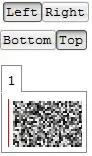
I expect that the red frame edge should be visible. The only one setting which is respected is Left.
Is this OS specific?
related: 44690
Tested on Win7 V10.0.2


ImageSize. When this option is missing, the image inTabViewis not clipped but rescaled to be fully visible. For example, try instead :{1 -> Framed[RandomImage[1, {200, 200}], FrameStyle -> Red]}. Or am I missing something ? – SquareOne Mar 04 '15 at 14:37Gridbut like images or graphics. Once again, in my example :{1 -> Framed[RandomImage[1, {200, 200}], FrameStyle -> Red]}, the random image is 200x200, it is larger than the display area 90x90, but it is not clipped but scaled down to fit the display. I am just saying thatTabViewbehaves differently whether graphics content were defined withImageSizeor not. It is complementary to your observations. – SquareOne Mar 04 '15 at 15:131 -> RandomImage[1, {200, 200}]and1 -> Show@RandomImage[1, {200, 200}]. The first is anImage, the second is aGraphics, both have 200x200 but display differently inTabView. – SquareOne Mar 04 '15 at 15:15