1

I have files of data that come with a whole bunch of junk in the beginning before the actual columns of data start. Is there any way to tell Mathematica to start putting the data into a table from file after a certain word?

the file looks something like this: Date 2015-02-06 Time 13:43:08 OrgMethod 1: Ramp 10.00 °C/min to 290.00 °C OrgMethod 2: Isothermal for 10.00 min OrgMethod 3: Mark end of cycle 1 OrgMethod 4: Ramp 5.00 °C/min to 30.00 °C OrgMethod 5: Mark end of cycle 2 StartOfData 3.33324E-4 39.29206 -1.902141 1.1479E-41 49.96894 .005333328 39.31792 -1.460834 12.71884 50.00748 0.01033333 39.34428 -1.054216 12.66656 50.01390 0.01533332 39.37120 -0.6898219 8.133291 49.98570 0.02033332 39.39765 -0.3520619 4.047560 49.92618 0.02366666 39.41610 -0.1382413 1.561064 50.11307 0.02866666 39.44513 0.1751882 -1.894620 49.97246 0.03366666 39.47487 0.4886028 -5.134019 50.03676 0.03699998 39.49480 0.7051464 -7.216820 50.00922

After importing the file, how do I tell it to only make a table of stuff after "StartOfData" ?

The file contains hundreds of thousands of lines of data... (maybe Import isn't quite the function I want to use) I need to plot the first column against the second one, find the maximum in said graph (which is just the max value in the third column) and integrate over the curve. Does anyone know of the best way to go about it by any chance?

edit: george2079, for some reason I still can't get it :( What's the difference between Table and Data? Does it not like that the file is in txt format?

enter image description here

SquareOne: enter image description here

Raksha
  • 633
  • 1
  • 6
  • 19
  • getting closer.. your delimiters need to be in brackets, {"StartOfData"} – george2079 Mar 06 '15 at 23:16
  • I tried it with and without them, but the error stayed the same. I put them back now just in case, but still looking at the same thing. Mathematica is so finicky... One day ... one day I'll know it inside and out ... – Raksha Mar 06 '15 at 23:24

3 Answers3

1

If you get irritated with Import, you can use streams:

fs = OpenRead["/path/to/data.txt"];
Find[fs, "StartOfData"]
data = {};
ln = Read[fs, Table[Number, {5}]];
While[Length[ln] == 5,
 AppendTo[data, ln];
 ln = Read[fs, Table[Number, {5}]];
 ]
Close[fs];

AppendTo gets slow at very large arrays, but {less than 1 million, 5} shouldn't have a problem.

Will
  • 11
  • 1
  • Looks like you got the same idea first ! ;) – SquareOne Mar 07 '15 at 00:23
  • I use ReadList to avoid the While loop and AppendTo. – SquareOne Mar 07 '15 at 00:26
  • @SquareOne ReadList is more efficient and should work, but instrument files like to throw unexpected characters in that trip up ReadList--I've found this to be more robust. – Will Mar 07 '15 at 05:13
  • @Solarmew If this is data from a TA (TGA, DSC...), check that it's not UTF-16. Easiest fix is to open in a text editor and then save as DOS, Mac, or UTF-8. – Will Mar 07 '15 at 05:15
1

You can use low level file operations :

stream = OpenRead["pathtoyourfile"];
Find[stream, "StartOfData"];
mydata = ReadList[stream, Number, RecordLists -> True]
Close[stream];

returns

{{0.000333324, 39.2921, -1.90214, 1.1479*10^-41, 
  49.9689}, {0.00533333, 39.3179, -1.46083, 12.7188, 
  50.0075}, {0.0103333, 39.3443, -1.05422, 12.6666, 
  50.0139}, {0.0153333, 39.3712, -0.689822, 8.13329, 
  49.9857}, {0.0203333, 39.3977, -0.352062, 4.04756, 
  49.9262}, {0.0236667, 39.4161, -0.138241, 1.56106, 
  50.1131}, {0.0286667, 39.4451, 0.175188, -1.89462, 
  49.9725}, {0.0336667, 39.4749, 0.488603, -5.13402, 50.0368}, {0.037,
   39.4948, 0.705146, -7.21682, 50.0092}}
SquareOne
  • 7,575
  • 1
  • 15
  • 34
  • for me this just returns {} for some reason – Raksha Mar 07 '15 at 00:25
  • @Solarmew ?? To debug, remove the ; at the end of each line of code. Try also to run each code line in a separate cell. – SquareOne Mar 07 '15 at 00:29
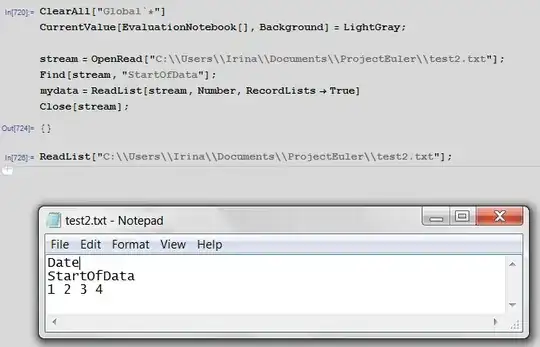
  • removed ; at the end of each line. Still got {}. Ran each line in separate cell. Got "InputStream", then "EndOfFile", then "{}", and finally ""C:\Users\Irina\Documents\ProjectEuler\test2.txt"" – Raksha Mar 07 '15 at 02:22
  • @Solarmew The EndOfFile is returned by the Find[stream, "StartOfData"] command and means that it did not find the "StartOfData" in your data. Inspect your file (open it in an editor) to check visually if everything is OK, and resave it like @Will suggested. – SquareOne Mar 07 '15 at 09:58
  • I literally copied the code I posted in the question just to make sure it's the same as what people who are helping me are using. I have no idea what Mathematica is having issues with now ... It always seems to find something ... – Raksha Mar 07 '15 at 16:53
  • @Solarmew what do you mean by "It always seems to find something" ? Maybe do a simple test first : try to read a very simple file (put 3 numbers in 3 lines) then ReadList["yourfile"]. – SquareOne Mar 07 '15 at 17:52
  • Oh, I'm just complaining that Mathematica always seems to be unhappy with something and noone knows why %\ ... but to be fair, I am just barely starting to scratch the surface. I posted a ss of what it's doing, which is nothing. With or without the text before the numbers. – Raksha Mar 07 '15 at 18:04
  • @Solarmew OK, this is weird. Try to Quit and Restart Mathematica then do the simple test again. If it still does not work try a more simple test : in your "test2.txt" just leave the line "1 2 3 4", delete all the others, then just try ReadList["test2.txt"]. – SquareOne Mar 07 '15 at 20:46
  • now it returned "{яю1}" ... wtf X.x ... why Russian? ah, Mathematica ... never seizes to baffle me ... – Raksha Mar 07 '15 at 23:04
  • Just another idea as I came across an interesting post about problems involving russian and file name path :"Use slash / instead of double backslash in the paths to files under Windows". Any change ? – SquareOne Mar 09 '15 at 20:11
  • Still same error unfortunately :( ... I wonder what the problem is ... – Raksha Mar 11 '15 at 02:06
0
     ImportString[StringTake[#, {
           StringPosition[ #  , "Data starts here:"][[1, -1]] + 2,
           StringPosition[ #  , "more junk"][[1, 1]] - 2
                                }], "Table"] &@ 
               Import["test.dat", "Text"]

alternately ( note here I've put the delimiting string lines in the list form they end up in when interpreted as table data )

      Take[ #, {
        Position[#, {"Data", "starts", "here:"}][[1, 1]] + 1,
        Position[#, {"more", "junk"}][[1, 1]] - 1
           } ] &@   Import["test.dat", "Table"]

edit: to take only three columns of the data:

    Take[ #, {
        Position[#, {"Data", "starts", "here:"}][[1, 1]] + 1,
        Position[#, {"more", "junk"}][[1, 1]] - 1
           } , { 1, 3 } ] &@   Import["test.dat", "Table"]
             ^^^^^^^^^^ third arg to Take[] selects cols 1-3
george2079
  • 38,913
  • 1
  • 43
  • 110
  • I think I'm doing something wrong >.> ... see capture above – Raksha Mar 06 '15 at 22:23
  • you can not Import columns {1,2,3} because the lines with text do not always have three items. Just Import[ file, "Data" ]. If you want the three columns of data add a "{1,3}" as a third argument to Take in my second example – george2079 Mar 06 '15 at 22:38
  • Sorry, I've never tried doing anything with files in Mathematica :( So I have: Take[#, {Position[#, {"StartOfData"}][[1, 1]] + 1, Position[#, {"end"}][[1, 1]] - 1},] &@ Import["C:\Users\Irina\Documents\ProjectEuler\test2.txt", "Data"];

    which gives the error: "Part 1 of {} does not exist. " Sequence specification (+n, -n, {+n}, {-n}, {m, n}, or {m, n, s}) expected at position 2 in Take

    – Raksha Mar 06 '15 at 22:50
  • see edit.. fifteen – george2079 Mar 06 '15 at 23:04