1

How can I create a button which sits next to the cell, like so: https://i.stack.imgur.com/32SuA.jpg

When you click the button it expands the cell, like this (note the cells on the right): https://i.stack.imgur.com/NGyJx.jpg

I can't find any code inside the Mathematica notebook for creating the button.

Duplicate of: Triangle that collapse cells

Lightvvind
  • 107
  • 4

1 Answers1

2

You need to set the option ShowGroupOpener to True:

SetOptions[EvaluationNotebook[], ShowGroupOpener -> True]

You can also use $FrontEnd (resp., $FrontEndSession) instead of EvaluationNotebook[] to get the effect for the current and future front-end sessions (resp., the current session).

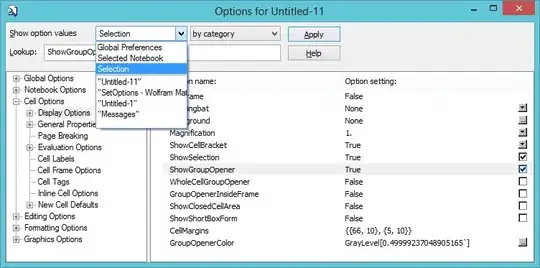
Alternatively, you can use the OptionInspector from the Format menu:

enter image description here

to set this option at theselected cell, selected notebook or global level.

kglr
  • 394,356
  • 18
  • 477
  • 896