Does anyone have an example of a Manipulate demonstration where the user can type into a box the differential equation, time interval, initial condition, and the result is plotted?
This possible in Mathmatica?
Does anyone have an example of a Manipulate demonstration where the user can type into a box the differential equation, time interval, initial condition, and the result is plotted?
This possible in Mathmatica?


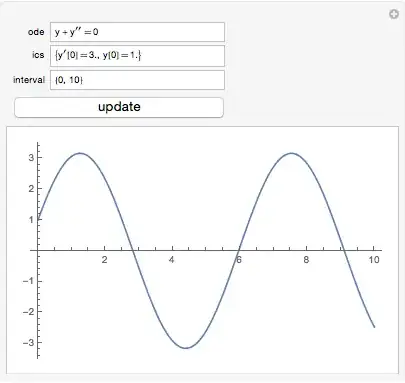
Here's an approach. With a little Rule/ReplaceAll manipulation, it can accommodate some
typical errors due to inattention to details of syntax. These can be removed if it is a goal to get students to enter proper Mathematica syntax.
Adapting some code
from
rcollyer, we can catch ] messages and display them inside the Manipulate if the user types incorrect input. One may want to filter which messages are caught, as some are only warnings; see Check for details.
SetAttributes[catchMessages, HoldAll];
catchMessages[code_] := Module[{myMessageList = {}},
  Internal`InheritedBlock[{Message, $InMsg = False},
   Unprotect[Message];
   Message[msg_, vars___] /; ! $InMsg :=
    Block[{$InMsg = True},
     AppendTo[myMessageList, StringForm[msg, vars]];
     Message[msg, vars]];
   (*code to run*)
   Check[code, Join[{$Failed}, myMessageList]]]]

Manipulate[
 update;
 With[{dep = First[Cases[ode, Derivative[_][var_] :> var, Infinity, Heads -> True]]},
  With[{indep = First[Cases[ode, Derivative[_][dep][x_] | dep[x_] :> x, Infinity] /.
    {} -> {x}]},
   With[{sol = Quiet@catchMessages[
        First@NDSolve[{ode, ics} /. {v : Derivative[_][_][_] :> v,
            w : Derivative[_][_] :> w[indep], u : dep[_] :> u,
            dep -> dep[indep]}, dep, Flatten[{indep, interval}]]]},
    If[FreeQ[sol, $Failed],
     Plot[Evaluate[dep[indep] /. sol], Evaluate@Flatten[{indep, dep["Domain"] /. sol}]],
     Column[
      Join[sol,
       {ode} /. {v : Derivative[_][_][_] :> v, w : Derivative[_][_] :> w[indep],
         u : dep[_] :> u, dep -> dep[indep]}]]]
    ]]],
 {{ode, y'' + y == 0}, InputField},
 {{ics, {y'[0] == 3., y[0] == 1.}}, InputField},
 {{interval, {0, 1}}, InputField},
 {{update, 0}, None}, Button["update", update++],
 TrackedSymbols :> {update}
 ]
The default independent variable is x. If a dependent variable appears with an argument, it is taken as the independent variable.


NDSolve[<stuff>]or enter it between list braces{de, ic, time}. You would have to construct theNDSolvecode from it. Is that the sort of thing you're after? – Michael E2 Mar 24 '15 at 23:24