3

For various reasons I need to define some controls in my Manipulate with complex behaviors that are not (or at least I don't think can be) accomplished using the simple default syntax for Manipulate controls.

Thanks to some answers here, I have controls that support thee behaviors, but

  • I can't get them to appear in my Manipulate aligned and labeled like the default controls, and
  • one of the controls does not update its displayed value when I click on it.

For example with

Manipulate[
 Row@start,
 {{r2, "q", "R2"}, {"p", "m", "q", "y", "z"}, ControlType -> SetterBar, Appearance -> "Palette"},
 {{r3, "z", "Label R3"}, {"p", "m", "q", "y", "z"}, ControlType -> SetterBar, Appearance -> "Palette"},

 {{r4, "-"}, ControlType -> None},
 Row[{
   SetterBar[
    Dynamic[r4, If[# != "-", n = 4; start = Take[Join[start, {"A"}], n], n = 3; start = Take[start, n]] &],
    {"\[Beta]", "\[Gamma]", "-"},
    Appearance -> "Palette"]
 }],

 Column[{Dynamic[pop /@ Range[n] // Row, TrackedSymbols :> {n}]}], {x,None}, {n, None}, {start, None},

 Initialization :> (pop[i_] := With[{j = i}, PopupMenu[Dynamic[start[[j]]], CharacterRange["A", "Z"], ImageSize -> {45, 19}]]; start = ConstantArray["A", 3]; n = 3;)

 ]

I get
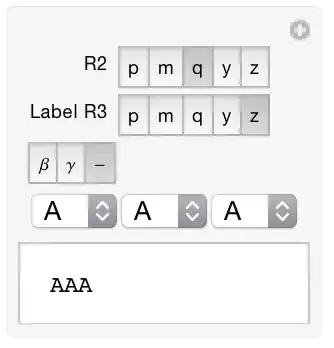
in which

  • the controls for r4 and the popup menus lack labels and do not align with the other (default style) controls, and
  • the r4 control does not reflect changes in the value of the variable.

How can I get these "custom" controls to appear and behave correctly in my Manipulate?


If there's a solution that uses "default" Manipulate control specification that I'm missing, that would be great, as would a solution that allows me to specify define and reuse a custom control (I have several that are similar to the popup control in that they involve several popups).

orome
  • 12,819
  • 3
  • 52
  • 100

1 Answers1

3

I do not understand everything the code is suppose to do, but passing the control as a pure function inside a variable declaration might give the desired behavior. The other change is the variable-setting function in the Dynamic for r4 was changed to actually set the value of r4 upon an update.

Manipulate[
 Row@start,
 {{r2, "q", "R2"}, {"p", "m", "q", "y", "z"}, 
  ControlType -> SetterBar, Appearance -> "Palette"},
 {{r3, "z", "Label R3"}, {"p", "m", "q", "y", "z"}, 
  ControlType -> SetterBar, Appearance -> "Palette"},
 {{r4, "-"}, 
  Row[{SetterBar[
      Dynamic[r4, 
       If[(r4 = #) != "-", n = 4; start = Take[Join[start, {"A"}], n],
          n = 3; start = Take[start, n]] &], {"\[Beta]", "\[Gamma]", 
       "-"}, Appearance -> "Palette"]}] &},
 {n, Column[{Dynamic[pop /@ Range[n] // Row, 
      TrackedSymbols :> {n}]}] &},
 {x, None}, {start, None},
 Initialization :> (pop[i_] := 
    With[{j = i}, 
     PopupMenu[Dynamic[start[[j]]], CharacterRange["A", "Z"], 
      ImageSize -> {45, 19}]]; start = ConstantArray["A", 3]; n = 3;)]
Michael E2
  • 235,386
  • 17
  • 334
  • 747
  • Excellent. Cases like this make me wonder why I can't extract this information from the documentation. Can you point me to the the part of the documentation that should have made this clear (obvious, really) to me? – orome Mar 28 '15 at 14:43
  • 1
    Sorry, I must have missed your comment, or because Aprils are usually very busy. -- Search for "Custom Control Appearances" in the tutorial Advanced Manipulate Functionality -- I don't know if it's the best reference. It's the one I often got to, when I want to check such stuff. The examples show a nice range of what's possible, even if the text does not explain everything. – Michael E2 Aug 30 '15 at 19:52