2

I'm trying to simulate the probability of a balanced hand in Bridge (The Theory of Probability by Santosh S. Venkatesh, 2013) using Mathematica. The problem is solved in the textbook but I just wanted to use it to practice writing programs in Mathematica.

The idea is to shuffle the deck, partition it into 4 hands of 13 cards each, and check whether each of the 4 partitions contains an Ace. I'm designating the numbers {1,14,27,40} as the aces (they could have been any 4 different numbers).

uno = Partition[RandomSample[Range[52], 52], 13];
And[
Apply[Or, Map[MemberQ[uno[[1]], #] &, {1, 14, 27, 40}]],
Apply[Or, Map[MemberQ[uno[[2]], #] &, {1, 14, 27, 40}]],
Apply[Or, Map[MemberQ[uno[[3]], #] &, {1, 14, 27, 40}]],
Apply[Or, Map[MemberQ[uno[[4]], #] &, {1, 14, 27, 40}]]
]

I was proud of being able to use Map "MemberQ" to each of the four values {1,14,27,40}.

Where I got stucked is trying to Map it a second time to the four elements of uno.

user23438
  • 188
  • 6

4 Answers4

4

Uuuh, that's like a breeze....

ace=  {1, 14, 27, 40};
uno = Partition[RandomSample[Range[52], 52], 13];
    Intersection[#, ace] & /@ uno

This returns the Aces returned in each hand

let's go gambling....hi,hi,hi

penguin77
  • 1,645
  • 9
  • 8
3

Just write simpler code! Here's an example... first, the setup:

cards = 52;
uno = Partition[RandomSample[Range[cards], cards], cards/4];
aces = 1 + {0, 1, 2, 3} cards/4;

(it's a bit easier to test if you set cards = 12).

FreeQ[
 Intersection[aces, #] & /@ uno,
 {}]

Enjoy.

djp
  • 1,493
  • 14
  • 18
3

Just for fun:

You can count number of "aces" (obviously arbitrary choice) 4 sets of 13 cards:

Total /@ Partition[
  Boole[Mod[#, 13] == 1] & /@ RandomSample[Range@52, 52], 13]

For simulation:

tab[n_] := 
  Table[Total /@ 
    Partition[Boole[Mod[#, 13] == 1] & /@ RandomSample[Range@52, 52], 
     13], {n}];

Now cheating by just testing patterns and enumerating permutations for an approximation:

a = With[{res = tab[1000000]},
   Length[Pick[res, # == {1, 1, 1, 1} & /@ res]]/1000000.];
b = With[{res = tab[1000000]},
   Length[Pick[res, # == {0, 0, 0, 4} & /@ res]]/1000000.];
c = With[{res = tab[1000000]},
   Length[Pick[res, # == {2, 2, 0, 0} & /@ res]]/1000000.];
d = With[{res = tab[1000000]},
   Length[Pick[res, # == {1, 1, 2, 0} & /@ res]]/1000000.];
e = With[{res = tab[1000000]},
   Length[Pick[res, # == {1, 3, 0, 0} & /@ res]]/1000000.];
w = {1, 4, 6, 12, 12};
sim = w {a, b, c, d, e};

Calculating exactly:

calc = With[{den = Binomial[52, 4]},
   ac = 13.^4/den;
   bc = 4. Binomial[13, 4]/den;
   cc = 6. Binomial[13, 2]^2/den;
   dc = 12. 13.^2 Binomial[13, 2]/den;
   ec = 12. Binomial[13, 3] 13./den;
   {ac, bc, cc, dc, ec}
   ];

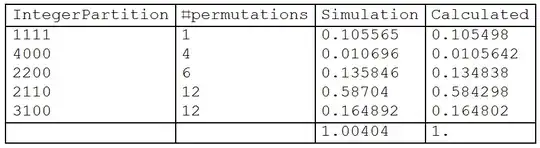
Comparing probabilities:

lab = PadRight[IntegerPartitions[4]]
perm = {4, 12, 6, 12, 1};
ord = {5, 1, 3, 4, 2};
Grid[Prepend[
  Append[Transpose[{Row /@ lab[[ord]], perm[[ord]], sim, calc}], {"", 
    "", Total@sim, Total@calc}], {"IntegerPartition", "#permutations",
    "Simulation", "Calculated"}], Alignment -> Left, 
 Dividers -> {All, {True, True, {False}, True, True}}]

enter image description here

ubpdqn
  • 60,617
  • 3
  • 59
  • 148
  • Wow! ubpdqn, your answer took me about an hour to digest, but I was a well spent hour. I was doing simulations with a For loop. It was taking me about 35 seconds to simulate a million trials. With your method it takes under 10 seconds. Brilliant. – user23438 Mar 29 '15 at 18:26
  • @user23438 I learn a lot too...the joy of this site is seeing how many different ways the same problem or issue can be approached and accumulating a broad and deep toolkit:) – ubpdqn Mar 30 '15 at 00:15
3

Your operation using the v10 operator form for MemberQ, along with Alternatives:

uno = RandomSample[Range @ 52] ~Partition~ 13;

And @@ MemberQ[1 | 14 | 27 | 40] /@ uno

Or using modular arithmetic as already provided by others:

x = RandomSample @ Range @ 52;

Sign[x ~Mod~ 13] ~Partition~ 4 // Total
{12, 11, 13, 12}

This is the number of non-ace cards in each hand.

Mr.Wizard
  • 271,378
  • 34
  • 587
  • 1,371
  • ...I need to user operator forms more... I also like labeling the "aces" 0 mod 13...and that it just happened to produce sample {1,2,0,1}...guess I am easily amused...+1 :) – ubpdqn Mar 28 '15 at 11:44
  • Thank you Mr Wizard. Brief and elegant. This is the first time I see the shortcut ' ~ '. – user23438 Mar 29 '15 at 18:01
  • @user23438 You're welcome. I'm kind of notorious for using ~infix~ syntax; personally I find it very useful to reduce the stacking of [[[brackets]]] which I find very hard to read; other people think the infix is hard to read. My advice it to experiment for yourself and see what you find more readable after experience with several styles. See also: (56504) – Mr.Wizard Mar 29 '15 at 22:26