9

Bug introduced in 10.0 and persisting through 11.0 or later


DateListPlot does not respect my Options setting for CoordinatesToolOptions:

SetOptions[
  DateListPlot, 
  CoordinatesToolOptions -> {"DisplayFunction" -> MapAt[DateString, 1]}
];

DateListPlot[{{1, 1, 2, 3, 5, 8, 11}, {5, 8, 9, 6, 2, 4, 7}}, {2013, 1, 1}, 
 Joined -> True]
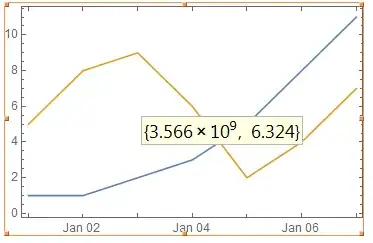
enter image description here

However if this option is given explicitly it works as desired:

DateListPlot[{{1, 1, 2, 3, 5, 8, 11}, {5, 8, 9, 6, 2, 4, 7}}, {2013, 1, 1}, 
 Joined -> True, CoordinatesToolOptions -> {"DisplayFunction" -> MapAt[DateString, 1]}]
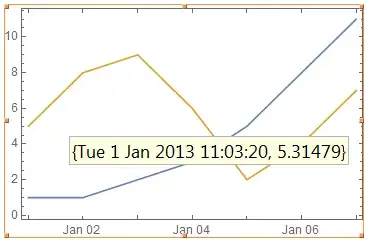
enter image description here

1. Why is my global Option value ignored?

2. What is the cleanest way to make DateListPlot respect my setting?

(Observations in 10.0.2 under Windows.)

Szabolcs
  • 234,956
  • 30
  • 623
  • 1,263
Mr.Wizard
  • 271,378
  • 34
  • 587
  • 1,371

2 Answers2

4

The option value is ignored because DateListPlot calls Graphics`DateListPlotDump`iDateListPlot which only uses Options for these items:

{PlotRange, AxesOrigin, GridLines, GridLinesStyle, Epilog, Prolog, Frame, Axes, Ticks,
FrameTicks, DateTicksFormat, DateFunction, DataRange, PlotRangePadding, PlotLegends,
PlotStyle, PlotMarkers, Joined, BaseStyle, LabelStyle, TargetUnits, Method}

The values of these options are modified as needed, then combined with explicit options after the latter are filtered with:

opts = FilterRules[opts, Options[If[caller === DateListLogPlot, ListLogPlot, ListPlot]]];

Therefore we can patch the broken definition with this replacement:

DateListPlot; (* preload; do not remove! *)

With[
  {dv := DownValues[Graphics`DateListPlotDump`iDateListPlot]},
  dv = dv /.
    (fr : FilterRules)[a : Graphics`DateListPlotDump`opts, b_Options] :> 
      fr[Join[a, Options @ Graphics`DateListPlotDump`caller], b]
];

Now:

SetOptions[DateListPlot, 
  CoordinatesToolOptions -> {"DisplayFunction" -> MapAt[DateString, 1]}];

DateListPlot[{{1, 1, 2, 3, 5, 8, 11}, {5, 8, 9, 6, 2, 4, 7}}, {2013, 1, 1}, 
 Joined -> True]

enter image description here

Mr.Wizard
  • 271,378
  • 34
  • 587
  • 1,371
  • 1
    +1. Nice spelunking. Note that the DateListPlot stuff has to be loaded before you fix the options. (I did it on a new kernel and it had no effect the first time.) Simply prepending DateListPlot; before With is sufficient, as you would probably know. – Michael E2 Apr 21 '15 at 18:06
  • @Michael Thanks. For some reason it seemed like preloading was not needed here but now that I try it again it seems it is; I don't know what mistake I made, but this is a good lesson to use preloading as a matter of practice. Correction imminent. – Mr.Wizard Apr 21 '15 at 18:59
  • @Michael I'll bet I used SetOptions[DateListPlot, . . .] before the replacement patch in my testing; I cannot think of another explanation for the behavior I observed earlier. – Mr.Wizard Apr 21 '15 at 19:04
  • 1
    SetOptions[DateListPlot, ... ] still does not work properly in 10.2 -- I tried PlotLegends -> Automatic and it is not working. – gwr Jul 23 '15 at 16:26
  • @gwr Thanks for the notice. I'll update the banner to include 10.2 specifically. – Mr.Wizard Jul 23 '15 at 16:28
  • @Mr.Wizard you might also remove the CoordinatesToolOptions constraint in the title? The issue seems to be broader if something like PlotLegends does not work in SetOptions, doesn't it? – gwr Jul 23 '15 at 16:31
  • @gwr Hang on, unless the problem has gotten worse PlotLegends should work as it is one of the options that is explicitly checked. (See the list in my answer above.) If that is not working it might be a separate problem? Please give me an example and I shall see how it behaves in 10.1.0. – Mr.Wizard Jul 23 '15 at 16:33
  • 1
    @Mr.Wizard Use SetOptions[ DateListPlot, PlotLegends -> Automatic] then simply plot two TimeSeries by DateListPlot[TimeSeries @@@ {{{1, 2, 3}, {1}}, {{3, 4, 5}, {1}}}]. Result: No legends, but if you add the options directly they will be plotted. – gwr Jul 24 '15 at 08:51
  • @gwr I got around to looking at that example, and I agree it seems buggy, but it originates for a different reason. It seems that the PlotTheme supersedes the Options for DateListPlot and the it uses PlotLegends -> "Expressions". That option does not appear to be valid for DateListPlot. If after using SetOptions you evaluate DateListPlot[TimeSeries @@@ {{{1, 2, 3}, {1}}, {{3, 4, 5}, {1}}}, PlotTheme -> None] you will see that the legend option is respected. – Mr.Wizard Jul 25 '15 at 11:13
  • @gwr I posted (89093) regarding this issue. – Mr.Wizard Jul 25 '15 at 11:41
0

You may consider this:

DateListPlot[{{1, 1, 2, 3, 5, 8, 11}, {5, 8, 9, 6, 2, 4, 7}}, {2013,1,1}, Joined -> True, 
 CoordinatesToolOptions -> {"DisplayFunction" -> (DateString@First@# &)}]

Then let's try this:

SetOptions[DateListPlot, 
 CoordinatesToolOptions -> {"DisplayFunction" -> (DateString@First@# &)}];
 DateListPlot[{{1, 1, 2, 3, 5, 8, 11}, {5, 8, 9, 6, 2, 4, 7}}, {2013, 
 1, 1}, Joined -> True]

Works perfectly well using M9. Sorry cannot test under M10.0.2.

Not sure what went wrong in your example. May be the expression following "DisplayFunction"-> was not enclosed in parenthesis (), or there might be an incompatible issue with M10?

Coordinates showing date string and value:

SetOptions[DateListPlot, 
  CoordinatesToolOptions -> {"DisplayFunction" -> 
       (Row[{DateString@First@#, " -> ", Last@#}] &)}];

DateListPlot[{{1, 1, 2, 3, 5, 8, 11}, {5, 8, 9, 6, 2, 4, 7}}, {2013,1, 1}, Joined -> True]

enter image description here

penguin77
  • 1,645
  • 9
  • 8