I have the following matrix
Keeping the 20 row and 20 column fixed (so the 21st rows and columns because I started at 0)...how do I push each row and column back one spot?
I need to push the 0th row and column to the 19th row and column, the 1st row and column to the 0th row and column..so pretty much swapping out every row and column with the one before it while keeping the 20th row and column fixed.
$\begin{bmatrix}a_{0,0} &a_{0,1}&....&a_{0,20}\\.&.&&.\\.&.&&.\\.&.&&.\\a_{20,0} & a_{20,1}&....&a_{20,20}\end{bmatrix}$


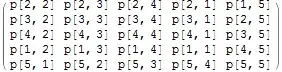


pp, just create newm = ppand do this onm. – Kuba Apr 16 '15 at 11:56p[0,1] p[0,2]................p[0,20] . . . . . . . . . p[20,1] p[20,2]..............p[20,20]
Would my code be like:
pp[[;; 20, ;; 20]] = RotateLeft[pp[[;; 20, ;; 20]], {0, 0}]; pp // MatrixForm?
– John Yates Apr 16 '15 at 12:01I added an image file with the respective problem
– John Yates Apr 16 '15 at 12:30{0,0}, not{1,1}... – Kuba Apr 16 '15 at 12:32