How can I plot points (for example {{1 , 1}, {3 , 7}, {5 , 5}}) having as an input a file which contains the points coordinates ?
And is there any way to draw a line between 2 consecutive points?
Import coordinates:
data = Import["file.txt", "CSV"]
Out:
{{1,1}, {3,7}, {5,5}}
Plot the points:
ListLinePlot[data]
Most basic examples like this can be easily found in the mathematica documentation. Hit F1 for help and look up for Import, ListPlot, ListLinePlot,... There are also helpful tutorials like tutorial/ImportingAndExportingData.
Import Formats
There are many ways to store data in files and import them.
You can use various $ImportFormats.
If you have a file containing comma seperated data like this
1, 1
3, 7
5, 5
use "CSV" for the import format.
In:
Import["file.txt", "CSV"]
Out:
{{1,1}, {3,7}, {5,5}}
This is how the data would be stored if you use the "List" import format:
{1, 1}
{3, 7}
{5, 5}
In:
Import["file.txt", "List"]
Out:
{{1,1}, {3,7}, {5,5}}
The data could also be seperated by tabs "\t":
1    10
3    7
5    5
then use "Table" for importing the data:
In:
Import["file.txt", "Table"]
Out:
{{1,1}, {3,7}, {5,5}}
Relation to Export
Export uses the same formats for writing a file with data.
In:
SetDirectory[NotebookDirectory[]];
data = {{1,1}, {3,7}, {5,5}};
Export["file.txt", data, "Table"];
Import["file.txt", "Table"]
Out:
{{1,1}, {3,7}, {5,5}}
Visualization
Use ListLinePlot if you want lines between the datapoints.
ListLinePlot[data]

With Joined -> True you can use ListPlot instead:
ListPlot[data, Joined -> True]
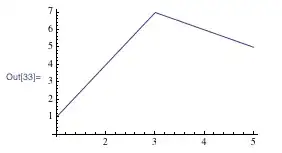
Show ListLinePlot and ListPlot together for better visualization:
Show[{ListLinePlot[data],
ListPlot[data, PlotStyle -> Directive[Red, PointSize[.02]]]}]


file.txt containing?
– Axx
May 02 '15 at 11:50
Import::noelem: The Import element "Table" is not present when importing as Text.
– Axx
May 02 '15 at 11:56
String, i edited that just now. You can also try "List", "CSV", or any other ImportFormat instead of "Table"
– sacratus
May 02 '15 at 11:58

Import[]andLine[]. – J. M.'s missing motivation May 02 '15 at 11:46