I have a problem with a 3D surface in Mathematica 10.1. The problem is that the surface comes out disconnected even if it shouldn't. Here's a minimal toy example showing the problem:
Plot3D[E^-(x - Round[x])^2, {x, 0, 3}, {y, 0, 3}, PlotRange -> {0, 1}]
the result is
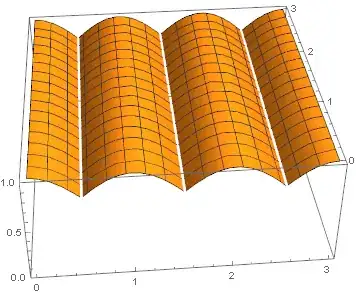
The surface profile (in 2D) is that of a continuous line (even if it is not differentiable at all points):
Plot[E^-(x - Round[x])^2, {x, 0, 3}, PlotRange -> {0, 1}]

Increasing the PlotPoints actually reduce the gaps' width, but doesn't eliminate them.
I have also tried the above code in Mathematica 9 and there's the same problem.
That effect is very awful in the rendering of a much more complex surface intended to reproduce a seashell (with bumps and nodules). Is there any simple workaround to smooth out (not differentiable) surfaces?


Exclusions -> Noneand a larger number forMaxRecursions. – Virgil May 04 '15 at 13:52Exclusions -> Noneoption. It seems to work. – Luca M May 04 '15 at 14:19