11

Suppose you have a function

f[t_, x_, y_] := t (1 - x^2 - y^2)

defined for {x,y} in Disk[] and an ElementMesh of that Region

<< NDSolve`FEM`
mesh = ToElementMesh[Disk[]]

You can evaluate the function for some t at the vertices and nodes of the mesh:

coords = mesh["Coordinates"];
values = f[0, Sequence@@#]& /@ coords;

and then build an InterpolatingFunction with:

ElementMeshInterpolation[{mesh}, values]

Now suppose you have a list of times:

tl = Range[0, 1, 0.05];

you can evaluate the function for all times and all mesh nodes:

values = Table[f[t, Sequence @@ ##] & /@ coords, {t, tl}];

But it is possible to build a single InterpolatingFunction from these data, accepting x,y,t as arguments?

I know I can do somethiong like

Interpolation@Flatten[Table[{t, Sequence @@ xy, f[t, Sequence @@ xy]}, {t, 
   tl}, {xy, coords}], 1]

ignoring some warning, but I don't think this method can take advantage of a previously built 2nd order ElementMesh, so I'm searching another way, basically the same way used when NDSolve handle a transient equation.

chris
  • 22,860
  • 5
  • 60
  • 149
unlikely
  • 7,103
  • 20
  • 52
  • 1
    I guess you could build a list of 2D interpolating functions using ElementMeshInterpolation, and then interpolate between their values in t? –  May 06 '15 at 00:54
  • I tried to look at the documentation for the ElementMeshInterpolationand failed. Could you kindly give a hint, where and how can I get it? – Alexei Boulbitch May 06 '15 at 08:12
  • @AlexeiBoulbitch You can find some sample here but unfortunately all the samples are only for stationary problems (search for "post-process"). A time-dependent case is missing. – unlikely May 06 '15 at 08:16
  • Is there a reason why you don't want to build a 3D mesh of the whole region directly at the start and then interpolate over that? Otherwise, doing that seems like the simplest option. – Virgil May 06 '15 at 14:49
  • @Virgil What if you want to extend to a f[t, x, y, z]? – unlikely May 06 '15 at 15:55
  • Out of curiosity, what do you use as the time integrator, 'NDSolve`? – user21 May 08 '15 at 09:17
  • @user21 At present I want to use this feature to represent the 3 components of a time-dependent 3D vector field with unknown analytical form, in a way consistent with the ElementMesh I will later use to solve a PDE, of wich the field is a source term, with NDSolve and FEM. Maybe I also need to use the feature to represent the solution obtained with a custom, simple, non-standard time integration method, but I still need to do some test. – unlikely May 08 '15 at 10:45
  • @unlikely, thanks. Good to know what the application is. – user21 May 08 '15 at 11:33

2 Answers2

6

Somewhat manual construction:

<< NDSolve`FEM`
mesh = ToElementMesh[Disk[], MaxCellMeasure -> Infinity];
tl = Range[0, 1, 0.2];
mesh3 = MeshOrderAlteration[
   With[{gc = ElementMeshToGraphicsComplex@MeshOrderAlteration[mesh, 1]},
    gc /. GraphicsComplex[pts_, g_, o___] :>
      ToElementMesh[
       "Coordinates" -> Flatten[
         PadLeft[pts, {Automatic, 3}, #] & /@ tl,
         1],
       "MeshElements" -> {TetrahedronElement[
          Flatten[
           Table[
             Cases[g, 
              Polygon[
                lis_] :> (lis /. 
                 tri : {_Integer, _Integer, _Integer} :>
                  With[{p = Join[tri + (n - 1) Length@pts, tri + n Length@pts]},
                   {p[[{1, 4, 5, 6}]], p[[{1, 5, 2, 6}]], p[[{2, 3, 1, 6}]]}
                   ]),
              Infinity],
             {n, Length[tl] - 1}],
           3]
          ]}
       ]
    ], 2];

mesh3["Wireframe"]

f[t_, x_, y_] := t (1 - x^2 - y^2)
values = f @@ Transpose[mesh3["Coordinates"]];
emifn = ElementMeshInterpolation[{mesh3}, values];

ContourPlot3D[f[t, x, y] == 0.1, {t, 0.`, 1.`}, {x, -1., 1.}, {y, -1., 1.}]

Mathematica graphics

Notes

The ordering for the tetrahedra was deduced from this decomposition of a prism on a triangular base:

foo = ToElementMesh[
   DiscretizeGraphics[
    gc = GraphicsComplex[
      {{0, 0, 0}, {1, 0, 0}, {0, 1, 0}, {0, 0, 1}, {1, 0, 1}, {0, 1, 1}},
      Polygon[{{1, 2, 3}, {6, 5, 4}, {1, 2, 5, 4}, {2, 3, 6, 5}, {3, 1, 4, 6}}]]
    ],
   MaxCellMeasure -> Infinity, "MeshOrder" -> 1];
foo["Coordinates"]
foo["MeshElements"]
(*
  {{0., 0., 0.}, {1., 0., 0.}, {0., 1., 0.}, {0., 1., 1.}, {1., 0., 1.}, {0., 0., 1.}}

  {TetrahedronElement[{{1, 6, 5, 4}, {1, 5, 2, 4}, {2, 3, 1, 4}}]}
*)

I tried RegionProduct but I either got errors or could not make the resulting mesh be the product of the meshes.

Reducing the mesh order to 1, forming the product, then bumping back up to 2 was easier than figuring out how to order the vertices of an order-2 tetrahedron. Surely it can be done, but this seemed easier/lazier.

chris
  • 22,860
  • 5
  • 60
  • 149
Michael E2
  • 235,386
  • 17
  • 334
  • 747
6

I like the answer of @Michael E2 but I'm still searching, if available, a simpler way. Experimenting I found this way. My way probably can be applied also for a 3D mesh/region.

The data to interpolate:

<< NDSolve`FEM`
f[t_, x_, y_] := t (1 - x^2 - y^2);
mesh = ToElementMesh[Disk[]];
coords = mesh["Coordinates"];
tl = Range[0, 1, .05];
values = Table[f[t, Sequence @@ ##] & /@ coords, {t, tl}];

Building the interpolating function:

if = NDSolveValue[{D[u[t, x, y], t] == 0, u[0, x, y] == 0}, u, 
     Element[{x, y}, mesh], {t, tl[[1]], tl[[-1]]}, 
     Method -> "FiniteElement"]

if = If[if[[2, 1]] != 5, $Failed, 
  ReplacePart[if, {
    {2, 3} -> 0, (* no derivatives provided *)
    {2, 4, 1} -> Length@tl,(* actual grid points along t *)
    {3, 1} -> tl, (* actual grid along t *)
    {4} -> List /@ values (* values to interpolate *)
    }]]

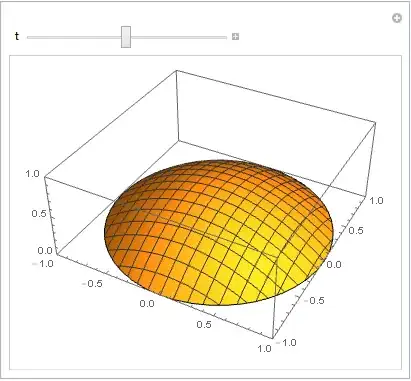
Apprently this works:

Manipulate[
 Plot3D[if[t, x, y], {x, y} \[Element] mesh, 
  PlotRange -> {{-1, 1}, {-1, 1}, {0, 1}}], {t, 0, 1}]

Mathematica graphics

I'm not completely satisfied with this approach because it relies on the undocumented internal structure of the InterpolatingFunction (partially revealed by this question, thanks!) and I completely ignore if it's "safe" to "tamper" with this internal structure (maybe Interpolation or NDSolve build also some private data accompaining the returned InterpolatingFunction?).

NOTE

I'm more confident with the the time variable after the space variables x,y so I also tried with:

NDSolveValue[{D[u[x, y, t], t] == 0, u[x, y, 0] == 0}, u, 
  Element[{x, y}, mesh], {t, tl[[1]], tl[[-1]]}, 
  Method -> "FiniteElement"]

Unfortunately I get this message

Drop::drop: Cannot drop positions 3 through 3 in {ElementMesh[{{1.,5.26062*10^-22},{0.990147,0.14003},{0.960783,0.2773},{0.91339,0.407085},<<43>>,{0.990147,-0.14003},{-0.601496,-0.540192},{-0.725006,-0.512798},<<951>>},<<2>>,{PointElement[{{1},<<49>>,<<46>>}]}],{<<1>>}}. >>

and soon the Kernel crahes. I think in the past I successfully used this standard...

UPDATE

Thanks to @user21 comment the following approach will be available with the next release.

values = Partition[values, 1];
Dimensions[values] == {Length@tl, 1, Length@mesh["Coordinates"]}
if = ElementMeshInterpolation[{tl, mesh}, values]
unlikely
  • 7,103
  • 20
  • 52
  • Clearly something like this is done for solutions to transient PDEs. I kept thinking I could hit on the right combinations of arguments to ElementMeshInterpolation to achieve it; but I'm thinking now it is done internally on such a low level as you've done, and there is no FEM` function that we can use. – Michael E2 May 06 '15 at 15:35
  • @MichaelE2, I added an example to the FiniteElementProgramming tutorial that shows how to do it. That will be available in the next release. If you do have FEM related questions, feel free to @ me. – user21 May 08 '15 at 09:16
  • @user21 Good news! – unlikely May 08 '15 at 09:46
  • @user21 Thank you very much. – Michael E2 May 08 '15 at 09:57
  • @user21 It is possible to have even a vague and short idea of how to do that even before the release of the new Mathematica version? – unlikely May 14 '15 at 17:26
  • 2
    @unlikely, ElementMeshInterpolation[{tRange, mesh}, data] will work, Where Length[mesh["Coordinates"]] is A and Length[tRange] B and Dimensions[data] is {B,1,A} – user21 May 18 '15 at 15:33
  • @user21 Thanks you very much. – unlikely May 18 '15 at 15:41
  • @user21 Following your last comment, I tried to do what I wrote in the "Update" section, but the Kernel crashes. I'm doing something wrong? – unlikely May 24 '15 at 10:50
  • @unlikely, the comment says this will be supported in the next update but it is not right supported right now (V10.1) – user21 May 24 '15 at 12:10
  • @unlikely, here is what I'd do: write a small function MakeElementInterpolation that for now uses one of the techniques of the answers and then replace that with the up coming solution. – user21 May 24 '15 at 12:13
  • @user21 Sorry, my understanding was that it was already supported but not yet documented and that the documentation will be updated for the next release. – unlikely May 24 '15 at 12:24
  • @user21 I tried to apply my own answer to my real scenario, waiting for a suppoerted way. Unfortunately the resulting InterpolatingFunction show some strange behavior. Calling some property like "ValuesOnGrid" causes the Kernel to crash. Maybe this is related with a similar Kernel crash as reported in my question http://mathematica.stackexchange.com/questions/85309/kernel-crash-while-using-valuesongrid-method-of-interpolatingfunction?noredirect=1#comment231689_85309... – unlikely Jun 07 '15 at 14:45
  • @unlikely, I am sorry to hear that and apploogize for the trouble that this causes you. I'll file this as a bug. – user21 Jun 08 '15 at 06:38