Most things that can be done via the front-end interface in Mathematica can also be accomplished by some function. Is that the case for find-and-replacing? That is, is there some code I could execute in a Mathematica notebook that would have the same effect as me using the Edit > Find… window to replace all occurrences of "find this text" with "replace with this text" through the whole notebook?
Asked
Active
Viewed 356 times
13

thecommexokid
- 1,335
- 8
- 17
-
Related: (27001) – Mr.Wizard May 15 '15 at 06:44
1 Answers
14
Update: I think I've got it.
I found a token that does the replacement without bringing up a dialog. The values from the last use of the Find and Replace dialog will be used. The command is:
FrontEndExecute @ FrontEndToken[nb, "ReplaceAll"]
where nb is the target Notebook object.
To preset the Find and Replace fields one can modify the FindSettings option of the Front End like so:
CurrentValue[$FrontEnd, {FindSettings, "FindString"}]  = "This";
CurrentValue[$FrontEnd, {FindSettings, "ReplaceBoxes"}] = "That";
Now:

FrontEndExecute @ FrontEndToken[nb, "ReplaceAll"]
After:
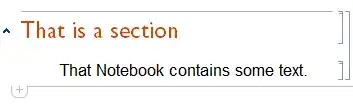
Version 7
In version 7 under Windows I need this variation for the method to work:
CurrentValue[$FrontEnd, {FindSettings, "ReplaceString"}] = "That";

Mr.Wizard
- 271,378
- 34
- 587
- 1,371
-
I can't make functions from
SystemResources/Find.nbworking, any idea?FE`Evaluate[ FEPrivate`FindExpression[ FrontEnd`CurrentValue[ FrontEnd`$FrontEnd, {FindSettings, "FindBoxes"}], "Previous", False, False, False]]– Kuba May 15 '15 at 07:32 -
@Mr.Wizard The
"FindString"option seems to work as expected for me, but the"ReplaceBoxes"(or"ReplaceString", which I also tried) option has no effect. (Mma 9.0.1.0) – thecommexokid May 15 '15 at 16:46 -
@thecommexokid Possibly just the
CurrentValuemethod is failing. Please use the Find and Replace dialog with unique values for the find and replace fields, then evaluateOptions[$FrontEnd, FindSettings]and tell me if the suboptions"FindString"and"ReplaceBoxes"exist, and have been set to the values you entered. If so it should be possible to get this working. – Mr.Wizard May 16 '15 at 03:20 -
Yes,
Options[$FrontEnd, FindSettings]gives the values I entered. – thecommexokid May 18 '15 at 01:20 -
And
CurrentValue[$FrontEnd, {FindSettings, "ReplaceBoxes"}] = "differentString"returnsNull, but if I executeOptions[$FrontEnd, FindSettings]again afterward, theReplaceBoxessetting shows the new value. – thecommexokid May 18 '15 at 01:21 -
@thecommexokid Please try
"ReplaceString"instead and see if it works. – Mr.Wizard May 18 '15 at 01:53 -
I've been trying all possible combinations of
StringandBoxesall along. – thecommexokid May 18 '15 at 02:28 -
@thecommexokid What operating system are you using? With the right choice of
"ReplaceBoxes"or"ReplaceString"this works in both 10.1 and 7.0 under Windows. – Mr.Wizard May 18 '15 at 04:08 -
OS X Yosemite (10.10.3) with, as I mentioned above, Mathematica 9.0. – thecommexokid May 18 '15 at 04:24