11

I have a conundrum.

I use an iMac's OS X 10.6.8 settings to start and stop the machine at the specific times that I need a particular notebook to run. I've done this because it has worked more reliably then timed events. Mathematica launches automatically when my computer boots and the notebook with all its cells set as Initialization Cells launches automatically and evaluates when Mathematica starts.

The last expression in the notebook:

NotebookSave[]

as evident, saves this active notebook. I need this because some graphics in the notebook change and I want to review them later.

This notebook will be the only open notebook at the time of its evaluation.

So far so good.

Now I want the notebook to programmatically quit the Mathematica FrontEnd.

This gets tricky and presents (at least) 2 problems:

Problem 1:

NotebookSave[]
FrontEndTokenExecute["FrontEndQuit"]

begins the process, but gives me the following popup window:

popup window

This doesn't help me, because I want this to run on its own and as stated above I have an OS setting that will shut down the computer soon after Mathematica would quit.

I won't have anyone in front of the computer to click "OK" and thereby allow the shutdown to proceed. No click no shutdown.

Problem 2:

All of the notebooks cells, including the one with the:

   FrontEndTokenExecute["FrontEndQuit"]

set as Initialization Cells presents another problem. IF I can find a work-around for the popup warning above, I still need a way to break, abort, or interrupt the flow of control so I don't have a notebook, which will always open, evaluate, then quit Mathematica. At some point I'll want it to stay open to edit or change the code.

I've looked at variations of:

NotebookSave[]
Interrupt[]; 
FrontEndTokenExecute["FrontEndQuit"]   

They give me a popup window like this:
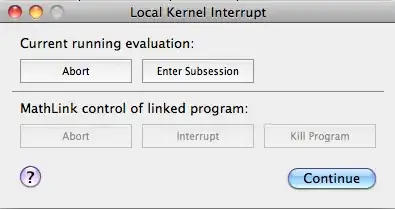
interrupt window

Pressing "Continue" or "Abort" just gives me the same popup window ("The notebook ..... contains a running evaluation...." as I had in "Problem 1".


If my solution in doing this includes automatically opening and evaluating the notebook I think I need some way to have a button or popup window come up which gives me a period of time, say 30 seconds to abort the closing of the application and its notebook. If no one aborts the process before 30 seconds I'd want the machine to shut down.

  • Is such a thing even possible given what I've found above?

  • Do I need to consider dispensing with the FrontEnd for this altogether? If yes, can someone point me in the right direction? At least for now I'd feel content if I can rely upon the OS to boot and shut down the computer so I guess I could launch the code when the computer boots. This way I wouldn't need to worry about recurring timers, that to date have proven unreliable.

The notebook in question does a lot of different stuff: opening parallel kernels, lots of parallel mapping, creating graphics, and emailing results both text and graphics. Is it even feasible for this kind of complication to run as a script on booting of the computer?

Stumped and looking for some guidance.

Thanks.

Jagra
  • 14,343
  • 1
  • 39
  • 81
  • 1
    This would be a dirty hack but you could use AppleScript to close the notebook. – sebhofer Jul 17 '12 at 08:15
  • @sebhofer - A hack, but maybe an expedient one. If I follow your thinking an AppleScript could simply "Quit" or "ForceQuit" Mathematica after my notebook saves itself. Mathematica saving a notebook could trigger the event or maybe a timer? This would also workaround the graphics problem. Thoughts or suggestions on how to do this welcome. Thx for the idea. – Jagra Jul 17 '12 at 13:07
  • I think it would be pretty straight forward to do such a thing. Calling an AppleScript from Mathematica can be done by running it from the command line. To work around problem 2, you can create a pop-up which closes after a given amount of time and quits the frontend. In principle you can also interact with all GUI elements programatically. – sebhofer Jul 17 '12 at 13:37
  • Unfortunately I don't have a Mac at my disposal but I'm pretty sure that should work without too much effort. – sebhofer Jul 17 '12 at 13:39
  • Based on Arnoud's answer here, you may be able to run "without" a Front End. Of course you do need a front end to handle notebooks and create graphics, but with this solution the Front End will be started and managed by the kernel as a process without a visible window, and not vice versa. As a user you'll only see the terminal window where the kernel is running. Note: I haven't tried precisely what you're trying to do (evaluate & save nb), but I believe it's possible using this approach. – Szabolcs Jul 17 '12 at 16:52

3 Answers3

9

How about an alternative: write a Mathematica script. Then calling it is as easy as

MathKernel -script file.m (* MacOSX specific kernel name *)

Or, more interestingly, you could make the script itself executable in a manner similar to a bash script by placing the following line as the first line in your script

#!/absolute/path/to/MathematicaScript -script

Both of these options obviates the need to invoke the front-end.

rcollyer
  • 33,976
  • 7
  • 92
  • 191
  • 3
    The graphics might be a problem then, right? – sebhofer Jul 17 '12 at 08:14
  • I haven't done any command line stuff in generations, so a couple questions. From the Mathematica script link "The script file can be used ..., assuming that the MathKernel or math executables are on your path and can be found." Apparently I don't have them in the path. How do I include them there and what is the absolute path to MathKernel under OS X? I assume the path to file.m as something like this /Users/userName/myScripts/file.m. Alternatively can't I specify the absolute paths in the command line script (not the file.m script) itself? – Jagra Jul 17 '12 at 12:48
  • 1
    @Jagra on my machine, v.8.0.4, they're in /Applications/Mathematica.app/Contents/MacOS. Where you put the path depends on how you're going to use it. If you are going to use the first form (i.e. pure .m file), then /path/MathKernel -script /otherpath/file.m is the way to go. However, if you want a stand-alone script, then the path must be included so that the shell can find it. – rcollyer Jul 17 '12 at 13:08
  • Got this working from the command line. I can run the MathematicaScript, but as @sebhofer suspected, given that I email graphic in a panel with some formatted text in a grid what I get in the email looks pretty messy. I'll think through if I can simplify what I need to send by the email. – Jagra Jul 17 '12 at 14:06
  • A MathematicaScript incorporating the ideas that @Szabolcs references in comments above look like the long term solution to what I need to do. It does need some work and thought to get right. For right now, Applescript gives me a more complete if not as long term interesting a solution. Thanks for the input. – Jagra Jul 17 '12 at 19:39
6

An idea on how to use osascript (as also suggested by sebhofer in a comment to the question): with Mathematica running, execute

osascript  -e 'tell application "Mathematica" to quit'

in a shell. It quits Mathematica completely. If there are unsaved notebooks, Mathematica pops up a dialog, so make sure everything is saved before doing that.

To be able to schedule this from a high level (ie from a GUI) you can write an Applescript containing tell application "Mathematica" to quit:

Mathematica graphics

and create a calendar event to run this whenever you want. Or, at least, you can if you are not running OS X 10.8, as Apple appear to have removed this ability in the latest version (you can still use launchd, for instance).

acl
  • 19,834
  • 3
  • 66
  • 91
  • This works from the command line and it circumvents the problems with graphics! How would I run this script on an event like a time of day or on saving the specific Mathematica notebook? Can I use this osascript inside of an AppleScript? – Jagra Jul 17 '12 at 14:20
  • This is AppleScript... – sebhofer Jul 17 '12 at 14:31
  • @sebhofer - You've been my wingman on this whole discussion, much appreciated ;-) – Jagra Jul 17 '12 at 14:44
  • 1
    you could just run an applescript with 'tell application "Mathematica" to quit' (as @sebhofer says, it's applescript, just called from a shell). you could for instance create a calendar event to run this periodically, or use command-line methods (which I could explain if you want, but I guess it's easy to google them and in any case that would better be done in chat) – acl Jul 17 '12 at 14:57
  • @Jagra :) I like the discussion, it reminds me of my old Mac days... – sebhofer Jul 17 '12 at 15:01
  • @Jagra If you want to run it from within Mathematica, I think you could just use the Run command. – sebhofer Jul 17 '12 at 15:02
  • @sebhofer the problem with that is that it pops up a window telling you that a process is running... – acl Jul 17 '12 at 15:55
  • I see, what about SystemOpen? This seems to spawn an asynchronous process. – sebhofer Jul 17 '12 at 16:24
  • @sebhofer good idea, let me see if I can work out how to run shell scripts (SystemOpen["bash /Users/acl/Desktop/qmma.sh"] just opens the script in Xcode on my machine) – acl Jul 17 '12 at 16:29
  • It works on Linux, so it should be possible. – sebhofer Jul 17 '12 at 16:37
  • @acl Make it executable and then try Run or Import["!...", "Text"] – rm -rf Jul 17 '12 at 17:57
  • @R.M of course, but that gives a warning about a process running in the background, preventing mma from quitting. One could script the UI, but sebhofer's idea was to use SystemOpen in the hope of avoiding this. I can't see how, unfortunately. – acl Jul 17 '12 at 19:26
  • Using a calendar event in iCal works like a charm. This also gives me some easy high level control. Maybe Applescript & iCal constitute a "dirty hack" and I do recognize that getting MathematicaScript to run might give me a more robust, flexible, and elegant solution down the road, but hey the hack works. Also since I no longer have Mathematica trying to close itself and I can just delete an iCal event this approach largely circumvents my Problem 2. Thanks for the help and another call out of appreciation to @sebhofer Thx – Jagra Jul 17 '12 at 19:29
  • @Jagra the iCal thing is robust, but it could be that the script fails for some reason. You could try checking (with applescript) that mma has indeed quit, but that won't work if the script stalls. I agree that it would be more robust to use something other than applescript, but this should work most of the time. – acl Jul 17 '12 at 19:36
  • @acl I managed to get my hands on one of my coworker's mac for a few minutes. That wasn't enough for a full solution but I managed to quit Mathematica from Mathematica by using AppleScript :) Use the AppleScript editor to create a standalone app which quits Mathematica and call it via SystemOpen (I had to use the full path to the app in order to do that.) Worked for me. Starting from this it shouldn't be a problem to include a pop-up, timeout, etc. – sebhofer Jul 17 '12 at 20:50
  • @sebhofer thanks--I think that depends on what application the file type is associated to. in my case, doing that opens the script in an editor, because that's also what open does (from the command line). it probably works in the default OS X config – acl Jul 17 '12 at 21:14
  • @sebhofer -- I'll give it try. Thanks again – Jagra Jul 18 '12 at 01:10
5

This post addresses the problem of saving graphics output in an automated session:

https://stackoverflow.com/questions/7626491/uncaught-throw-generated-by-jlink-or-usefrontend

E.g. with a file called test.m containing this:

Needs["JLink`"];
$FrontEndLaunchCommand="Mathematica.exe";
UseFrontEnd[ nb = NotebookOpen["C:\\Temp\\run.nb"];
SelectionMove[nb, Next, Cell];
SelectionEvaluate[nb];
];
Pause[10]; CloseFrontEnd[]; 

Running this by a timed event will execute a cell in run.nb, saving the results:

start MathKernel -noprompt -initfile "C:\Temp\test.m"

Run.nb contains:

x1 = 0;
While[x1 < 1000000, If[Mod[x1, 100000] == 0,
  Print["x1=" <> ToString[x1]]]; x1++];
NotebookSave[EvaluationNotebook[]];
NotebookClose[EvaluationNotebook[]]; 

In test.m you could of course evaluate the whole notebook using

...
SelectionMove[nb,All,Notebook];

etc.

(The "uncaught Throw" events referred to in the link do not affect execution.)

P.S.

You'll need Mathematica in your path to run the script. For Windows this will work:

PATH = C:\Program Files\Wolfram Research\Mathematica\8.0\;%PATH%
start MathKernel -noprompt -initfile "C:\Temp\test.m"

If you want avoid repeatedly adding Mathematica to the path here is a relevant post:

https://stackoverflow.com/questions/141344/how-to-check-if-directory-exists-in-path/7685205#7685205

Chris Degnen
  • 30,927
  • 2
  • 54
  • 108
