4
parametersNV := {R = 2.5};   
parametersNV;   
diffeq = {u''''[x] + \[Alpha]*(x*u'''[x] + 3*u''[x]) + R*u[x]*u'''[x] - 
 R*u'[x]*u''[x] == 0};    
inicond = {u[0] == 0, u''[0] == 0, u[1] == 1, u'[1] == 0};    
sol = ParametricNDSolve[{diffeq, inicond}, {u}, {x, 0, 4}, {\[Alpha]}];
d1 = Evaluate[u[0.1]'[x] /. sol];    
framelbl := {{{"\[Theta](\[Zeta])",Rotate["", 180 Degree]}, {"\[Zeta]", parametersNV}}};    

This is my code and i want to label my frame using the list parametersNV. The problem i am facing is that it only shows it value {2.5}. i want it to show R=2.5. i know i can achieve it by just enclosing is in " " and using in following command. The case i posted here is very simple. i am automating the system and would have to deal with many curves and parameters. So it would be good directly to use the aforementioned list. Here is my try.

pic = Plot[{d1}, {x, 0, 1}, PlotRange -> All, Axes -> False,Frame -> True, LabelStyle -> Black,FrameLabel -> {{"\[Phi](\[Eta])",Rotate["", 180 Degree]}, {"\[Eta]", parametersNV}}, PlotLegends ->Placed[LineLegend[Automatic, {"\[Lambda]=0.4", "\[Lambda]=-0.4"},LegendLayout -> "Column", LegendFunction -> "Frame",LegendMarkerSize -> {17, 1}], {0.84, 0.2}],FrameStyle -> Directive["Areal", 14]]

need it to be

pic = Plot[{d1}, {x, 0, 1}, PlotRange -> All, Axes -> False,Frame -> True,LabelStyle -> Black,FrameLabel -> {{"\[Phi](\[Eta])",Rotate["", 180 Degree]}, {"\[Eta]","need a lable here using framelbl saying R=2.5"}},PlotLegends ->Placed[LineLegend[Automatic, {"\[Lambda]=0.4", "\[Lambda]=-0.4"},LegendLayout -> "Column", LegendFunction -> "Frame",LegendMarkerSize->{17, 1}], {0.84,0.2}],FrameStyle->Directive["Areal", 14]]
naveed
  • 339
  • 1
  • 12
  • use R = 2.5; parametersNV = HoldForm[R = 2.5]; or R= 2.5; parametersNV = "R = 2.5";? – kglr May 24 '15 at 13:01
  • Thank you for your reply but it would require typing it again. this is what i want to avoid. i will write every thing in a loop later. so need it automated. – naveed May 24 '15 at 13:15
  • does parametersNV = Defer[R = 2.5]; work? – kglr May 24 '15 at 13:20
  • I would do sth like parametersNV={"R="<>ToString[the value from outer source]} – corey979 May 24 '15 at 13:27
  • @ corey979 I am afraid it wont. i posted just one parameter R. In original code i have many and i want to avoid typing them again and again. this is the primary goal.@ kguler R needs to be evaluated for ParametricNdsolve, but for lalbel i need it unevaluated. i tired many things but in vain. at the moment i am just copy-pasting the values inside parametersNV to " " in Frame label command. but obviously it manual – naveed May 24 '15 at 13:39

1 Answers1

7

With no changes in the first 6 lines of your first code block,

pNV = OwnValues[parametersNV] /. RuleDelayed[x_, {y_}] :> HoldForm[y] /. {x_} :> x;

framelbl := {{"θ(ζ)", Rotate["", 180 Degree]}, {"ζ", pNV}};

Plot[{d1}, {x, 0, 1}, PlotRange -> All, Axes -> False, Frame -> True, 
 LabelStyle -> Black, FrameLabel -> framelbl, 
 PlotLegends -> Placed[LineLegend[{"λ = 0.4", "λ = -0.4"},
    LegendLayout -> "Column", LegendFunction -> "Frame",
    LegendMarkerSize -> {17, 1}], {0.84, 0.2}], FrameStyle -> Directive["Arial", 14]]

Mathematica graphics

A less convoluted approach is to change your second line to

parametersNV2 := HoldForm[R = 3.5]; ReleaseHold[parametersNV2];

and use

framelbl2 :=  {{"θ(ζ)", Rotate["", 180 Degree]}, {"ζ", parametersNV2}};

With the option setting FrameLabel -> framelbl2 we get the same picture as above.

Using

parametersNV3 :=  HoldForm[{R = 2.5, otherparameters = {1, 2, 3}}]; 
ReleaseHold[parametersNV3];

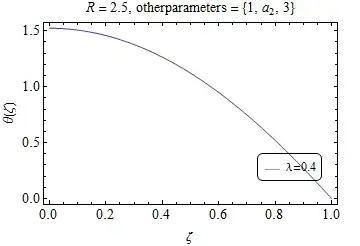
framelbl3 :=  {{"θ(ζ)", Rotate["", 180 Degree]}, {"ζ", parametersNV3}};

we get

Mathematica graphics

Updates:

How can we remove these { } from last option?

Using Composition[StringTrim[#, "{" | "}"] &, ToString][parametersNV3] instead of parametersNV3 in the definition of framelbl3

Mathematica graphics

... some parameters had subscripts, i cant use them with trimming ...

parametersNV4 := HoldForm[Sequence[R = 2.5, otherparameters = {1, Subscript[a, 2], 3}]]; 
ReleaseHold[parametersNV4];
framelbl4 := {{"θ(ζ)", Rotate["", 180 Degree]}, 
  {"ζ", StringReplace[ToString[parametersNV4, StandardForm], "HoldForm[" | "]" -> ""]}};

Mathematica graphics

kglr
  • 394,356
  • 18
  • 477
  • 896
  • How can we remove these { } from last option? i tries first two; the first give HoldPattren n every think inside. the second one doesnt work with more than one parameters. the first and last can work if we could get rid of extra {} or Hold thingy. thank you very much by the way for your efforts, – naveed May 24 '15 at 15:01
  • @naveed, in the last example, you can trim the curly braces using Composition[StringTrim[#, "{" | "}"] &, ToString][parametersNV3] and use it instead of parametersNV3 in the definition of framelbl3. – kglr May 24 '15 at 15:12
  • I am sorry for bothering you again and again. trimming did the work but now a new problem :). some parameters had subscripts, i cant use them with trimming coz if i do things just get messed up and {} remains there and subscripts get displayed as separate variables.any way to fix that? – naveed May 24 '15 at 15:32
  • @naveed, does this work parametersNV3 := HoldForm[Sequence[R = 2.5, otherparameters = {1, Subscript[a, 2], 3}]]; ReleaseHold[parametersNV3]; framelbl3 := {{"\[Theta](\[Zeta])", Rotate["", 180 Degree]}, {"\[Zeta]", StringReplace[ToString[parametersNV3, StandardForm], "HoldForm[" | "]" -> ""]}};? – kglr May 24 '15 at 15:55
  • Thank you v v much. that does the trick and finally i got what i wanted. @ everyone "gratitude" – naveed May 24 '15 at 16:24
  • @naveed, my pleasure. Thank you for the accept. – kglr May 24 '15 at 16:28