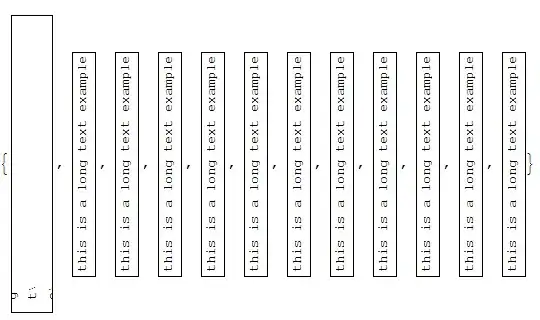
6

Why in this:

Grid[{{Item[Rotate["this is a long text example", Pi/2], ItemSize -> {2, 10}]}}, Frame -> True]

or this

Grid[{{Pane[Rotate["this is a long text example", Pi/2], {59, 300}]}}, Frame -> True]

the text length is still wrapped based on the horizontal dimension?

enter image description here

UPDATE

To reinforce my comment, lets try something more close to the unfortunate complexity of the real world:

Grid[{{Row[{Rotate["this is a long text example", Pi/2], "haha"}]}}, Frame -> True]

vs

Grid[{{Item[Row[{Rotate["this is a long text example", Pi/2], "haha"}], ItemSize -> {2, 10}]}}, Frame -> True]

enter image description here

So, I think you can see that placing Rotate before, instead of after, is probably not an universal solution.

PS: and many of these difficulties would not be there if Grid was intrinsically completed with what was added with Pane... like the possibility of limiting in height and not only in width, the ImageSizeAction, or better, ItemSizeAction, or both... (since there is the Scaled, couldn't there be a Imaged and an Itemed equivalent?)

P. Fonseca
  • 6,665
  • 2
  • 28
  • 60
  • 1
    Use, e.g., Grid[{{Rotate[Pane["this is a long text example", {300, 59}], Pi/2]}}, Frame -> True]... think about it. – ciao May 24 '15 at 18:25
  • @ciao Sure. But there seems to be nothing wrong with the two posted ways. I can see that there are many ways of doing the same thing, but they should be doing the same thing, shouldn't they? Should we always try to guess which way works, even if they are both sound? – P. Fonseca May 24 '15 at 18:34
  • @ciao please see my updated examples – P. Fonseca May 24 '15 at 19:18
  • for the second and fourth examples Grid[{{Item[Rotate["this is a long text example", Pi/2], ItemSize -> {{2}, 10}]}}, Frame -> True] and Grid[{{Item[ Row[{Rotate["this is a long text example", Pi/2], "haha"}], ItemSize -> {{2}, 10}]}}, Frame -> True] seems to work. – kglr May 24 '15 at 19:30
  • @kguler 50% done! Don't you want to add as an answer? Could we conclude it from the documentation, or is this solution an unexpected side effect correcting the original side effect? – P. Fonseca May 24 '15 at 19:34
  • ... and for the second example: Grid[{{Pane[Rotate["this is a long text example", Pi/2], {{Automatic}, 300}, Alignment -> Center]}}, Frame -> True] – kglr May 24 '15 at 19:41
  • @kguler 100% done! – P. Fonseca May 24 '15 at 19:45

1 Answers1

3

Example 1:

Grid[{{Item[Rotate["this is a long text example", Pi/2], 
      ItemSize -> {#, 10}]}}, Frame -> True] & /@ 
 {2, {2}, {200}, {}, All, {All}, Full, {Full}, Automatic, 
  {Automatic}, haha, {haha, haha}}

enter image description here

Comparing with the case where ItemSize is not specified (i.e. it takes the default setting), it seems that the width is set to the default value in all these cases:

{Grid[{{Item[Rotate["this is a long text example", Pi/2]]}}, Frame -> True], 
 Grid[{{Item[Rotate["this is a long text example", Pi/2],  ItemSize -> {All, 10}]}}, 
   Frame -> True]}

enter image description here

Example 2:

Grid[{{Pane[Rotate["this is a long text example", Pi/2], {#, 300}, 
      Alignment -> Center]}}, Frame -> True] & /@ 
 {59, {300}, All, {All}, {Full}, Automatic, {Automatic}, {59, Automatic}}

enter image description here

Again, in comparison with the default value of ItemSize:

{Grid[{{Pane[Rotate["this is a long text example", Pi/2], 
     Alignment -> Center]}}, Frame -> True], 
 Grid[{{Pane[Rotate["this is a long text example", Pi/2], 
     {{Automatic}, 300}, Alignment -> Center]}}, Frame -> True]}

enter image description here

Using the setting ImageSize -> {{59, 300}, 300} gives what is expected in this example:

Grid[{{Pane[Rotate["this is a long text example", Pi/2], 
    ImageSize -> {{59, 300}, 300}, Alignment -> Center]}}, Frame -> True]

enter image description here

Example 3:

Grid[{{Item[Row[{Rotate["this is a long text example", Pi/2], "haha"}], 
      ItemSize -> {#, 10}]}}, Frame -> True] & /@ 
 {2, {200}, {}, Full, {Full}, All, {All}, Automatic, 
  {Automatic}, haha, {haha, haha}}

enter image description here

versus the default setting for ItemSize:

{Grid[{{Item[Row[{Rotate["this is a long text example", Pi/2], "haha"}], 
     Alignment -> Center]}}, Frame -> True], 
 Grid[{{Item[Row[{Rotate["this is a long text example", Pi/2], "haha"}], 
     ItemSize -> {All, 10}, Alignment -> Center]}}, Frame -> True]}

enter image description here

Changing ItemSize -> {#, 10} to ItemSize -> {#, 40}, and adding Alignment -> Center: enter image description here

kglr
  • 394,356
  • 18
  • 477
  • 896
  • ... all this leaves me more inclined to use the approach suggested by @ciao in the comments above. – kglr May 24 '15 at 20:31
  • When it is possible, right? Or is it always possible? Did you figured out if this findings were possible from the documentation? Thank you for all this clarifications. – P. Fonseca May 24 '15 at 20:40
  • @P.Fonseca, I thought the usage ImageSize->{{minwidth, maxwidth}, {minheight, maxheight}} (from the docs on ImageSize) would work here.; and it does if we set the maxwidth high enough to get the rotated text fit inside. But afaik we can't do a similar thing with ItemSize settings. – kglr May 24 '15 at 20:57