20

Some brief, only slightly important background. I am doing a research project using the data from NASA's GRACE mission. I wrote a short Perl script to take two data files and find the change in groundwater between the two dates. This gave me a set of 64,800 3D coordinates (One for every degree latitude and longitude on the Earth's surface). Using Mathematica, I created a ListDensityPlot to visualize the changes in groundwater. As you can see from the code below, the way I deal with clipping is pretty clumsy and doesn't look very good on the map. Otherwise, I am pretty happy with this plot. It pretty well shows everything I want it to. Most of the code courtesy of @Mr.Wizard.

den = ListDensityPlot[jpl200313,ColorFunction ->(ColorData["ThermometerColors"][1 - #] &),
    ClippingStyle -> {RGBColor[0.5, 0.02, 0.03],RGBColor[0, 0.01, 0.56]},
    PlotLegends ->BarLegend[Automatic,LegendMarkerSize -> 180,LegendFunction -> "Frame",
    LegendMargins -> 5,LegendLabel -> "Water Level Change (cm)"],PlotRange -> {-20, 20}];
prim = First@Cases[den, Graphics[a_, ___] :> a, {0, -1}, 1];
geo = GeoGraphics[{Opacity[0.6], prim},GeoBackground -> GeoStyling["StreetMapNoLabels"], 
   ImageSize -> 1000];
geo~Legended~den[[2]]

This shows global change in groundwater (in centimeters),from July 2003 to July 2013

The final piece that I would like to figure out is how to narrow down to specific countries while keeping the legend. Eventually I will build a table or possibly an animate function of several maps of the same country with time being the manipulatable variable. These pictures are from code courtesy of @FJRA.

southamerica =ListDensityPlot[jpl200313, AspectRatio -> 1/2, Frame->None, 
   PlotRangePadding -> 0, PlotRange -> {-20, 20},ColorFunction ->
    (ColorData["ThermometerColors"][1 - #] &)];
img1 = Rasterize[southamerica, "Image", RasterSize -> 360];
img2 = SetAlphaChannel[img1, .8];
geoplot = GeoGraphics[{GeoStyling[{"GeoImage", img2},GeoRange -> {{-90, 90}, {-180, 180}}],
    Polygon[EntityClass["Country", "SouthAmerica"]]},GeoBackground ->
    GeoStyling["StreetMapNoLabels"],GeoZoomLevel -> 3,GeoProjection -> "Equirectangular"]

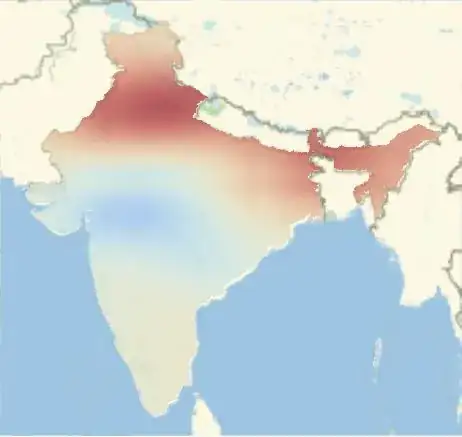
The code for the picture of India is identical except for the name and the Entity function. South America changes in groundwater India changes in groundwater

Anyway, my big question at this point is whether or not the functionality of looking at individual countries can be combined with the readability of the first plot where I can add legends, titles labels etc. Thanks again!

disc otter
  • 303
  • 1
  • 8

2 Answers2

22

Please see the Utility function section for a concise summary.

An arbitrary density plot for the example:

den = DensityPlot[Sin[x] Sin[y], {x, -180, 180}, {y, -90, 90}]

enter image description here:

Extract the graphics primitives from the density plot:

prim = First @ Cases[den, Graphics[a_, ___] :> a, {0, -1}, 1];

Plot them directly with GeoGraphics while setting the desired GeoStyling for the GeoBackground:

GeoGraphics[
  {Opacity[0.8], prim},
  GeoBackground -> GeoStyling["ReliefMap"]
]

enter image description here

With GeoStyling["ContourMap"]:

enter image description here

ImageSize proves to be important; with "StreetMapNoLabels" an and and ImageSize of 512 or less no country borders are shown; 513 or greater and they are:

GeoGraphics[
  {Opacity[0.6], prim},
  GeoBackground -> GeoStyling["StreetMapNoLabels"], 
  ImageSize -> 600
]

enter image description here


Projections

To enable arbitrary projections we need to convert the plain coordinates in in the DensityPlot primitives to GeoPosition coordinates. prim as extracted above is a GraphicsComplex object which we can convert with:

prim2 = MapAt[GeoPosition @* Map[Reverse], prim, 1];

Now:

GeoGraphics[
  {Opacity[0.7], prim2},
  GeoBackground -> GeoStyling["StreetMapNoLabels"], 
  ImageSize -> 700,
  GeoProjection -> "Albers"
]

enter image description here

Legends

Including the legend from the original DensityPlot may be done like this:

den = DensityPlot[Sin[x] Sin[y], {x, -180, 180}, {y, -90, 90},
        PlotLegends -> Automatic];

prim = First @ Cases[den, Graphics[a_, ___] :> a, {0, -1}, 1];

geo = GeoGraphics[{Opacity[0.6], prim},
        GeoBackground -> GeoStyling["StreetMapNoLabels"], 
        ImageSize -> 600];

geo ~Legended~ den[[2]]

enter image description here


Utility function

The methods above may be combined into a single utility function.

toGeoGraphics[
  Shortest[opac : _?NumericQ : 0.6],
  opts : OptionsPattern[GeoGraphics]
][in_] :=
  With[{trans = If[MatchQ[OptionValue[GeoProjection], Automatic | "Equirectangular"], {},
     gc_GraphicsComplex :> MapAt[GeoPosition@*Map[Reverse], gc, 1]]},
    in /. Graphics[prim_, ___] :>
      GeoGraphics[{Opacity @ opac, prim /. trans}, opts, Options @ toGeoGraphics]
  ]

Define any default options that you want:

Options[toGeoGraphics] =
  {GeoBackground -> GeoStyling["StreetMapNoLabels"], 
   ImageSize -> 600};

Now use it like this:

DensityPlot[Sin[x] Sin[y], {x, -180, 180}, {y, -90, 90},
 PlotLegends -> Automatic] // 
   toGeoGraphics[GeoProjection -> "Mollweide"]

enter image description here

The first parameter of toGeoGraphics is the opacity; the remainder are any options you wish to pass to GeoGraphics, overriding defaults.

big = DensityPlot[Sin[x/38] Sin[y/25], {x, -180, 180}, {y, -90, 90}, 
  ColorFunction -> "CMYKColors", PlotPoints -> 100, MeshFunctions -> {#3 &, #3 &}, 
  Mesh -> {Range[-1, 1, 0.4], Range[-0.8, 0.8, 0.4]}, MeshStyle -> {Black, Dashed}, 
  PlotLegends -> Automatic];

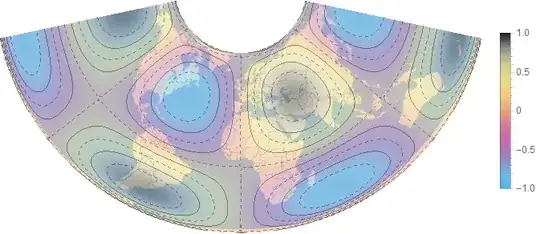
big // toGeoGraphics[0.4, GeoProjection -> "Albers"]

enter image description here

Mr.Wizard
  • 271,378
  • 34
  • 587
  • 1,371
  • @discotter Did you respect the First @ den part of my proposal? You need to extract the primitives from the Graphics expression or you will get that message. If you still get it I will take another look at this. – Mr.Wizard May 28 '15 at 01:32
  • No, I'm sorry. It did end up working. Apparently the PlotLegend piece of my code brought up the graphics error. Once I removed the PlotLegend command, I was able to combine them. Are there any projections I can use that don't have the continent and ocean names on them? – disc otter May 28 '15 at 01:56
  • @discotter I didn't consider legends; indeed a plot with a legend will have a format of Legended[Graphics[ . . . ], . . . ] and you would need to strip that too, e.g. First @ First @ den or den[[1, 1]]. Perhaps more robust would be FirstCase[den, Graphics[a_, ___] :> a, {}, {0, -1}]. Good question about the labels; let me check and get back to you. – Mr.Wizard May 28 '15 at 02:07
  • @discotter I realized that I was over-complicating things with Epilog. Please see the update. – Mr.Wizard May 28 '15 at 02:16
  • Wow! That looks great. I did a sample run with "ReliefMap" styling. I included the picture above in my original question. Unfortunately the clipping issue still makes it look weird but I'll continue to tinker with that. This has been quite helpful. Thank You. – disc otter May 28 '15 at 02:36
  • The StreetMapNoLabels option is exactly what I wanted. However, the country borders won't show up on my plot. Is there a reason for this? – disc otter May 28 '15 at 02:57
  • @discotter (1) I don't know why country borders are missing; which version of Mathematica are you using? (2) Can you upload the data somewhere so that I may examine the clipping issue for myself? – Mr.Wizard May 28 '15 at 16:02
  • I am using Mathematica 10. Where should I upload the data so that it is easily accessible? – disc otter May 28 '15 at 16:42
  • Are you sure the command you used was "StreetMapNoLabels"? Even when I directly copied your code and attempted to overlay it on your arbitrary density plot, country borders didn't show up at all. – disc otter May 28 '15 at 19:13
  • @discotter It seems ImageSize is important, which I did not realize. Without it I get no country borders either. My exact code for the last plot is: GeoGraphics[{Opacity[0.6], prim}, GeoBackground -> GeoStyling["StreetMapNoLabels"], ImageSize -> 600]. For upload try perhaps http://pastebin.com/ or Google Drive? Or maybe your ISP gives you a small personal web storage area? – Mr.Wizard May 29 '15 at 14:46
  • If you give me your email, I can send you the CSV notepad file as an attachment. – disc otter May 29 '15 at 15:43
  • @discotter I am sorry but I prefer not to disseminate my email address more than I already have. Perhaps you could Select a small region of the data where clipping occurs (like Alaska) and post that. – Mr.Wizard May 29 '15 at 15:57
  • If you want to see the country borders, it has to be at least zoom 2. You can force a particular zoom by using the GeoZoomLevel option, or using an explicit ImageSize that would make the Automatic zoom to be greater than 1. – FJRA May 29 '15 at 21:15
  • 2
    A word of caution: The legend does not account for the opacity of the density/contour plot, which might cause difficulties connecting the colors to their corresponding values. (+1 of course) – shrx May 29 '15 at 21:39
  • @FJRA Thank you. – Mr.Wizard May 30 '15 at 00:45
  • @shrx A valid warning. I'll see what I can do about that later if I have time/memory/interest enough. – Mr.Wizard May 30 '15 at 00:46
  • This is more help than I would have ever imagined I would receive. Thank you so much @Mr. Wizard. The amount of effort and time you put into this answer is incredible. – disc otter May 30 '15 at 02:45
  • @discotter I am curious: why did you Accept the other answer instead? Regardless you are welcome. I'll still see if I can improve the legend consistency if I have time. – Mr.Wizard May 30 '15 at 03:03
  • I'm curious too, I would have chosen yours @Mr.Wizard ! – FJRA May 30 '15 at 03:55
  • @MR. Wizard Sorry for the confusion. I don't know much about Stack Exchange yet. I had accepted Mr.Wizard's answer first, but then took pieces from both of them because they were both very helpful. I accepted the second answer thinking I could accept both not realizing that it made me unaccept the other. Honestly they were both very helpful. – disc otter May 30 '15 at 16:50
  • @discotter No problem and thanks for the Accept. Know that the Accept is always yours to do with as you please; I was merely curious after the glowing review why you would Accept another and now I know. FJRA, thank you. – Mr.Wizard May 30 '15 at 16:50
  • One final comment. With your method, @Mr.Wizard, is there a way to look at individual sections of the world? It would be nice to be able to zoom in and highlight specific countries or continents. Thanks! – disc otter May 30 '15 at 16:53
  • @discotter Good question. I'll look into that. I just noticed and corrected a syntax error in my toGeoGraphics code in case it was causing you problems. – Mr.Wizard May 30 '15 at 16:58
  • @discotter Plotting over a smaller region appears to work by default except for an unwanted border: DensityPlot[Sin[x/180] Sin[y/180], {x, 40, 180}, {y, 30, 90}] // toGeoGraphics[]. If you have a full-size DensityPlot and you want to zoom that can be done with PlotRange (without the unwanted border) like this: DensityPlot[Sin[x] Sin[y], {x, -180, 180}, {y, -90, 90}] // toGeoGraphics[PlotRange -> {{40, 180}, {30, 90}}] however that does not combine with GeoProjection. What is your desired workflow? – Mr.Wizard May 30 '15 at 17:04
  • @Mr.Wizard I will post a fairly sizable edit to my original question in an effort to show some things. – disc otter May 30 '15 at 17:22
10

I would prefer to use the "GeoImage" styling, because you can use other projections when using it.

Let's say you have data for the whole world in a matrix:

data = Table[
  Sin[x Degree] Sin[y Degree], {y, -90, 90}, {x, -180, 180}]

Then you use ListDensityPlot:

den1 = ListDensityPlot[data, AspectRatio -> 1/2, Frame -> None, 
  PlotRangePadding -> 0];

And convert it to an image, and add some transparency level:

img1 = Rasterize[den1, "Image", RasterSize -> 360];
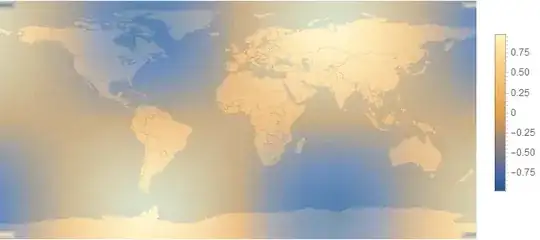
img2 = SetAlphaChannel[img1, .5]

enter image description here

Then you can use GeoStyling with "GeoImage":

GeoGraphics[{GeoStyling[{"GeoImage", img2}, 
   GeoRange -> {{-90, 90}, {-180, 180}}], 
  FilledCurve[
   GeoPath[{{-90, -180}, {90, -180}, {90, 0}, {90, 180}, {-90, 
      180}, {-90, 0}}, "Rhumb"]]}, GeoRange -> "World", 
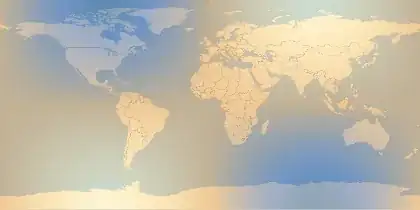
 GeoBackground -> GeoStyling["StreetMapNoLabels"], GeoZoomLevel -> 2]

enter image description here

As I said, the good thing is that you can project it (but be careful with the GeoPath, needs to be modified for some projections that are not defined in the poles):

GeoGraphics[{GeoStyling[{"GeoImage", img2}, 
   GeoRange -> {{-90, 90}, {-180, 180}}], 
  FilledCurve[
   GeoPath[{{-86, -180}, {86, -180}, {86, 0}, {86, 180}, {-86, 
      180}, {-86, 0}}, "Rhumb"]]}, GeoRange -> "World", 
 GeoBackground -> GeoStyling["StreetMapNoLabels"], GeoZoomLevel -> 2, 
 GeoProjection -> "Mercator"]

enter image description here

Or clip only an specific area:

GeoGraphics[{GeoStyling[{"GeoImage", img2}, 
   GeoRange -> {{-90, 90}, {-180, 180}}], 
  Polygon[EntityClass["Country", "SouthAmerica"]]}, 
 GeoBackground -> GeoStyling["StreetMapNoLabels"], GeoZoomLevel -> 3, 
 GeoProjection -> "LambertAzimuthal"]

enter image description here

FJRA
  • 3,972
  • 22
  • 31
  • 1
    I added projections to my method as well. +1 for making me step up my game. :-) – Mr.Wizard May 29 '15 at 15:16
  • @FJRA This is great! However, I am still encountering one problem. Is there any way to keep a Plot Legend on the side of the map? For this data, it is pretty important that the viewer be able to see the units of what the density plot is showing. Is there a way to keep the plot legend separate and not combine it as part of the image? Thanks! – disc otter May 29 '15 at 18:08
  • @discotter I updated my answer for legends. – Mr.Wizard May 29 '15 at 18:29